

Browsilla
Browsilla transforms your Chrome new tab into a focused dashboard with tasks, bookmarks, weather, and daily inspiration.
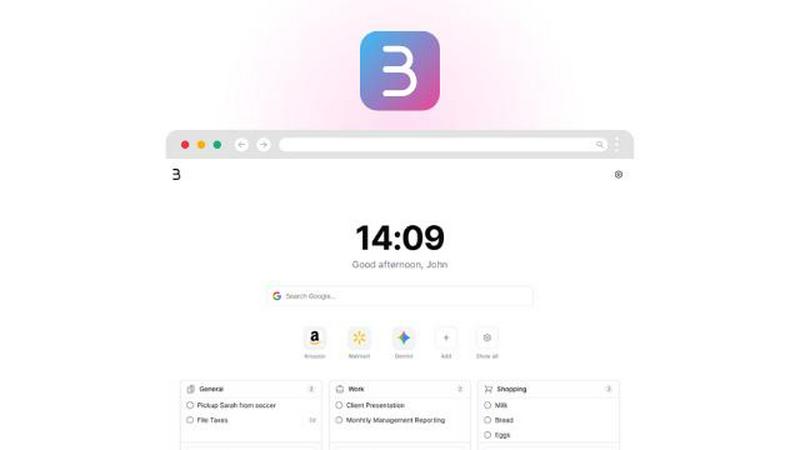
About Browsilla
Browsilla is a lightweight Chrome extension designed to transform your new tab into a focused, productivity-enhancing workspace. In a world full of distractions, Browsilla provides a serene environment where you can prioritize your most important tasks. By eliminating clutter and removing ads or news feeds, it presents you with a clean interface featuring your tasks, bookmarks, quick links, local weather updates, and an efficient search bar. This tool is perfect for makers, founders, and professionals who seek simplicity and efficiency in their daily workflows. With Browsilla, you can seamlessly integrate your essential tools into one manageable dashboard, ensuring every new tab is a purposeful moment dedicated to productivity.
Features of Browsilla
Task Manager Built-In
With Browsilla's built-in task manager, you can create and organize your to-do list directly on your new tab. No need to switch between multiple apps; simply add tasks, categorize them in folders, and check them off as you complete them. This feature ensures that your tasks are always visible, helping you stay organized and focused.
Quick Bookmarks
Get instant access to your most-used websites without the hassle of digging through bookmark folders. Browsilla allows you to pin your favorite sites directly on your new tab for effortless access. You can easily add and organize these bookmarks, making your browsing experience more efficient and streamlined.
Local Weather Updates
Stay informed about the weather without opening another tab. Browsilla displays real-time weather updates for your location, including current conditions and temperatures. This feature aids in planning your day effectively, ensuring you're prepared for whatever weather comes your way.
Daily Inspiration
Start each browsing session on a positive note with a fresh motivational quote displayed on your new tab. This small dose of daily inspiration can help set a productive and uplifting tone for your work, encouraging a mindset geared towards success and creativity.
Use Cases of Browsilla
For Busy Professionals
Professionals often juggle multiple tasks throughout their day. Browsilla provides a centralized dashboard to manage tasks, bookmarks, and weather updates, allowing them to stay focused and organized while reducing time spent switching between various applications.
For Students
Students can benefit from Browsilla by keeping their assignments and study materials easily accessible. With quick bookmarks for educational resources and a task manager to track homework deadlines, it simplifies the learning process and enhances productivity.
For Entrepreneurs
Entrepreneurs need to maintain focus amidst numerous responsibilities. Browsilla helps them streamline their workflow by combining essential tools like task management, quick links to important sites, and daily motivation, all in one clean interface.
For Remote Workers
Remote workers can enhance their productivity with Browsilla by using it as their personalized workspace. With easy access to tasks and bookmarks, along with local weather updates, they can create a balanced work environment that fosters concentration and efficiency.
Frequently Asked Questions
Is Browsilla really free?
Yes, Browsilla is completely free to use. There are no hidden charges or premium features that require payment. You can enjoy all its functionalities without any cost.
Do I need to create an account?
No, you do not need to create an account to use Browsilla. Simply install the extension, and you can start using it immediately without providing any personal information.
Does Browsilla work offline?
Browsilla is designed to work primarily within your browser, and while it offers many features that work offline, certain functionalities like weather updates may require an internet connection.
Is my data private and secure?
Absolutely. Browsilla is built with privacy as a core principle. Your data is not collected or stored, and the extension operates anonymously, ensuring that your personal information remains secure and private.
Explore more in this category:
Similar to Browsilla

VoiceVibe
Talk to your computer: dictate, rewrite, ask about your screen, launch AI agents.

imgtxtapp.laviolab.com
imgtxtapp.laviolab.com is a Telegram-based image-to-text converter that turns photos, screenshots, scanned documents into editable text

AFFLIGO
AFFLIGO is a free online toolkit for everyday file tasks. Easily edit PDFs, compress images, convert file formats, and get things done.

SafePDF
Free online PDF tools to merge, split, compress, convert, sign, and edit PDFs privately in your browser. No signup required.

ColdCrow
AI cold email writer: turn one line about a prospect into personalized outreach with a deliverability score in seconds. Free trials, no credit card.

Ask Versa AI
AI verdicts for any two Amazon products, in seconds. Live specs plus real buyer reviews, scored 0-100, one clear winner. Free, no account.

Panzoe
Panzoe is an all-in-one AI platform for personal productivity, business automation, AI assistants, content creation, and custom AI solutions.

TryThatTool
Discover AI tools worth trying. Compare options, explore practical reviews, and build your own AI stack based on your goals and budget.