

ChatFlowchart
Transform text into editable flowcharts and diagrams effortlessly with ChatFlowchart's AI-powered interface.
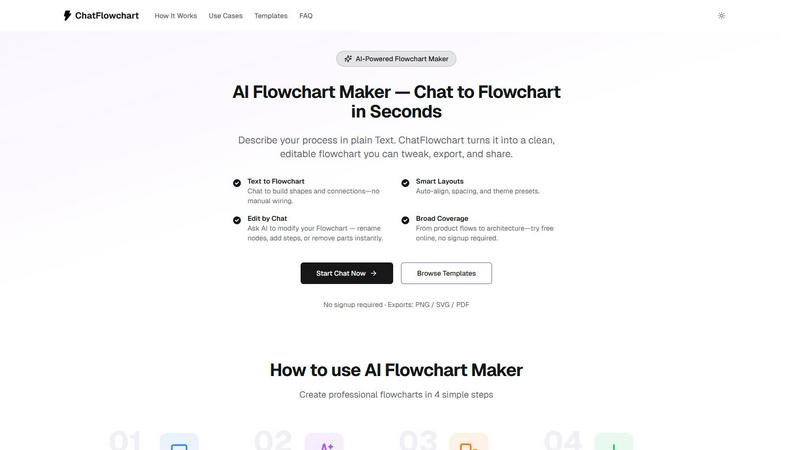
About ChatFlowchart
ChatFlowchart is an innovative AI-powered diagram generator designed to simplify the process of creating visual representations from plain text or chat-style prompts. Whether you are a project manager, software developer, educator, or business analyst, ChatFlowchart is tailored to meet your needs by allowing you to describe workflows, system architectures, business processes, or data models in natural language. The AI quickly translates your descriptions into clear, visually appealing, and fully editable diagrams. This product stands out due to its ability to save time and enhance productivity, eliminating the tedious manual work traditionally associated with diagram creation. With a variety of diagram formats available, including flowcharts, mind maps, UML diagrams, BPMN, and more, users can choose the most relevant structure for their specific requirements without the hassle of starting from scratch. The interactive chat interface enables continuous iteration on your diagrams, ensuring clarity and precision in your visualizations, which is essential for effective communication in any professional setting.
Features of ChatFlowchart
Text to Diagrams
ChatFlowchart's core feature allows users to convert text descriptions into various types of diagrams instantly. This eliminates the need for manual drawing and enables professionals to focus on the content rather than the format.
Smart Layouts
The smart layouts feature automatically aligns elements, spaces them evenly, and applies theme presets to ensure that every AI-generated diagram is clean and easily readable. This feature enhances visual clarity, making it simple to understand complex information at a glance.
Edit by Chat
This unique feature allows users to interactively modify their diagrams through a chat interface. You can easily rename nodes, add new steps, rewire connections, or switch between diagram types instantaneously, making it incredibly user-friendly.
Broad Coverage
ChatFlowchart is versatile, supporting a wide range of diagram types, from product flows to statistics and database ERDs. This broad coverage allows users to utilize a single AI diagram generator for all their diagramming needs, streamlining workflows significantly.
Use Cases of ChatFlowchart
Workflow Visualization
Professionals can use ChatFlowchart to visualize complex workflows simply by describing them in plain text. This is particularly useful for teams that need to document processes quickly and efficiently.
Educational Purposes
Educators can harness the power of ChatFlowchart to create engaging visual aids for their lessons. By converting curriculum content into diagrams, teachers can enhance students' understanding and retention of information.
Software Development
Developers can utilize ChatFlowchart to transform technical specifications into UML diagrams or flowcharts. This helps in visualizing system interactions and architectures, ensuring clarity during the development process.
Business Process Mapping
Business analysts can use ChatFlowchart to map out business processes and workflows. By generating clear diagrams, they can identify inefficiencies and communicate findings effectively to stakeholders.
Frequently Asked Questions
How does ChatFlowchart work?
ChatFlowchart uses advanced AI algorithms to convert plain text or chat-style prompts into various types of diagrams. Simply describe your desired workflow or process, and the AI will generate a clear visual representation that you can edit.
What types of diagrams can I create?
You can create a wide array of diagrams with ChatFlowchart, including flowcharts, tree diagrams, probability trees, entity-relationship diagrams, and more. This versatility makes it suitable for various professional needs.
Do I need to sign up to use ChatFlowchart?
No, you do not need to sign up or provide any credit card information to start using ChatFlowchart. You can create diagrams for free in just a few seconds, making it accessible for everyone.
Can I modify my diagrams after they are generated?
Absolutely! ChatFlowchart provides an interactive chat interface that allows you to modify your diagrams easily. You can rename nodes, add or remove elements, and even change the type of diagram as needed.
Explore more in this category:
Similar to ChatFlowchart

Budgetpixel AI
Create and edit AI images, videos, music, and designs in one workspace, with multiple models, reusable characters, and API access.

@fuck.it - email with attitude
Private email. Pure. Secure. Exclusive. No ads, no tracking, no data selling. GDPR compliant, EU-hosted.

Try OC Maker
Create OCs from text or images, customize their look, and turn them into animated videos with AI.

xfiles
Free PDF, image and audio tools that process your files locally in your browser. No account or added watermarks.

IconCreator
IconCreator is an AI-powered logo and app icon generator. Create professional logos, app icons, favicons, and brand assets in minutes.

this+that
An AI agent that reads every email and chat message your team gets, turns requests into tasks, and does what they ask.

Toolbit.ai
Describe your task and Toolbit finds the right AI tool. Compare tools side by side, see top rankings, and follow daily AI news and guides.
