

CheckoutReceipt
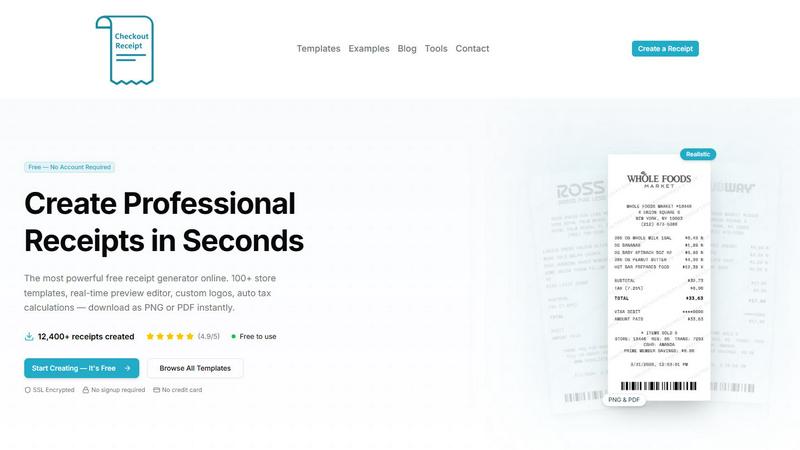
CheckoutReceipt is a free tool to create realistic receipts instantly with over 100 templates and no account required.
About CheckoutReceipt
CheckoutReceipt is a free, browser-based tool that lets you create professional, realistic receipts in under 60 seconds. With over 100 customizable templates covering retail, restaurants, services, healthcare, travel, and more, this receipt maker is designed for anyone who needs a quick, authentic-looking receipt for legitimate business, creative, or educational purposes. The core value proposition is simplicity and speed: no account creation, no software installation, and no credit card required. You simply pick a template, fill in the details, and download your receipt as a high-quality PNG or PDF. The editor features a real-time live preview, so every change you make — from store name and address to item prices and tax rates — is reflected instantly. You can also upload custom logos, choose from multiple fonts and paper textures, and even generate realistic barcodes. CheckoutReceipt is trusted by over 10,000 users and has helped create more than 12,400 receipts. It is important to note that the tool is strictly for legitimate use cases such as expense reporting, business documentation, creative projects like film props or game design, and educational demonstrations. Generating receipts to commit fraud or deceive others is prohibited under the Terms of Service. Whether you need a receipt for a fictional store in a video game, a proof of purchase for a reimbursement claim, or a realistic prop for a theater production, CheckoutReceipt provides the fastest, most flexible solution available online.
Features of CheckoutReceipt
100+ Store-Specific Receipt Templates
Choose from a vast library of over 100 templates that mimic the exact formats of popular retailers like Target, Walmart, Home Depot, Whole Foods, Subway, Publix, Ross, Dunkin, and dozens more. Each template is carefully designed to look authentic, with the correct layout, font choices, and item categories for that specific store type. You can also browse by receipt type, such as automotive, hospitality, food and dining, healthcare, financial, retail, professional services, and utilities, ensuring you always find the perfect starting point for your project.
Real-Time Live Preview Editor
See every change you make instantly as you type. The live preview panel shows exactly what your downloaded receipt will look like, eliminating guesswork and reducing editing time. You can adjust store information, add or remove line items, change prices and tax rates, select payment methods, and modify dates, with the preview updating in real time. This feature is especially useful for fine-tuning details like alignment, spacing, and overall visual balance before you commit to a download.
Fully Customizable with Logo Upload and Barcode Generation
Every element of your receipt is editable, from the store name and address to individual item descriptions and prices. You can upload your own business logo or use built-in store logos, with adjustable sizing and positioning. The tool also automatically generates realistic barcodes based on customizable numbers, adding an extra layer of authenticity to your receipts. Combined with font choices (thermal, clean, typewriter) and paper textures (aged, worn, creased), you have complete control over the final look.
Private, Secure, and No Account Required
CheckoutReceipt runs entirely in your browser, meaning no data is stored on external servers. Your information never leaves your device, ensuring complete privacy and security for sensitive receipt details. There is no signup, no account creation, and no credit card required to use any feature. You can start creating receipts immediately, download them as PNG or PDF in high resolution, and close the tab without leaving any trace of your work behind.
Use Cases of CheckoutReceipt
Expense Reporting and Business Documentation
Small business owners, freelancers, and employees can quickly generate receipts for expenses that were paid in cash or for which the original receipt was lost. For example, a consultant who paid for a client lunch can create a restaurant receipt with the correct date, amount, and items to submit for reimbursement. Similarly, a landlord can generate a rent receipt for a tenant, or a contractor can create a service receipt for a completed job, all without needing expensive accounting software.
Creative Projects and Content Creation
Filmmakers, game developers, graphic designers, and social media influencers often need realistic receipts as props or visual assets. A film set designer might need a grocery store receipt for a scene set in a kitchen, or a game developer might need a fictional receipt from a futuristic store. CheckoutReceipt allows creators to customize every detail, from store names to barcodes, ensuring the prop matches the narrative perfectly. The ability to add custom logos and paper textures makes the result highly convincing.
Educational Demonstrations and Training
Teachers, trainers, and financial literacy educators can use CheckoutReceipt to create realistic examples for lessons on budgeting, expense tracking, or consumer math. For instance, a high school teacher can generate a set of receipts for a class project where students must calculate total spending, taxes, and tips. Similarly, a corporate trainer can create sample receipts for a workshop on expense report compliance, helping participants learn to identify legitimate versus fraudulent documentation.
Personal Record Keeping and Budgeting
Individuals can use CheckoutReceipt to create digital copies of receipts for personal budgeting or warranty purposes. If you lose a paper receipt for an electronics purchase, you can recreate it with the correct date, store, and item details to keep your financial records organized. The tool also helps with tax preparation by providing a clean, downloadable record of deductible expenses like medical bills, charitable donations, or home improvement supplies, all stored privately on your own device.
Frequently Asked Questions
Is CheckoutReceipt really free? Do I need to create an account?
Yes, CheckoutReceipt is completely free to use with no hidden costs. You do not need to create an account, sign up, or provide any personal information. There is no credit card required, and all features, including the 100+ templates, logo upload, barcode generation, and PNG/PDF export, are available at no charge. The tool is supported by its user base and is designed to be accessible to everyone.
Can I use CheckoutReceipt to create fake receipts for fraudulent purposes?
No. CheckoutReceipt is strictly for legitimate business, creative, and educational use only. Generating receipts to commit fraud, deceive others, or misrepresent transactions is a violation of the Terms of Service. The tool is intended for honest purposes like expense reporting, props for media projects, and educational demonstrations. Misuse could lead to legal consequences, and the platform reserves the right to restrict access for violations.
What file formats can I download my receipt in, and what is the quality?
You can download your receipt as either a PNG image or a PDF document. Both formats are high-resolution and optimized for crisp text and clear graphics at any size. PNG is ideal for digital use, such as inserting into a document or posting online, while PDF is better for printing or sharing as a formal document. The export process is instant, and you can download your receipt as many times as you like.
How do I add a custom logo or change the paper texture?
To add a custom logo, simply click the upload button in the editor and select an image file from your device. You can then adjust its size and position on the receipt. For paper texture, choose from options like thermal (smooth, modern), aged (yellowed, worn), or creased (folded lines) in the settings panel. These features are available in the drag-and-drop editor, and all changes are reflected in the live preview immediately.
Explore more in this category:
Similar to CheckoutReceipt

PLRental
AI-powered platform for car, motorcycle, and ATV rental agencies: scan IDs, generate contracts, and manage fleet and finances.

Replyinger
Automate Instagram and Facebook DMs, comment replies, and story interactions to turn followers into leads and customers. No coding required.

Agent Pets
Your Claude Code & Codex sessions as pets in Chrome. Approve, deny and reply to your coding agents from any tab.


Montaureo
AI-powered country comparison for relocation, living costs and lifestyle decisions.

TypeFire
Type a few letters, get the whole reply. Markdown notes as files you own. Find anything you copied.

Compresser PDF
Lighter PDFs. Your files stay with you.

WhichAIStack
Describe what you want to make and get the 3 AI tools that fit, with hand-checked prices and exact free-plan limits. Free, no signup.