

CleanPaste
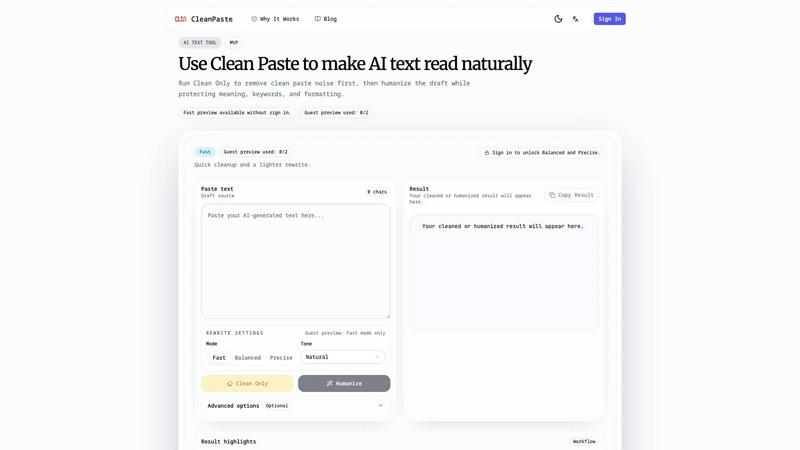
CleanPaste transforms AI-generated text into natural, polished copy by removing hidden formatting noise and enhancing readability.
About CleanPaste
CleanPaste is an innovative online workbench designed to enhance the quality of AI-generated drafts. It specifically focuses on cleaning up hidden paste noise that often plagues AI text, ensuring that the content reads naturally while maintaining its original meaning, keywords, and structure. This tool is ideal for content creators, marketers, and anyone who relies on AI for drafting but wants to ensure that the final output is polished and professional. By offering a streamlined process that first cleans the text and then rewrites it, CleanPaste helps users produce high-quality content that is ready for publication. Whether you are a small business owner looking to improve your marketing materials or a professional writer aiming to refine your drafts, CleanPaste provides the tools necessary to elevate your work without losing the essence of your original content.
Features of CleanPaste
Clean Only Mode
The Clean Only mode is a standout feature that detects and removes hidden paste artifacts from your text. This mode provides a thorough analysis of the draft, explaining what was found and ensuring that your content is free from invisible formatting issues. By starting with this step, users can significantly improve the reliability and readability of their drafts before further editing.
Three Rewrite Modes
CleanPaste offers three distinct rewrite modes: Fast, Balanced, and Precise. Each mode caters to different needs, allowing users to choose the depth and speed of their revisions. Fast mode provides a quick cleanup and lighter rewrite, perfect for initial drafts. Balanced mode aims for an optimal mix of quality, cost, and speed, making it suitable for everyday production tasks. Precise mode, on the other hand, is tailored for high-stakes final drafts, ensuring that every detail is meticulously refined.
Careful Preservation of Content
One of the key advantages of CleanPaste is its ability to preserve vital elements of your text, such as facts, names, keywords, and overall structure. This feature is crucial for maintaining the integrity of your message, especially in SEO and product writing, where specific terms and phrases must remain intact. With CleanPaste, the focus is on enhancing readability without diluting crucial information.
Multi-Language Support
CleanPaste currently supports English and Chinese, with plans for expansion into Spanish, German, and French for paid users. This feature allows a broader range of users to benefit from the tool, making it a versatile option for international teams and multilingual content creation. The core workflow is specifically tuned for these languages, ensuring high-quality output across different linguistic contexts.
Use Cases of CleanPaste
Content Creation for Marketing
Marketers can utilize CleanPaste to refine AI-generated marketing copy, ensuring that it resonates with their target audience. By cleaning up hidden paste noise and improving the flow of sentences, the final copy feels more engaging and professional, ultimately leading to better conversion rates.
Academic Writing Enhancement
Students and researchers can benefit from CleanPaste when drafting essays or reports. The tool helps in cleaning up drafts generated by AI tools, ensuring that the text maintains clarity and coherence while preserving key arguments and references, which is critical in academic settings.
Blog and Article Refinement
Bloggers and content creators can use CleanPaste to polish their articles before publication. By running their drafts through the Clean Only mode first, they can eliminate any formatting issues, then choose a rewrite mode to enhance readability and engagement without losing the original message.
Technical Document Improvement
Professionals working on technical documentation can leverage CleanPaste to ensure that complex information is clearly presented. The tool helps maintain the necessary terminology and structure while making the content more approachable for readers, which is essential for effective communication in technical fields.
Frequently Asked Questions
How does CleanPaste improve AI-generated content?
CleanPaste enhances AI-generated content by first removing hidden paste noise, then offering various rewrite modes to improve readability while preserving the original meaning and important keywords.
What are the differences between the rewrite modes?
The Fast mode provides quick revisions for initial drafts, Balanced mode offers a good mix of quality and speed for everyday use, and Precise mode is geared towards final, high-stakes drafts that require meticulous attention to detail.
Can I try CleanPaste without signing up?
Yes, CleanPaste allows users to try the Fast mode as a guest without the need for an account. This feature enables potential users to experience the tool's capabilities before committing to a subscription.
What languages does CleanPaste support?
CleanPaste currently supports English and Chinese, with plans to expand into Spanish, German, and French for users on the paid tier. This multi-language support broadens its accessibility for a global audience.
Similar to CleanPaste

screenRIG
Signage and kiosk infrastructure for AI agents. Your agent publishes images, video, streams, web pages and apps to screens via one plugin.screenRIG is

Kingprompt
KingPrompt is a free prompt engineering workbench to build, tune, and structure prompts for Claude, GPT, Gemini, DeepSeek, and Llama.

shardstitch
ShardStitch helps recover and hand off AI coding work, with a visual website editor and SEO Guardrails MCP in development.

Sayble
AI copilot that tells you what to say next on live sales calls, then writes the recap and follow-up.


Screen Issues
Free Online Screen Test Tool - Instantly diagnose dead pixels, lines, color issues, and flickering. Multiple test modes, no download needed.

