

CustomTattoo AI
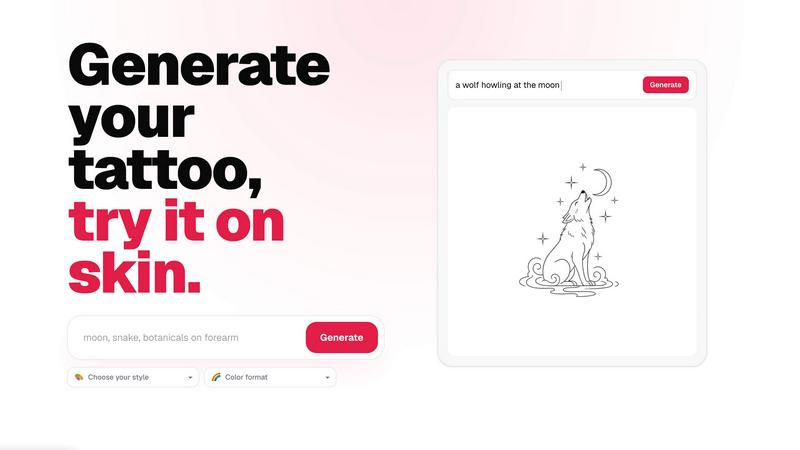
Describe your tattoo idea and instantly see it previewed on your own skin before you book.
About CustomTattoo AI
CustomTattoo AI is an innovative, AI-powered platform designed to help you plan, visualize, and perfect your next tattoo before you ever step into a studio. Whether you are a first-time client feeling nervous about committing to a permanent design, or a seasoned tattoo enthusiast looking to explore new styles, this tool puts you in control. You start by simply describing your tattoo idea in plain language, like "crescent moon and botanicals" or "gothic dragon with wide wings." The AI then generates custom tattoo concepts in a wide range of artistic styles, from traditional and neo-traditional to blackwork, watercolor, and geometric. But the real magic happens next: you can preview each generated design directly on your own skin using the try-on feature. This allows you to see exactly how a design will look on your arm, leg, chest, or any other placement before you make any permanent decisions. You can save your favorite designs to a personal library, compare different styles side-by-side, and test various placements to find the perfect visual direction. The goal is to give you confidence and clarity, so you arrive at your tattoo artist with a clear, refined reference that they can easily work with. CustomTattoo AI is built for anyone who wants to move beyond guesswork and bring their vision to life with certainty. It is a friendly, approachable tool that demystifies the design process, making it accessible to everyone. With a free trial that includes three credits, you can test the generator and see your first idea on your skin without any risk or commitment.
Features of CustomTattoo AI
AI-Powered Tattoo Generator
Describe your tattoo idea in your own words, and let the AI bring it to life. You can specify the subject, placement, and mood, then choose from a wide variety of tattoo directions and color formats. For example, type "gothic dragon with wide wings," select a style like "Gothic blackwork" and a color format like "Black & Grey," and the AI generates multiple unique concepts instantly. This feature removes the guesswork from the initial design phase.
On-Skin Preview
See your tattoo design on your own body before you book an appointment. The on-skin preview tool uses advanced visualization to map the generated design onto a photo of your skin. You can test different placements, sizes, and angles to see how the tattoo will look in real life. This gives you the confidence that the design fits your body perfectly and aligns with your vision.
Personal Design Library
Save all your favorite generated concepts and previews to a personal library. This allows you to organize your ideas, compare different styles and placements side-by-side, and refine your visual direction over time. You can revisit your library at any time to make decisions or share your top choices with friends, family, or your tattoo artist.
Artist-Ready Direction
Every design you generate and preview is created to serve as a clear reference for your tattoo artist. The platform helps you move from a vague idea to a specific, refined concept that includes style, placement, and color details. This ensures you and your artist are on the same page, saving time during consultations and leading to a final tattoo that matches your expectations.
Use Cases of CustomTattoo AI
First-Time Tattoo Planning
If you are getting your first tattoo, the process can feel overwhelming. CustomTattoo AI lets you explore hundreds of design possibilities without any pressure. You can describe a simple idea, see it rendered in multiple styles, and preview it on your skin. This helps you build confidence and ensures you choose a design you will love permanently, reducing the anxiety of making a lifelong commitment.
Exploring Multiple Styles for a Single Idea
You might have a core concept, like a floral sleeve or a memorial portrait, but are unsure which artistic style suits it best. Use the generator to create versions in traditional, watercolor, neo-traditional, blackwork, or geometric styles. Preview each style on your skin and compare them side-by-side in your library. This helps you discover a visual direction you might not have considered.
Testing Placement and Size
A design that looks great on paper might not work well on a curved surface like your forearm or shoulder blade. With the on-skin preview, you can upload a photo of the specific body part and see how the design wraps around it. You can adjust the size, angle, and position to find the most flattering and practical placement before you sit in the artist's chair.
Creating a Refined Reference for Your Artist
Instead of showing your tattoo artist a blurry Pinterest photo or a vague verbal description, bring them a custom-generated design that has been previewed on your skin. This artist-ready direction includes the style, color format, and placement you prefer. It streamlines the consultation process, allowing the artist to focus on the technical execution and personalization of your tattoo.
Frequently Asked Questions
Is CustomTattoo AI free to try?
Yes, you can start for free. When you sign up, you receive three free credits. You can use these credits to generate a tattoo design, choose your style and color format, and preview the result on your skin. There is no credit card required to claim these free credits, so you can test the platform and see your first idea before deciding to purchase more credits or a subscription.
How does the on-skin preview work?
The on-skin preview uses AI to map your generated tattoo design onto a photo of your body. You can upload a picture of the area where you want the tattoo, such as your arm, leg, or chest. The tool then adjusts the design to fit the contours of your skin, allowing you to see how it will look in real life. You can move, resize, and rotate the design to find the perfect placement.
Will there be hidden subscriptions?
No, there are no hidden subscriptions. CustomTattoo AI operates on a transparent credit-based system. You get three free credits at signup, and you can purchase additional credits as needed. There are no automatic renewals or surprise charges. You have full control over your spending, and you can use the platform at your own pace without any long-term commitment.
Can I take the design to my tattoo artist?
Absolutely. The designs you generate are meant to serve as a clear, artist-ready direction for your tattoo artist. You can download or share your final chosen design, along with the style and placement details, directly with your artist. This gives them a precise visual reference, which helps ensure the final tattoo matches your vision. The designs are a starting point for collaboration, not a final stencil.
Similar to CustomTattoo AI

Enhance My Photo
Online AI photo enhancer that sharpens portraits, products, scenery, pets and text images and exports JPEG/PNG/WebP without watermarks.

Ideogram 4.5
Ideogram AI 4.5 is an image generator and editor for precise, drift-free refinement, native 2K lettering, and Pixel Lock.

nanobanana 2.1
Nano Banana 2.1 is a fast AI image generation and editing model for realistic visuals, consistent characters, readable text, and precise creative cont

Vikas Editor
Upload a photo, pick a style prompt, get an AI edit. Credit-based Vikas Editor.

AI Halloween Photo Generator
Halloween AI portraits—templates, no long prompts

UX Critic
AI design critic: scored UX reviews with every issue pinned to the exact region of your screenshot.

bad quality image maker
Make any image look intentionally bad — blurry, pixelated, or deep fried. Free, in your browser, no signup.

picttool
Create and edit images with a collection of easy-to-use AI tools