

Cuto
Cuto is an AI video editing assistant that transforms raw clips into polished, share-ready videos in just minutes.
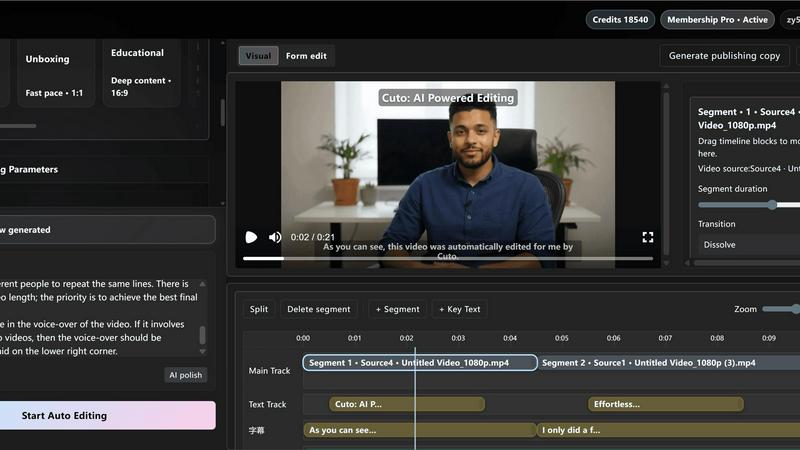
About Cuto
Cuto is an innovative AI-powered video editing assistant designed to streamline the video creation process for creators, marketers, and educators. Whether you are producing quick social media clips or detailed educational content, Cuto makes it easy to generate high-quality short videos in a fraction of the time. Users can upload up to 12 video clips and simply describe their editing goals in plain language. Within approximately 30 seconds, Cuto analyzes the footage, identifies key moments, and automatically assembles a polished first cut. This efficiency empowers users to focus on creativity rather than technicalities. The platform also offers a user-friendly interface for fine-tuning elements like timing, subtitles, and visual styles. With scenario presets tailored for various content types, Cuto ensures that the editing rhythm aligns with the intended message, enhancing the overall viewing experience. Additionally, it facilitates seamless subtitle alignment, branded watermarking, and one-click exports, enabling creators to publish across platforms like TikTok, YouTube Shorts, Instagram Reels, and Xiaohongshu quickly and efficiently.
Features of Cuto
AI-Powered Smart Cut
Cuto's AI-driven smart cut feature allows users to describe their editing goals in natural language. The AI then generates an editable edit plan, efficiently analyzing rhythm and high-performing clips to create a professional-grade video edit. This automated approach reduces the time spent on manual editing, making video production accessible for all skill levels.
Multi-Clip Analysis and Highlight Extraction
The platform supports parallel multi-clip analysis, enabling users to upload multiple videos at once. Cuto intelligently extracts highlights and eliminates redundant content, ensuring that only the best moments are included in the final edit. This capability is particularly beneficial for creators dealing with extensive footage.
Scenario Presets for Various Content Types
Cuto includes built-in scenario presets designed for specific video types such as talking heads, product demos, unboxing, and educational content. By selecting a preset, users can leverage AI to auto-adjust editing strategies and parameters, saving time and enhancing the quality of their videos.
Platform-Specific Copy Generation
Upon exporting videos, Cuto generates platform-optimized titles, descriptions, and hashtags tailored for channels like TikTok, YouTube Shorts, and Instagram Reels. This feature ensures that content creators can quickly publish their videos with consistent quality and relevant metadata, improving visibility and engagement on social media.
Use Cases of Cuto
Quick Social Media Clips
Marketers can use Cuto to create engaging short clips for social media campaigns. By uploading raw footage and letting the AI handle the editing, teams can produce high-quality content that captures audience attention without the lengthy editing process.
Educational Content Creation
Educators can leverage Cuto to transform lengthy lectures or tutorials into concise, informative videos. The platform’s ability to highlight key points and generate subtitles enhances learning while making it easier for students to digest the material.
Product Launch Promotions
Businesses can utilize Cuto for creating compelling unboxing and product demonstration videos. The smart editing features ensure that promotional content is fast-paced and visually appealing, effectively showcasing product features and benefits.
Livestream Highlights
Content creators can capture key moments from their livestreams and quickly edit them into highlight reels using Cuto. This allows for timely sharing of engaging content with viewers who may have missed the live event, maximizing audience reach and retention.
Frequently Asked Questions
How does Cuto generate an edit plan?
Cuto uses advanced AI algorithms to analyze uploaded footage based on your described editing goals. It identifies rhythm, highlights, and key moments, creating an editable edit plan in approximately 30 seconds.
Can I upload multiple clips at once?
Yes, Cuto supports the upload of up to 12 clips simultaneously. This feature allows for efficient multi-clip analysis, making it easier to compile and edit extensive footage.
What types of videos can I create with Cuto?
Cuto is versatile and can handle various types of videos including talking-head segments, product demos, unboxing videos, and educational content. You can select scenario presets to optimize the editing approach for each type.
Is there support for subtitles in Cuto?
Absolutely! Cuto automatically aligns subtitles with the video content and offers multiple subtitle styles. This ensures that viewers can easily follow along, enhancing engagement and accessibility.
Explore more in this category:
Similar to Cuto


Rankbox
Get cited by ChatGPT and ranked on Google, on autopilot.

Piano to Sheet Music
Turn a piano recording into sheet music, MIDI and MusicXML, with the first 30 seconds free in your browser.

Link to Song
Paste a TikTok, YouTube, Instagram, Facebook or X video link and get the song name, artist and official listening links.


VideoCutout
Remove video backgrounds with AI, export transparent WebM, or replace scenes with a custom image.