

Easy Watermark Remover
Easily remove Gemini AI watermarks from images online for free with no signup, using smart AI or quick crop methods for perfect results.
About Easy Watermark Remover
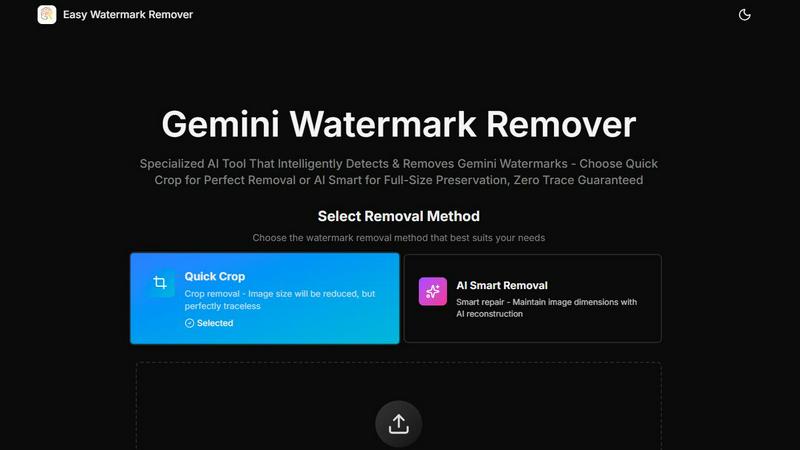
Easy Watermark Remover is a user-friendly, free browser-based tool that allows you to effortlessly erase watermarks from your images, particularly focusing on Gemini AI logos and SynthID watermarks. Designed for content creators, marketers, and anyone needing clean visuals, this tool provides two effective removal methods: Quick Crop and AI Smart Removal. Quick Crop allows for immediate results but reduces the image size, while AI Smart Removal intelligently reconstructs the image, preserving its original dimensions. The tool processes all operations locally in your browser, ensuring your privacy while handling images. Supporting various formats like PNG, JPG, and WebP up to 16MB, Easy Watermark Remover caters to diverse user needs, making it ideal for enhancing social media posts, marketing materials, and other professional visuals.
Features of Easy Watermark Remover
AI Smart Removal
AI Smart Removal is a powerful feature that intelligently reconstructs your images while keeping their original size. This method uses advanced algorithms to analyze surrounding pixels, ensuring a seamless blend that makes the watermark completely disappear without compromising image quality.
Quick Crop
Quick Crop provides a swift solution for watermark removal by cropping the area around the watermark. While this method reduces the overall image size, it offers instant results and is perfect for users who need quick fixes without requiring detailed adjustments.
Batch Processing
With Easy Watermark Remover, you can process multiple images at once using batch processing. This feature saves time and enhances efficiency, making it a great choice for users dealing with large volumes of images, like photographers or e-commerce businesses.
Cross-Device Compatibility
This tool works seamlessly across all devices and modern browsers, eliminating the need for installation. Whether you are on a desktop, tablet, or smartphone, you can easily access Easy Watermark Remover and start removing watermarks in just a few clicks.
Use Cases of Easy Watermark Remover
Content Creation for Social Media
Content creators often use AI-generated images, but watermarks can detract from their professional appearance. Easy Watermark Remover allows users to create polished visuals quickly, enhancing their social media presence without the hassle of complex editing software.
E-Commerce Product Images
For online retail, clear product images are essential. Easy Watermark Remover enables sellers to eliminate distracting watermarks from their product photos, ensuring that potential buyers see a clean and attractive representation of the items they wish to purchase.
Marketing Material Design
Marketers frequently utilize AI-generated images in presentations and promotional materials. With Easy Watermark Remover, they can remove watermarks swiftly, resulting in professional-quality graphics that effectively communicate their message.
Personal Projects and Portfolios
Individuals working on personal projects or building portfolios can benefit from using Easy Watermark Remover. By removing watermarks from their images, they can present their work more effectively, showcasing their creativity without any distractions.
Frequently Asked Questions
Is Easy Watermark Remover really free?
Yes, Easy Watermark Remover is completely free to use. There is no signup or installation required, allowing you to start removing watermarks immediately.
What image formats does Easy Watermark Remover support?
The tool supports a variety of image formats including PNG, JPG, and WebP, with a maximum file size limit of 16MB for each image you want to process.
How does AI Smart Removal work?
AI Smart Removal utilizes advanced algorithms to reconstruct the area around the watermark intelligently, ensuring that the image retains its original size and appears natural after the watermark has been removed.
Is my data safe when using Easy Watermark Remover?
Absolutely! All processing occurs locally in your browser, meaning that your images never leave your device. This ensures that your data remains secure and private throughout the watermark removal process.
Explore more in this category:
Similar to Easy Watermark Remover

Reword Image
Change the text already printed inside a photo, screenshot or poster, without the original design file.

Artcraft AI
AI image and video studio in your browser: generate and edit images, turn photos into videos, edit clips by sentence.

Dola AI
Dola AI video generator online: make Seedance 2.5 videos from text or a photo in your browser. No app, no watermark, free credits.

ToonBee AI
ToonBee AI turns a script or a one-line idea into a narrated cartoon video, keeping the same character in every scene. 10+ styles, 16:9 or 9:16.

sakuttoAI
A free suite of online tools for everyday tasks like PDF compression, image conversion, text diff and CSV to Excel.

Bulin 47 AI
Turn one portrait into a vertical AI-generated freestyle performance video.

imgtxtapp.laviolab.com
imgtxtapp.laviolab.com is a Telegram-based image-to-text converter that turns photos, screenshots, scanned documents into editable text

AnyFileKit Image Translator
Translate the text in screenshots, photos and manga, with the translation drawn back over the original image.