

Fig0
Fig0 turns any text, sketch, or reference into publication-ready vector figures with zero manual drawing.
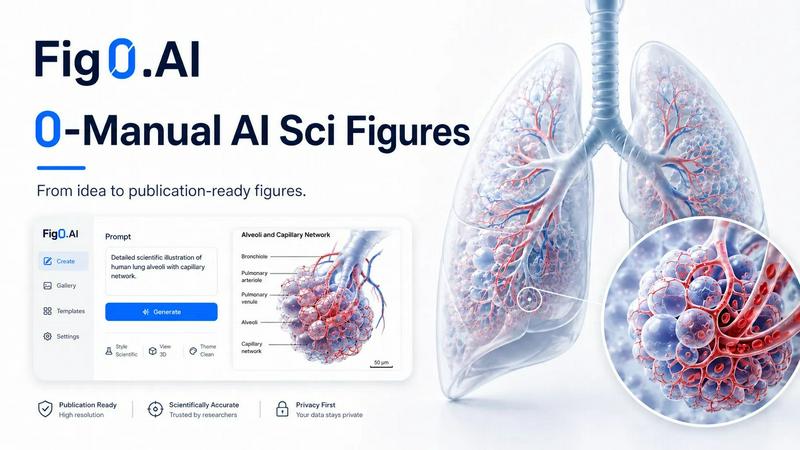
About Fig0
Fig0 is a revolutionary AI-powered platform that is transforming how scientists, researchers, and educators create and manage scientific figures. If you have ever spent hours painstakingly drawing diagrams, adjusting labels, or redoing an entire figure because of a reviewer comment, Fig0 is built specifically for you. This tool moves beyond traditional, time-consuming manual illustration by leveraging advanced artificial intelligence to generate, refine, and export publication-ready figures from a wide array of inputs. The core philosophy is simple: reduce manual effort to zero. You can start with a text description of a biological pathway, a rough sketch of an experimental setup, a reference image from a paper, or even an existing figure you want to improve. Fig0 takes that input and produces a clean, structured, and editable vector illustration. The platform is trusted by over 150,000 scientists from top educational institutes and is designed to handle the entire scientific figure creation workflow. From initial concept generation to final export in formats like SVG, PPTX, PDF, PNG, and TIFF, Fig0 makes the process faster, more intuitive, and significantly more efficient. Its main value proposition is that it saves you time, reduces frustration, and lets you focus on your research rather than the tedious aspects of visual communication.
Features of Fig0
Text-to-Figure
Describe your scientific concept in plain language and let Fig0 do the drawing. Whether it is a complex molecular mechanism, a multi-step experimental workflow, a conceptual model, or a detailed biological pathway, you simply type your description. Fig0's AI interprets your text and generates a structured, publication-ready scientific figure. This feature is perfect for when you have a clear idea in your head but lack the time or artistic skill to translate it into a polished diagram. You can iterate on the prompt to refine the output without ever touching a drawing tool.
Sketch and Reference Inputs
Not all ideas start as text. Sometimes you have a rough drawing on a napkin, a screenshot from a presentation, or a figure from a paper you want to adapt. Fig0 welcomes all these inputs. You can upload a rough sketch, and the AI will clean it up, straighten lines, and apply a professional scientific style while preserving your intended layout. Similarly, you can use a reference image as a visual starting point, and Fig0 will generate a new figure that matches the style or structure you need. This flexibility makes the tool incredibly practical for real-world research workflows.
Canvas-Based Refinement
The work does not stop after the first generation. Fig0 provides an infinite canvas where you can continue to arrange, annotate, and polish your figure. You can move elements around, adjust text labels, refine specific regions, and change the composition without starting over. This feature eliminates the need to jump between disconnected tools. Everything you need for editing is right there in the same workspace, allowing for a seamless revision process that keeps your figure editable and your workflow uninterrupted.
Editable Vector Delivery
One of the biggest frustrations with AI-generated images is that they are often locked into a single format. Fig0 solves this by exporting figures in formats that remain useful after generation. You can download layered SVG files, editable PPTX files, and vectorized PDFs. This means your team or journal can continue to edit colors, annotations, and layout using standard tools like PowerPoint or Adobe Illustrator. It is a feature designed for collaboration and the reality that figures often need last-minute changes before submission.
Use Cases of Fig0
Preparing Figures for Journal Submission
A researcher has completed their experiments and needs to create a clear, publication-ready figure for a manuscript. They have a rough idea of the experimental design and a few reference images. Using Fig0, they describe the workflow in text, upload a reference sketch, and generate a first draft. They then use the canvas to refine labels, adjust the color scheme to match journal guidelines, and export a high-resolution TIFF at 600 DPI for submission. The entire process takes minutes instead of hours.
Responding to Reviewer Comments
A professor receives reviewer feedback requesting significant changes to a figure in their accepted paper. The reviewer wants additional labels, a reorganized pathway, and a different background. Instead of reopening a complex design file or starting from scratch, the professor uploads the original figure into Fig0. They use the text input to describe the requested changes, and the AI generates an updated version. They make final tweaks on the canvas and export an editable PPTX for their lab manager to polish. The revision is completed before the next lab meeting.
Creating Diagrams for Educational Materials
An educator is preparing a lecture on cellular respiration for an undergraduate biology course. They need a series of clear, accurate diagrams showing glycolysis, the Krebs cycle, and the electron transport chain. Using Fig0, they describe each process in simple text prompts. The AI generates clean, scientifically accurate illustrations that are easy for students to understand. The educator exports the figures as SVG files and inserts them directly into their PowerPoint slides, saving hours of manual drawing or searching for suitable images online.
Designing Figures for Grant Applications
A postdoctoral fellow is writing a grant proposal and needs a compelling figure to illustrate their proposed research methodology. They have a conceptual outline but no visual materials. They use Fig0 to generate a figure from a text description of their experimental pipeline. They then refine the figure on the canvas, adding specific labels for key steps and equipment. Finally, they export a high-quality PNG for the grant document and a layered PDF for future editing. The polished figure helps communicate their complex idea clearly to reviewers.
Frequently Asked Questions
What types of input can Fig0 accept?
Fig0 is designed to be flexible with your input. You can use text descriptions, rough sketches, reference images, existing figures, PDFs, or photos. The AI is trained to interpret all of these inputs and generate a coherent scientific figure based on what you provide. This means you can start from any stage of your ideation process, whether you have a fully formed concept or just a vague idea.
Can I edit the generated figures after they are created?
Absolutely. One of Fig0's core strengths is that figures remain editable after generation. You can use the built-in infinite canvas to adjust labels, move elements, refine specific regions, clean up backgrounds, and change the composition. You do not have to start over from scratch for every small change. This makes the revision loop for journal submissions or reviewer comments incredibly efficient.
What export formats are available for my figures?
Fig0 offers a range of export formats to suit different needs. For continued editing and collaboration, you can export as SVG (scalable vector graphic), editable PPTX (PowerPoint), and vectorized PDF. For manuscript submission and print workflows, you can export high-resolution PNG and TIFF files at 300 or 600 DPI. This ensures your figures are ready for both digital and print publication requirements.
Who is Fig0 designed for?
Fig0 is built for the entire scientific community. It is used by researchers, professors, postdocs, graduate students, and educators who need to create clear and professional scientific visuals. The platform is especially valuable for anyone who finds manual figure creation time-consuming or frustrating. It is trusted by over 150,000 scientists from top educational institutes and is optimized for the specific demands of scientific publishing, presentations, and teaching.
Similar to Fig0

Medrecords AI
Medrecords AI turns large medical files into chronologies, summaries and report drafts. Every line links to its source page. From 10 cents a page.

MarsDataAI
MarsDataAI is an AI relationship assistant


Coach AI
Conversational AI coach for runners, cyclists and triathletes. Reads your wearable data, adapts daily.

NexiaTools
NexiaTools is an all-in-one AI platform with 86+ micro-tools for writing, marketing and everyday business tasks. Free to try.

ChatFrom
Build an AI chatbot from your own documents and website, connect it to your own tools, and put it on your site with one script tag. Free to start.

LaunchIntel
Your AI agent picks relevant directories, submits your product in your browser and tracks every step. One-time purchase.

Veena
AI assisted DAW for music producers and artists.