

formind
Formind lets you create and edit photos just by describing them in text or voice, no design skills needed.
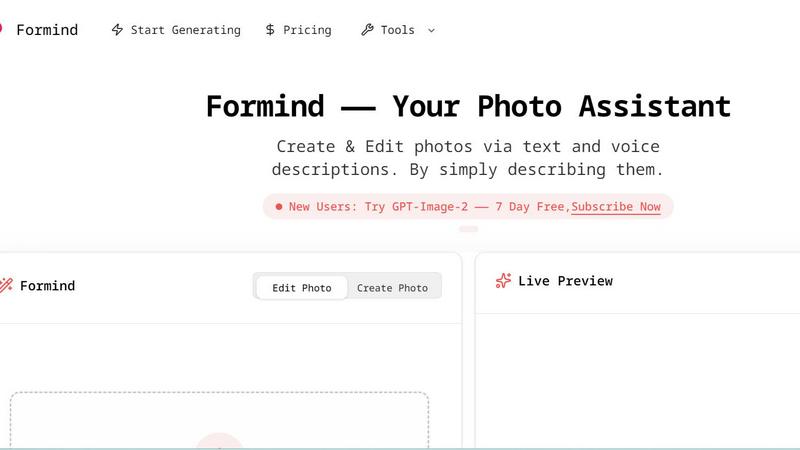
About formind
Formind is your friendly, AI-powered photo assistant that makes creating and editing images as easy as having a conversation. Instead of wrestling with complex software or struggling to learn intricate design tools, you can simply describe what you want in plain text or even use your voice. Formind listens to your ideas and brings them to life, whether you are starting from a blank canvas or refining an existing photo. Think of it as having a creative partner who understands your vision and works tirelessly to make it a reality. The core value proposition is accessibility: anyone, from professional designers and marketers to social media enthusiasts and complete beginners, can generate stunning, high-quality visuals without any technical skills. You can generate entirely new images based on your descriptions, or you can upload a photo and ask Formind to modify it, refine its details, or completely transform its style. The tool is designed to be intuitive, with a simple drag-and-drop interface and a live preview feature that lets you see changes as they happen. From ultra-realistic portraits and cinematic landscapes to whimsical anime illustrations and fantasy concept art, Formind empowers your imagination. It eliminates the barrier between your idea and the final image, making photo creation and editing a fun, fast, and fluid experience. Whether you need a professional headshot, a unique piece of art for your blog, or just want to experiment with visual creativity, Formind is the tool that turns your words into pictures.
Features of formind
Text and Voice Image Generation
Formind allows you to create entirely new images simply by describing them with text or voice commands. You do not need to be a skilled artist or photographer. Just type or speak a detailed description of the scene, subject, style, and mood you have in mind. For example, you could say "a cinematic sci-fi scene with a solitary figure on a frozen alien ocean" and Formind will generate a high-quality image matching that description. This feature opens up endless creative possibilities, letting you visualize concepts, stories, and ideas in seconds.
Image Upload and Modification
If you already have an image that is almost perfect but needs a few tweaks, Formind has you covered. You can upload a photo and then use text or voice descriptions to modify it. Want to change the background, adjust the lighting, add an object, or alter a person's expression? Simply describe the desired change. For instance, you could upload a portrait and ask Formind to "change the background to a futuristic cityscape" or "make the lighting warmer and softer." This feature gives you precise control over your existing visuals.
Live Preview and Iterative Refinement
Formind provides a live preview feature that shows you the results of your edits and creations in real-time. This allows you to see how your descriptions are being interpreted and make adjustments on the fly. If the first result is not exactly what you envisioned, you can refine your prompt, add more details, or change the style. This iterative process ensures you can fine-tune the output until it perfectly matches your creative vision, making the editing experience smooth and collaborative.
Curated Creation Gallery for Inspiration
Formind includes a Creation Gallery that showcases a curated collection of stunning images made by the community and the tool itself. This gallery serves as a fantastic source of inspiration, demonstrating the wide range of styles and subjects Formind can handle. From high-end fashion magazine covers and humorous advertisements to dark fantasy anime illustrations and epic fantasy concept art, the gallery helps you understand the tool's capabilities. You can browse these examples to get ideas for your own projects and see what types of prompts work well.
Use Cases of formind
Professional Content Creation for Marketing
Marketers and social media managers can use Formind to quickly generate high-quality visuals for campaigns, ads, and social media posts. Instead of hiring a designer or photographer for every image, you can describe the exact look you need. For example, you could create an "ultra realistic humorous advertisement photo inside a cozy Japanese ramen shop" featuring a Shiba Inu chef. This allows for rapid prototyping of creative concepts and the production of unique, brand-aligned imagery without a large budget or long turnaround times.
Personal Artistic Exploration and Hobby Projects
Artists, writers, and hobbyists can use Formind to bring their imaginative concepts to life. If you are a writer visualizing a scene from your novel, a game master designing a location for a campaign, or just someone who loves creating art, Formind is a powerful tool. You can generate "high quality fantasy concept art of a massive ancient tree at the center of a ruined city" or a "dark fantasy anime illustration of a girl with a scythe." It helps you explore visual styles and iterate on ideas quickly, serving as a digital sketchpad that understands complex descriptions.
Photo Editing and Enhancement for Personal Use
Everyday users can easily enhance their personal photos without needing advanced editing skills. You can upload a family photo and ask Formind to "improve the lighting" or "remove the background." You could take a simple snapshot and transform it into a stylized portrait, like a "high-end fashion magazine cover." This makes professional-quality photo editing accessible to everyone, allowing you to create beautiful images for personal projects, gifts, or simply to preserve memories in a more artistic way.
Rapid Prototyping for Designers and Developers
Designers and UI/UX developers can use Formind to generate visual assets for mockups and prototypes. Instead of searching for stock photos or creating placeholder images, you can generate context-specific visuals on demand. For example, you could create a "cinematic sci-fi scene" for a game concept or a "minimalist product shot" for an app interface. This speeds up the design process, allowing for more creative exploration and faster iteration on visual concepts before moving to final production.
Frequently Asked Questions
How do I create an image from scratch using Formind?
To create an image from scratch, simply go to the "Create Photo" section. In the text input field, type a detailed description of the image you want to generate. You can specify the subject, style, mood, lighting, and any other relevant details. Alternatively, you can use the voice input feature to speak your description. Once you are ready, click the "Send" button, and Formind will generate an image based on your prompt. You can then refine your description and generate again if needed.
Can I edit an image I already have with Formind?
Yes, absolutely. Formind is designed for both creation and modification. To edit an existing image, go to the "Edit Photo" section and upload your image by dragging and dropping it into the upload area or clicking to browse. Once the image is uploaded, describe the changes you want to make in the text or voice input box. For example, you can say "change the background to a beach at sunset" or "add a glowing golden crown." Formind will then process your request and modify the image accordingly.
What kind of images can Formind generate?
Formind can generate a wide variety of image styles and subjects, as shown in the Creation Gallery. It can create ultra-realistic photographs, cinematic scenes, high-fashion portraits, anime illustrations, fantasy concept art, humorous advertisements, and much more. The tool is highly versatile and can handle complex prompts that include details about lighting, composition, color palette, and specific artistic styles. The key is to provide a clear and descriptive prompt to guide the AI.
Is there a free trial or a way to test Formind before subscribing?
Yes, Formind offers a free trial for new users. The website mentions a "7 Day Free" subscription for "GPT-Image-2". This allows you to explore the tool's features, create and edit images, and see if it meets your needs before committing to a paid plan. You can take advantage of this trial period to experiment with different prompts and understand how Formind can assist with your specific creative or professional projects.
Explore more in this category:
Similar to formind

Enhance My Photo
Online AI photo enhancer that sharpens portraits, products, scenery, pets and text images and exports JPEG/PNG/WebP without watermarks.

Kamero
AI event photo sharing for photographers. Guests take a selfie and face recognition instantly finds every photo they appear in from weddings & events.

Hotel Lobby AI
Hotel Lobby AI turns two portraits into a duet video in an orange recording booth with motion, lip-sync, and audio.

Tiny Desk AI Video Maker
Turn three photos into a vertical Tiny Desk-style concert video with original sound.

ZombieTrend AI
ZombieTrend AI turns two photos into a cinematic zombie love story video with sound, no watermark, and a free preview.

WhiteBackground.app
Make photo backgrounds pure white with private, free browser processing.

Rhinobird
AI video ads, UGC-style videos, and product visuals for cross-border sellers and e-commerce brands.

GenX
All-in-one AI workspace to generate images, videos, and audio with multiple leading AI models.