

AI Quiz Solve
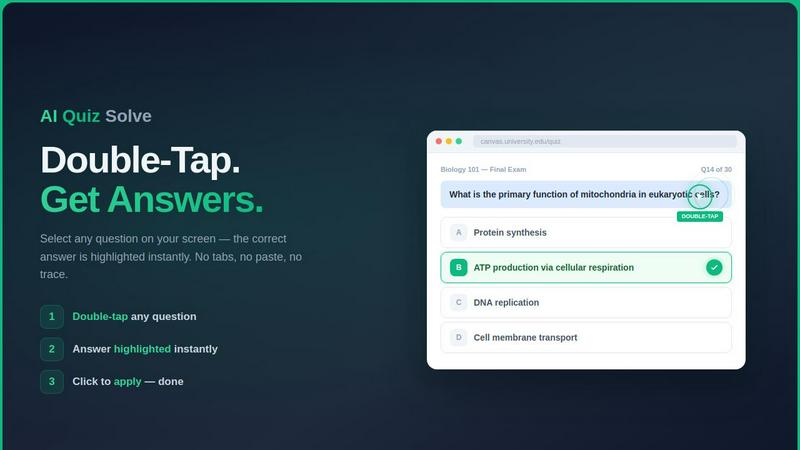
Instantly solve online quiz questions with a screenshot or double tap directly inside your LMS, with explanations included.
About AI Quiz Solve
AI Quiz Solve is a powerful Chrome extension designed to help students solve online quizzes, homework, assignments, and assessments in seconds. It acts as your personal AI study assistant, working directly inside your browser on popular learning management systems like Canvas, Blackboard, Moodle, Google Forms, Brightspace (D2L), Pearson, McGraw Hill, and Cengage. The tool uses advanced AI and OCR technology to understand and answer multiple-choice questions, true/false questions, fill-in-the-blank prompts, short answer questions, matching exercises, and even image-based problems across more than 50 subjects. Instead of copying and pasting questions into separate AI tools or ChatGPT, AI Quiz Solve lets you double-tap any question on your screen to instantly receive an accurate answer with a clear explanation. For locked content, PDFs, slides, or handwritten problems, you can use the screenshot mode to capture the question and let the AI solve it. This product is built for students who want to study faster, prepare for exams more efficiently, and get unstuck on difficult problems without leaving their browser. Whether you are a college student facing a tough biology test or a high school learner working through algebra homework, AI Quiz Solve provides the support you need to understand concepts and complete your work with confidence.
Features of AI Quiz Solve
Instant AI Answers with Explanations
AI Quiz Solve delivers correct answers to quiz questions in real time, right inside your learning management system. When you double-tap a question, the extension highlights the correct answer and provides a step-by-step explanation of why that answer is right. This feature helps you not only get the right answer but also understand the underlying concept, making it a valuable study tool for exam preparation and homework completion.
Screenshot and Draw to Solve
For questions that appear on locked pages, PDFs, slides, or handwritten materials, AI Quiz Solve offers a screenshot mode. You can press a keyboard shortcut or click the extension button to capture your screen, then draw a box around the question you need help with. The AI reads the image using OCR technology and returns the correct answer along with a full explanation. This feature bypasses text-selection locks and works on any content you can see on your screen.
Cross-Platform LMS Support
AI Quiz Solve works seamlessly across more than 15 popular learning platforms, including Canvas, Blackboard, Moodle, Google Classroom, Brightspace, Schoology, Coursera, edX, Quizlet, McGraw-Hill, Pearson, Google Forms, Microsoft Forms, Kahoot, Udemy, Khan Academy, and Chegg. This broad compatibility means you can use the same extension for all your courses without switching tools or learning new workflows.
All Question Types Handled
The extension supports a wide variety of question formats including multiple-choice questions (MCQs), matching exercises, short answer prompts, true/false statements, fill-in-the-blank items, and image-based questions. Whether you are solving a biology multiple-choice test or a chemistry short answer assignment, AI Quiz Solve understands the question type and delivers an accurate response tailored to that format.
Use Cases of AI Quiz Solve
Taking Timed Online Exams
When you are in the middle of a timed quiz on Canvas or Blackboard, AI Quiz Solve helps you answer questions quickly and accurately. Instead of panicking over a difficult question, you can double-tap it to get an instant answer with an explanation. This saves precious time and reduces stress, allowing you to complete your exam with confidence and move on to the next question without missing a beat.
Completing Homework and Assignments
For homework assignments on platforms like Moodle or Google Forms, AI Quiz Solve acts as a reliable homework helper. When you encounter a challenging problem, the extension provides the correct answer and a clear explanation so you can learn the concept. This is especially useful for subjects like math, science, and history where understanding the reasoning behind an answer is just as important as getting it right.
Studying for Exams with Practice Quizzes
Many students use practice quizzes to prepare for final exams. AI Quiz Solve enhances this study process by showing you the correct answers and explanations for every practice question you attempt. You can quickly identify your weak areas, review the explanations, and reinforce your understanding before the real test. This turns passive practice into active learning and helps you retain information longer.
Handling Locked or Image-Based Content
Some online courses use locked pages or image-based questions that prevent text selection. AI Quiz Solve’s screenshot mode is perfect for these situations. You can capture a screenshot of a diagram, a handwritten math problem, or a question on a locked PDF, and the AI will read it and provide the answer. This feature ensures you never get stuck on content that is otherwise unselectable or inaccessible.
Frequently Asked Questions
Is AI Quiz Solve free to use?
Yes, AI Quiz Solve offers a free plan that gives you 5 questions per day and 2 screenshot solves per day. This is enough for light use or to test the extension before committing. If you need more, you can upgrade to the Pro plan for unlimited questions and unlimited screenshot solves starting at $6.99 per month.
Which learning platforms does AI Quiz Solve support?
AI Quiz Solve works with over 15 major learning platforms including Canvas, Blackboard, Moodle, Google Classroom, Brightspace, Schoology, Coursera, edX, Quizlet, McGraw-Hill, Pearson, Google Forms, Microsoft Forms, Kahoot, Udemy, Khan Academy, and Chegg. This wide compatibility means you can use the extension across all your courses without needing separate tools.
How does the screenshot solve feature work?
The screenshot solve feature lets you capture any question on your screen by pressing a keyboard shortcut or clicking the extension button. You then draw a box around the question, and the AI reads the image using OCR technology. Within seconds, the extension returns the correct answer along with a step-by-step explanation. This works on locked pages, PDFs, slides, and handwritten content.
Can AI Quiz Solve handle math equations and diagrams?
Yes, AI Quiz Solve can handle math equations, graphs, and diagrams through its draw-to-solve feature. When you capture a screenshot or draw a box around a math problem or a diagram, the AI reads the visual content and provides the correct answer with reasoning. This makes it useful for STEM subjects like physics, chemistry, and advanced mathematics.
Pricing of AI Quiz Solve
AI Quiz Solve offers a free plan that includes 5 questions per day and 2 screenshot solves per day. For students who need more frequent help, the Pro plan provides unlimited questions and unlimited screenshot solves starting at $6.99 per month. The Pro plan is ideal for heavy users who are taking multiple courses or preparing for major exams. There is no long-term commitment, and you can upgrade or downgrade at any time from your account settings.
Similar to AI Quiz Solve

Takehound
AI video editor in your browser for long talking videos. Cuts pauses and retakes, places your own footage, and says why for every change.


Uniclip
Clip pages, take full-page screenshots and batch-capture list data to Notion, Feishu, Obsidian, Markdown, CSV or JSON.

Ideogram 4.5
Ideogram AI 4.5 is an image generator and editor for precise, drift-free refinement, native 2K lettering, and Pixel Lock.

TroveKey
Search tabs, Chrome bookmarks and history, run browser commands, and save webpages and social posts locally—no account.

TravelMapVisited
Use a countries visited map to track your travels, count how many countries you’ve been to, and create a visited countries map.

Vikas Editor
Upload a photo, pick a style prompt, get an AI edit. Credit-based Vikas Editor.

Bloom
An adaptive AI tutor that turns topics or your materials into courses, lessons, and answers tailored to how you learn.