

Gleem.AI Studio
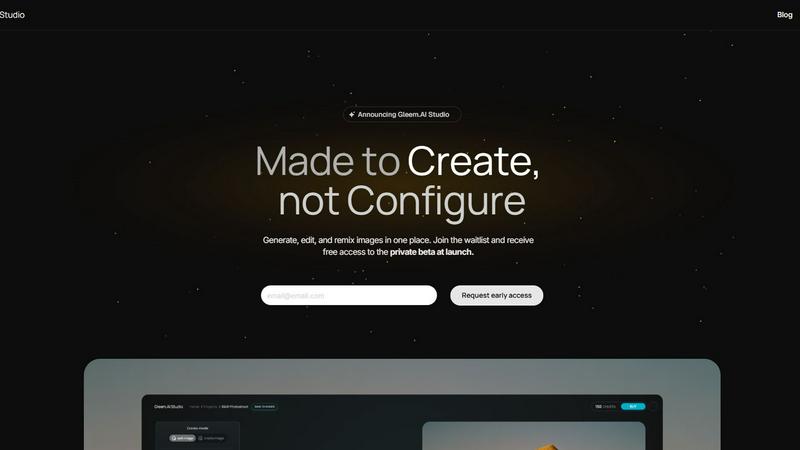
Gleem.AI Studio is your all-in-one creative workspace for generating and editing stunning visuals effortlessly.
About Gleem.AI Studio
Gleem.AI Studio is a comprehensive AI image workspace crafted specifically for creators who prioritize simplicity and creativity over cumbersome configurations. This innovative platform merges the capabilities of AI image generation and editing into a cohesive environment, enabling users to seamlessly iterate on their visual projects without the need to start from scratch with each adjustment. Designed with marketers, content creators, and small teams in mind, Gleem.AI Studio eliminates unnecessary technical complexities, allowing users to focus on making impactful visual decisions swiftly and efficiently. Whether you are producing marketing assets, social media content, or product visuals, this all-in-one solution facilitates a smooth and intuitive workflow, ensuring that the creative process remains fast and enjoyable. With features like text-to-image generation and AI-driven editing tools, Gleem.AI Studio empowers users to bring their ideas to life while maintaining high-quality results.
Features of Gleem.AI Studio
Text-to-Image Generator
The text-to-image generator transforms your written ideas into stunning visuals with ease. Users can choose the desired size for their images and set a clear vision, while Gleem’s Prompt Enhance feature refines the input to produce professional-quality images that resonate with the intended message.
AI Image Editing
Gleem.AI Studio includes an intuitive AI image editing tool that allows users to modify images directly within the same workspace. Users can add or remove objects, adjust poses, apply filters, and even restore older images effortlessly, making the editing process straightforward and user-friendly.
AI Avatars
With the AI Avatars feature, users can generate and personalize their own avatars to fit into any scene. This functionality allows for pose adjustments and outfit try-ons without the need for additional photoshoots, streamlining the creative process and enhancing visual storytelling.
Organized Projects
Each project within Gleem.AI Studio has its own dedicated space, where users can save prompts, edits, and different versions of their work. This organizational structure makes it easy to revisit and build upon previous ideas, ensuring that everything stays accessible and ready for further development.
Use Cases of Gleem.AI Studio
Marketing Campaigns
Gleem.AI Studio is perfect for marketers looking to create cohesive visuals for campaigns. Users can generate eye-catching images and edit them on the fly, making it simple to produce engaging content that aligns with branding and messaging goals.
Social Media Content Creation
Content creators can leverage the platform to design striking visuals for various social media platforms. With its efficient workflow, users can quickly create, edit, and publish images that capture audience attention and enhance online presence.
Product Image Development
For e-commerce businesses, Gleem.AI Studio provides a streamlined process to generate and edit product images. Users can create high-quality visuals that showcase products effectively, ultimately improving customer engagement and conversion rates.
Creative Variations Testing
Gleem.AI Studio allows teams to test different creative variations of images easily. By utilizing its iterative features, users can quickly generate multiple versions of a visual asset, enabling them to identify the most effective design elements for their projects.
Frequently Asked Questions
What is Gleem.AI Studio?
Gleem.AI Studio is an integrated AI image workspace that combines image generation and editing in a single platform, simplifying the creative process for marketers and content creators.
Who can benefit from using Gleem.AI Studio?
Marketers, content creators, and small teams looking for a fast, user-friendly solution for creating and editing visuals will find Gleem.AI Studio particularly beneficial.
How does the text-to-image generator work?
The text-to-image generator allows users to input descriptive text, which the AI then transforms into high-quality visuals. The feature includes Prompt Enhance to refine the input for better outcomes.
Is there a learning curve associated with using Gleem.AI Studio?
No, Gleem.AI Studio is designed with simplicity in mind, allowing users to create and edit images without needing extensive technical skills or experience. The intuitive interface supports a smooth learning experience.
Explore more in this category:
Similar to Gleem.AI Studio

White Screen Checker
Check your screen display for dead pixels using White screen or black screen checkers.

LooksMeter
Upload one photo for a free PSL score and face rating. 47 tools cover face shape, symmetry, color season and more. No signup needed.

Mitu AI
All-in-One AI Image & Video Generator Online. Make viral videos or turn your ideas into high-quality visuals.

Vonsel
Google Maps scraper with emails, phones and socials, pay as you go. AI finds local business leads and you only pay for the ones that match.

MenuCapture
Upload a photo of your dish, type what you want changed, and get an edited menu photo in about 15 seconds. The dish in the photo stays the same.

MentionReach
Track whether ChatGPT, Gemini and Claude recommend your app or website, at what rank, and who they name instead.

Goshortsai
Turn photos into AI videos for free with Goshortsai. Sign in daily for free credits, upload an image, describe motion, and generate your video.

Dola AI Hub
Browser workspace for AI video, image and audio. Compare Seedance, Kling and Wan models, see credit costs, try with 10 signup credits.