

GmapsScraper AI
Stop wasting hours copying data; GmapsScraper AI extracts 1,000+ verified business leads with emails and phones in minutes with no plugin needed.
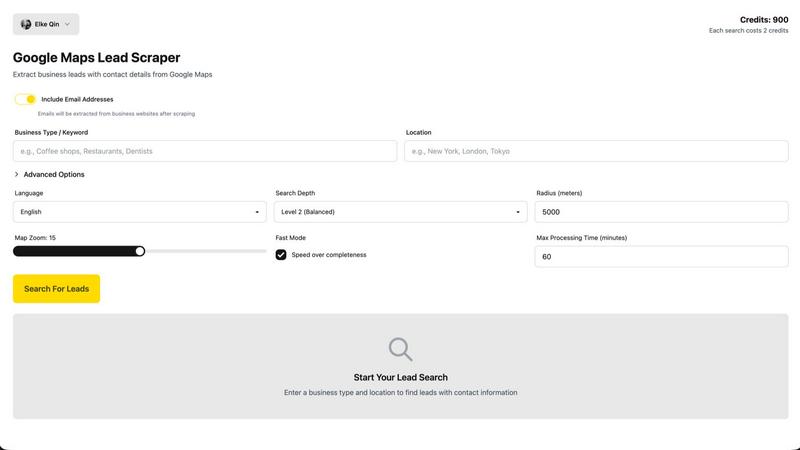
About GmapsScraper AI
GmapsScraper AI is a free, browser-based Google Maps data extraction tool designed to eliminate hours of manual copy-paste work for sales teams, marketing agencies, recruiters, and business owners. Instead of opening dozens of Google Maps listings one by one and frantically copying phone numbers into spreadsheets, you simply enter your search keywords and location, and the AI-powered scraper automatically collects verified business leads from Google Maps. This includes business names, phone numbers, emails, websites, addresses, ratings, and reviews. You can extract over 1,000 leads per search in under 3 minutes with no browser extension or software installation required. The AI-powered email discovery feature finds contact emails not listed on Google Maps, and one-click export to Excel or CSV makes your data ready for immediate outreach. It supports searches across any city, region, or country worldwide, with 10 free searches included and no credit card required. Unlike traditional scraping tools that require technical setup or expensive plugins, GmapsScraper works entirely in your browser. Paste your keywords, hit search, and download your organized spreadsheet ready for cold outreach, CRM import, or market research. The tool also offers an API for developers who want to integrate Google Maps data extraction into their own workflows. Rated 4.88 out of 5 stars by over 1,200 customers, GmapsScraper AI replaces tedious manual prospecting with automated, accurate data collection that saves you over 6 hours per day.
Features of GmapsScraper AI
Instant Browser-Based Extraction
GmapsScraper AI operates entirely within your browser with no plugin downloads, no software installations, and no complicated setup required. You can start extracting leads in under 30 seconds by simply entering your target industry and location. The tool works on any device including desktop, laptop, or tablet, making it accessible wherever you work. This eliminates the technical headaches and compatibility issues that come with traditional scraping tools and browser extensions.
Comprehensive Data Collection
The tool extracts everything you need for successful outreach including verified phone numbers with proper formatting, email addresses crawled from business websites, complete addresses for location-based targeting, business ratings and review counts for qualification, website URLs for research and personalization, operating hours to time your outreach perfectly, and business categories for precise segmentation. All this data is pulled fresh from Google Maps in real time.
AI-Powered Email Discovery
Beyond what is listed on Google Maps, GmapsScraper AI uses artificial intelligence to discover contact emails from business websites. This means you get more complete lead profiles that include direct email addresses for outreach. The AI crawls and cross-references multiple sources to find contact information that would otherwise require manual searching of each individual business website, saving you countless hours of additional research.
Flexible Export and Integration Options
With one-click export to Excel, CSV, or JSON formats, your data is ready for immediate use in your CRM, email campaigns, or market research spreadsheets. The tool also offers a developer API for programmatic access with full documentation and examples. This allows you to integrate Google Maps data extraction directly into your own workflows, automation pipelines, or custom applications for seamless business intelligence gathering.
Use Cases of GmapsScraper AI
Sales Prospecting and Lead Generation
Sales professionals can build qualified prospect lists in minutes instead of hours. Simply search for businesses in your target industry and location, and GmapsScraper AI delivers a complete spreadsheet of verified leads with phone numbers, emails, and addresses. This allows you to spend your time actually calling prospects and closing deals rather than manually collecting data. The smart filtering options let you target businesses by rating, review count, or price level to focus on the highest quality leads.
Marketing Agency Client Acquisition
Marketing agencies can quickly identify and qualify potential clients for their services. Search for businesses in specific industries and locations that match your ideal client profile, then export the data directly into your CRM for outreach campaigns. The tool supports multi-location targeting, allowing you to extract leads from multiple cities in a single session. This makes it easy to build territory-specific prospect lists for your sales team or run targeted email campaigns for agency growth.
Recruiting and Talent Sourcing
Recruiters can find businesses in specific industries and locations to identify potential hiring opportunities or source candidate leads. Search for companies by category, extract their contact information, and build a targeted list of organizations to approach for recruiting partnerships. The comprehensive data including website URLs and business categories helps you research each company before reaching out, ensuring your recruitment pitches are personalized and relevant to each business.
Market Research and Competitive Analysis
Business owners and market researchers can gather intelligence on competitors and market trends. Extract data on businesses in your industry across different regions to analyze pricing, service offerings, and customer ratings. The bulk extraction feature allows you to process multiple searches simultaneously, making it easy to compare markets in different cities or countries. This data helps you identify gaps in the market, understand competitive landscapes, and make informed strategic decisions for your business.
Frequently Asked Questions
Do I need to install any software or browser extensions to use GmapsScraper AI?
No, GmapsScraper AI works entirely in your browser with no downloads, plugins, or software installations required. You simply visit the website, enter your search keywords and location, and start extracting leads immediately. The tool is compatible with any modern browser on desktop, laptop, or tablet devices, making it accessible from anywhere.
How many leads can I extract and how long does it take?
GmapsScraper AI can extract over 1,000 verified leads per search in under 3 minutes. This includes business names, phone numbers, emails, websites, addresses, ratings, and reviews. The exact extraction time depends on your search parameters and the number of results available, but the process is designed to be significantly faster than manual copy-paste methods.
Is there a free trial and do I need a credit card?
Yes, GmapsScraper AI offers 10 free searches included with no credit card required. You can start using the tool immediately to extract leads and see the results for yourself. If you need more searches, you can upgrade to a paid plan at any time. There is no risk or commitment to try the free version.
What data fields does GmapsScraper AI extract from Google Maps?
The tool extracts verified phone numbers, email addresses crawled from business websites, complete addresses, business ratings and review counts, website URLs, operating hours, and business categories. This comprehensive data set gives you everything you need for successful outreach, CRM import, or market research without having to manually look up additional information.
Pricing of GmapsScraper AI
GmapsScraper AI offers a free tier with 10 searches included and no credit card required. For users who need more extraction capacity, the tool provides paid upgrade options that can be accessed at any time from the pricing page. The exact pricing for paid plans is available on the GmapsScraper AI website and includes options for different usage levels to match your business needs.
Similar to GmapsScraper AI

PageLint
AI copy audit for landing pages: 55 checks, each finding quotes your page and cites its source. Free 16-check audit, no signup.

Leadeon
AI growth tool for X and LinkedIn: write posts in your voice, schedule at your best times, find leads on X and see what works.

Assistly
An AI receptionist on your website that answers visitors 24/7 from your own content and captures every lead.

FollowX Today
Swipe to match with verified solo founders in your niche. Form 7-day mutual follow pacts, earn points, and grow a feed full of builders who engage in

ViewMax Studio
AI video generator that turns one prompt into shorts, UGC-style ads and faceless videos, with script, voiceover and captions.


Klype AI
Writes LinkedIn and social posts in your own measured voice and checks every draft for AI tells and invented claims.

SiteScoper
AI Website UX Auditor & Instant SEO Checker