

Hypeshare
Hypeshare lets you send files up to 10GB for free with end-to-end encryption, passwords, and no account required.
About Hypeshare
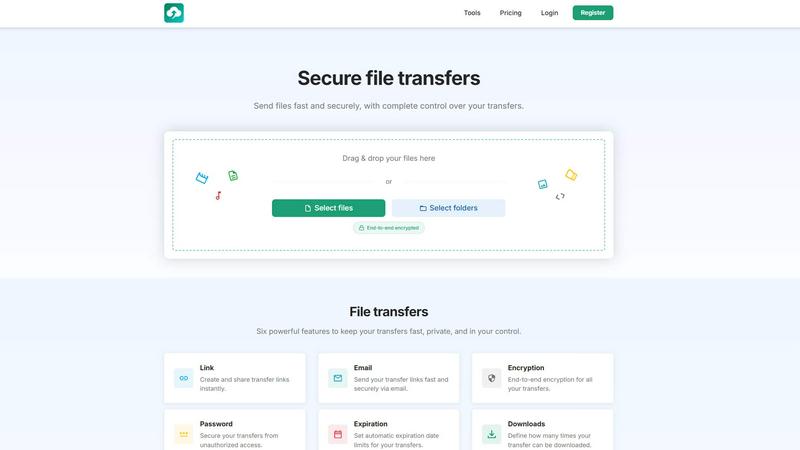
Hypeshare is a secure online file transfer platform designed to make sending and receiving large files fast, private, and hassle-free. Whether you are a freelancer delivering final artwork to a client, a small business sending confidential contracts, or just someone who needs to share a large video with family, Hypeshare removes the complexity of traditional cloud storage. You can upload files up to 10GB for free, and the best part is that no account is required on either the sender or the receiver's end. Every transfer is protected with robust AES-256 encryption, and you get complete control over your shared files with features like password protection, download limits, and automatic expiry dates. For users who need more power, Pro plans offer 1TB of storage, the ability to send files up to 200GB per transfer, custom domains for branded sharing, email notifications, and a unique File Requests feature that lets you receive files from anyone via a shareable upload link. There are never any ads on download pages. Hypeshare positions itself as a faster, safer, and more straightforward alternative to services like WeTransfer, Dropbox Transfer, and clunky email attachments. It is built for anyone who values speed, security, and simplicity in their file sharing workflow.
Features of Hypeshare
End-to-End Encryption and Password Protection
Every file you send through Hypeshare is protected with AES-256 encryption, ensuring that your data remains private during transit and at rest. You can add an extra layer of security by setting a unique password for each transfer. This means only the intended recipient, who knows the password, can access and download the files. This feature is crucial for sharing sensitive documents like legal contracts, financial reports, or personal identification, giving you peace of mind that your information is safe from unauthorized access.
File Requests
This powerful feature allows you to receive files from anyone, even if they do not have a Hypeshare account. You simply create a custom request link and share it via email, social media, or your website. When someone clicks the link, they are taken to your personal upload page where they can drag and drop files directly to you. You can set an expiration date for the request and receive email notifications every time a new file is uploaded. This is perfect for collecting client assets, wedding photos from guests, or project submissions from a team.
Complete Transfer Control
Hypeshare puts you in the driver's seat with granular control over every transfer you send. You can set an automatic expiration date, after which the link and files are automatically deleted from the server. You can also define exactly how many times a file can be downloaded, preventing the link from being shared indefinitely. These controls help you manage your data lifecycle, reduce clutter, and ensure that sensitive files are only accessible for a limited time and by a limited number of people.
Large File Support and No Account Required
You can send files up to 10GB for free, and up to 200GB per transfer with a Pro subscription. This eliminates the frustration of file size limits imposed by email providers. Perhaps the most convenient aspect is that no account is required on either end for basic transfers. The sender simply drags and drops files, and the recipient clicks a link to download. This frictionless experience makes Hypeshare ideal for one-off transfers or sharing with clients who may not want to sign up for yet another service.
Use Cases of Hypeshare
Freelancers Delivering Final Work
A graphic designer can use Hypeshare to send a large, high-resolution final logo package to a client. By using password protection and a download limit, the designer ensures only the client can access the files and that the link stops working after the first download. The client does not need an account, making the process seamless. The automatic expiry date also ensures the files are not lingering on a server indefinitely, which is great for project-based work.
Collecting Media from Event Guests
For a wedding or corporate event, the organizer can create a File Request link with a custom name like "hypeshare.io/request/SmithWedding". They share this link with all guests. Guests can then upload their photos and videos directly from their phones or computers without creating an account. The organizer receives an email notification for each upload, and all media lands neatly in their Hypeshare dashboard, ready to be downloaded and compiled into a shared album.
Secure Business Document Sharing
A legal firm needs to send a sensitive contract to a client for review. Using Hypeshare, they upload the document, set a strong password, and configure the link to expire in 7 days with a limit of 3 downloads. They send the link and the password separately via a secure channel. This ensures that even if the email is intercepted, the document remains protected. This workflow is far more secure than sending a document as an unprotected email attachment.
Software Developers Sharing Builds
A development team can use Hypeshare to share large application builds or installation files with beta testers. With the Pro plan's 200GB transfer limit, they can easily send entire virtual machine images or database dumps. They can use custom domains to maintain brand consistency and rely on the API to integrate file transfers directly into their deployment pipeline. The download analytics help them track how many testers have received the latest build.
Frequently Asked Questions
Do I need to create an account to send or receive files?
No, you do not need an account to send or receive files under the Guest plan. You can upload files up to 10GB and share the link directly. However, creating a free account unlocks more features like 20GB of storage, a 30-day data retention period, and the ability to track downloads. The recipient never needs an account to download a file you send.
How is my data protected during a transfer?
All files transferred via Hypeshare are protected with AES-256 encryption, which is the industry standard for data security. Additionally, you can add password protection to your transfers and set download limits. Files are automatically deleted from the server after the expiry date you set, ensuring your data is not stored indefinitely. Hypeshare also has a strict no-ads policy on download pages, providing a clean and secure experience for recipients.
What is the maximum file size I can send?
For free and guest users, the maximum file size per transfer is 10GB. For Pro subscribers, this limit is significantly increased to 200GB per transfer. This makes Hypeshare suitable for everything from sharing a few high-resolution photos to sending large video projects or software builds.
How do File Requests work?
File Requests allow you to receive files from anyone without them needing an account. You create a request, and Hypeshare generates a unique, shareable link (e.g., hypeshare.io/request/yourcustomname). You share this link, and anyone can click it to upload files directly to your Hypeshare dashboard. You can set an expiration date for the request and receive email notifications for every new upload. It is a perfect tool for collecting assets from clients, guests, or team members.
Pricing of Hypeshare
Hypeshare offers a straightforward pricing structure with three tiers to fit different needs.
Guest: This is a no-account option that is perfect for one-off transfers. You are limited to 5 transfers per month, 10 files per transfer, and 10GB per transfer. Data is retained for 7 days. You get file encryption and a custom alias.
Free: This plan requires a free account and offers 10 transfers per month, 10 files per transfer, 20GB of storage, and 10GB per transfer. Data is retained for 30 days. It includes file encryption, custom alias, API access, download notifications, and no ads.
Pro: Priced at 8.99 USD per month (billed monthly or yearly), this is the most popular plan. It offers unlimited transfers, unlimited files, 1000GB (1TB) of storage, and 200GB per transfer. You get unlimited transfer downloads, 50 emails per transfer, file encryption, custom aliases, support for up to 5 custom domains, unlimited data retention, data export, full API access, download notifications, no ads, File Requests, Transfer Analytics, branded downloads, and priority support.
Explore more in this category:
Similar to Hypeshare

Promptifi
Reviewed AI prompts and workflows for B2B sales, from account research to renewal. Run them in ChatGPT, Claude, Gemini or Copilot. 100 free.

Statement2QBO
Bank statement PDF to QBO, Excel and Xero. Runs in your browser; three pages a day are free.

Emailyy
Free email tools for signatures, subject lines, HTML previews, word counts, and email headers. Browser-based, simple to use, and no signup required.

Kamero
AI event photo sharing for photographers. Guests take a selfie and face recognition instantly finds every photo they appear in from weddings & events.

Uniclip
Clip pages, take full-page screenshots and batch-capture list data to Notion, Feishu, Obsidian, Markdown, CSV or JSON.

TroveKey
Search tabs, Chrome bookmarks and history, run browser commands, and save webpages and social posts locally—no account.

TravelMapVisited
Use a countries visited map to track your travels, count how many countries you’ve been to, and create a visited countries map.

PLRental
AI-powered platform for car, motorcycle, and ATV rental agencies: scan IDs, generate contracts, and manage fleet and finances.