

Image to Music AI
Image to Music AI instantly creates original soundtracks that match the mood and emotion of any photo you upload.
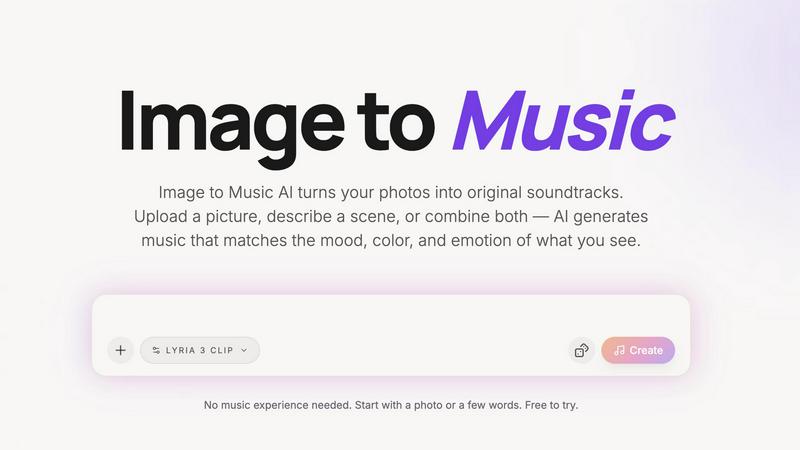
About Image to Music AI
Image to Music AI is a revolutionary creative tool that transforms your photos and visual ideas into original, matching soundtracks. Unlike traditional text-based AI music generators that require you to describe a sound, this tool uses your image as the creative starting point. It intelligently analyzes the visual mood, colors, composition, and energy of your photo to compose a unique piece of music that captures the feeling of what you see. Powered by Google's state-of-the-art Lyria model, it offers both image-to-music and text-to-music modes for maximum flexibility. Whether you're a travel photographer wanting to give your landscapes an audio identity, a vlogger needing a quick background track, or anyone looking to add an emotional layer to their visuals, this tool makes it simple. You don't need any music theory or production experience. Just upload a picture, let the AI interpret the scene, and within minutes you can preview, refine, and download a professional-sounding track. It’s the perfect bridge between visual inspiration and sonic creation, making original music accessible to everyone.
Features of Image to Music AI
Dual Input Modes: Image & Text
Start your creative process with maximum flexibility. You can upload any photo—a landscape, a portrait, or a memory—and let the AI interpret its visual story. Alternatively, type a scene description, or powerfully combine both an image and text prompts. This dual approach ensures you can create music for any project, whether you have a specific visual or just an idea in your head.
Powered by Google Lyria
At the core of the generation is Google's advanced Lyria AI model, a state-of-the-art system for music creation. This technology ensures the generated tracks are high-quality, musically coherent, and emotionally resonant. By leveraging this powerful engine, Image to Music AI delivers professional-grade results that feel authentic and tailored to your visual input.
Full Creative Control & Comparison
You’re always in the driver's seat. After the AI generates an initial track based on your image, you can fine-tune it using text prompts to adjust genre, tempo, energy, and instrumentation. Even better, you can generate several different versions from the same photo and listen to them side-by-side. This comparison feature lets you audition multiple creative directions and pick the absolute best soundtrack for your project.
Instant Preview & Simple Export
The workflow is designed for speed and simplicity. Once you initiate a generation, you get a preview of your AI-generated soundtrack in just 2-5 minutes. Listen instantly, make refinements if needed, and when you’re happy, download your track as an audio file with no extra steps, watermarks, or complicated export processes. It’s creation made effortless.
Use Cases of Image to Music AI
For Travel Photographers & Bloggers
Transform your stunning landscape shots and travel photos into evocative soundtracks. Give every destination or photo series its own unique audio identity, creating immersive slideshows or video blogs that engage both the eyes and ears of your audience with perfectly matched mood music.
For Short-Form Video & Vlog Creators
Speed up your content creation workflow dramatically. Simply take a key frame from your video footage, upload it, and generate a custom background track in minutes. This is perfect for YouTube Shorts, TikTok, Instagram Reels, or vlogs, ensuring your music always complements the visual story you're telling.
For Creative Projects & Mood Boards
Breathe sonic life into your visual concepts. Whether you're working on concept art, a design mood board, a presentation, or any creative project, you can transform the visual atmosphere into an original audio piece. This helps communicate the intended feeling more completely and can spark further inspiration.
For Personal Memories & Gifts
Add a beautiful, emotional layer to your personal photos. Turn a picture from a wedding, a family gathering, or a special vacation into a custom piece of music. It creates a unique and heartfelt gift or a personal keepsake that combines a visual memory with a soundtrack that captures its essence.
Frequently Asked Questions
How does the AI turn a picture into music?
The AI analyzes key visual elements of your uploaded photo, such as the overall mood, color palette, lighting, and composition. It interprets these visual cues—like warm sunset tones suggesting a calm melody or high-contrast images implying more energetic beats—and translates them into corresponding musical parameters like key, tempo, instrumentation, and rhythm to compose an original track.
Do I need any music experience to use this?
Not at all! Image to Music AI is built specifically for visual thinkers and creators of all skill levels. You can start by simply uploading a photo, and the AI will handle the complex task of composition. The text prompts for refinement use simple, descriptive language (like "cinematic," "upbeat," or "add piano"), so no technical music knowledge is required.
What audio format do I get when I download?
When you are satisfied with your generated track and choose to download it, you will receive a standard, high-quality audio file. This file is ready to be imported directly into your video editing software, social media platform, or music player without any need for further conversion.
How long does it take to generate a track?
Generation time is typically between 2 to 5 minutes per track. This allows the AI sufficient time to thoughtfully analyze your image and compose a detailed, high-quality piece of music. You can preview the track as soon as it's ready, making it a quick process from idea to finished soundtrack.
Pricing of Image to Music AI
New users start with 15 free credits to try the service, which typically allows for several generations. For continued use, Image to Music AI operates on a credit-based system. You can purchase packs of credits, with the "Pro" tier (likely utilizing the more advanced Lyria model) being the recommended starting point for the best quality. Specific package sizes and prices are available on the official website's Pricing page.
Explore more in this category:
Similar to Image to Music AI

Reword Image
Change the text already printed inside a photo, screenshot or poster, without the original design file.

Artcraft AI
AI image and video studio in your browser: generate and edit images, turn photos into videos, edit clips by sentence.

sakuttoAI
A free suite of online tools for everyday tasks like PDF compression, image conversion, text diff and CSV to Excel.

imgtxtapp.laviolab.com
imgtxtapp.laviolab.com is a Telegram-based image-to-text converter that turns photos, screenshots, scanned documents into editable text

AnyFileKit Image Translator
Translate the text in screenshots, photos and manga, with the translation drawn back over the original image.

PXDMD
Free AI image editor: remove backgrounds, erase objects and watermarks, and color-grade photos in seconds.

AFFLIGO
AFFLIGO is a free online toolkit for everyday file tasks. Easily edit PDFs, compress images, convert file formats, and get things done.

SightRadar
Face recognition API, a drop-in replacement for AWS Rekognition. Index, search, compare and detect faces, billed per photo with no subscription.