

imagetostl
Turn any image into a 3D printable STL model in seconds with fast, easy generation and a free preview.
About imagetostl
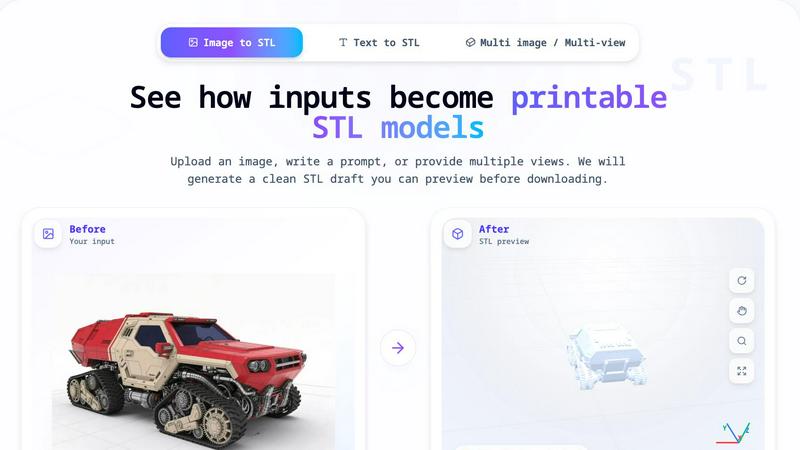
ImageToSTL.pro is an online AI-powered tool that transforms your 2D images into 3D printable STL models with remarkable ease. Instead of wrestling with complex 3D modeling software, you simply upload a JPG, PNG, or WEBP image, let the AI generate a 3D model, preview it in your browser, and then download the STL file ready for printing. This tool is designed for makers, 3D printing enthusiasts, designers, hobbyists, and anyone who wants to quickly turn image-based ideas into physical objects. The core value proposition is speed and accessibility — you go from a flat picture to a printable 3D draft in about one minute. The platform offers multiple generation modes (Fast, Standard, Advanced) so you can balance speed against detail, and it even includes advanced options like PBR textures, custom face count, and smart decimation for finer control. Importantly, credits are returned automatically if a generation fails, so there is no risk in trying. The entire workflow is built around a simple four-step process: upload, generate, inspect, and print. This makes it an ideal starting point for prototyping gifts, testing Etsy product ideas, creating classroom demos, or experimenting with new shapes. While it is not a full 3D modeling suite, it excels at producing clean, inspectable STL drafts that you can then refine in your slicer or 3D editor.
Features of imagetostl
Multiple Generation Modes
Choose between Fast, Standard, and Advanced modes to match your project needs. Fast mode uses only 2 credits and takes about 30 seconds, ideal for quick drafts and rough ideas. Standard mode uses 3 credits and takes around 60 seconds for a balanced result. Advanced mode uses 4 credits and takes about 90 seconds, giving you the highest quality geometry and detail. This flexibility lets you control both speed and output quality depending on your use case.
Built-in 3D Preview and Inspection
Before you download anything, you can rotate, zoom, and inspect your generated 3D model directly in the browser. The preview shows the model along X, Y, and Z axes, allowing you to check the overall shape, identify any issues, and verify that the geometry matches your expectations. This preview step is crucial for catching problems early and ensuring your model is print-ready before you commit to downloading.
Advanced Customization Options
For users who want more control, ImageToSTL offers three advanced options: PBR Textures for adding surface detail, Custom Face Count for adjusting polygon density, and Smart Decimation for optimizing geometry while preserving important features. Each option costs one additional credit but gives you professional-level control over the final STL output. These features are perfect for users who need specific mesh characteristics for their printing or design workflow.
Credit System with Automatic Refunds
The platform uses a straightforward credit system where each generation costs between 2 and 4 credits depending on the mode and options selected. If a generation fails for any reason, the credits are automatically returned to your account. This no-risk policy encourages experimentation and lets you try different images and settings without worrying about losing credits on unsuccessful attempts.
Use Cases of imagetostl
3D Printing Drafts and Prototypes
Turn reference images into first-pass STL geometry for your 3D printing projects. Whether you are working on a custom part, a decorative item, or a functional prototype, ImageToSTL gives you a fast starting point. You can then import the STL into your slicer to adjust scale, add supports, and set orientation before printing. This dramatically reduces the time from idea to physical object compared to modeling from scratch.
Etsy Product Tests and Shop Ideas
Prototype charms, ornaments, reliefs, and keepsakes before investing time in full production. If you are an Etsy seller or craft entrepreneur, you can quickly test new product concepts by converting images into 3D models. Preview how a custom pet portrait, a geometric pattern, or a themed ornament would look in 3D, then refine the design before ordering materials or setting up production.
Custom Gifts and Personalized Creations
Create printable model ideas from pets, objects, and drawings to give as unique gifts. Imagine converting a photo of a beloved pet into a 3D figurine, turning a child's drawing into a physical keepsake, or transforming a favorite logo into a custom keychain. ImageToSTL makes these personalized projects accessible to anyone, regardless of their 3D modeling experience.
Classroom Demos and Educational Projects
Show how a 2D image can become a physical model in a classroom or workshop setting. Teachers can demonstrate the concept of 3D conversion by uploading simple images and letting students watch the generation process. Students can then inspect the model in 3D, discuss geometry and design principles, and even print the results. This hands-on approach makes abstract concepts tangible and engaging.
Frequently Asked Questions
What image formats and sizes does ImageToSTL support?
ImageToSTL accepts JPG, PNG, JPEG, and WEBP formats. The maximum file size is 8MB. For best results, upload a single clear image with a visible subject and simple background. The tool works best when the image has enough structure and contrast for the AI to infer printable geometry.
How does the credit system work and what happens if a generation fails?
Each generation costs credits based on the mode you choose: Fast mode costs 2 credits, Standard costs 3, and Advanced costs 4. Advanced options like PBR Textures, Custom Face Count, and Smart Decimation each add 1 additional credit. If a generation fails for any reason, the credits are automatically returned to your account, so there is no risk in trying different images or settings.
Can I preview the model before downloading the STL file?
Yes, absolutely. After the AI generates your 3D model, you can rotate, zoom, and inspect it directly in the browser preview. You can view the model along the X, Y, and Z axes to check the geometry and overall shape. Only when you are satisfied with the preview do you download the STL file.
What kind of images work best for conversion?
Images that convert best have one clear subject, a simple background, and sharp visible edges. Clean contrast between the subject and background helps the AI infer the outline and main form. Avoid blurry, dark, or crowded images. Cropping the image to focus on the main object also improves results. The tool is designed for turning clear 2D images into printable STL drafts, not for complex scenes with multiple overlapping objects.
Similar to imagetostl

Promptifi
Reviewed AI prompts and workflows for B2B sales, from account research to renewal. Run them in ChatGPT, Claude, Gemini or Copilot. 100 free.

OpenDaemon
Free Windows AI agent app: describe an app in plain words and it plans and builds it phase by phase with your coding app.

Easemic
Free open-source Android comic & manga cloud reader streaming encrypted libraries from S3, WebDAV & OPDS.

Rhinobird
AI video ads, UGC-style videos, and product visuals for cross-border sellers and e-commerce brands.

Maeve Social
Plan, approve and publish social content with an AI assistant, analytics, and API, CLI and MCP access for agents.

GenX
All-in-one AI workspace to generate images, videos, and audio with multiple leading AI models.

Bloom
An adaptive AI tutor that turns topics or your materials into courses, lessons, and answers tailored to how you learn.

Agent Pets
Your Claude Code & Codex sessions as pets in Chrome. Approve, deny and reply to your coding agents from any tab.