

Imgoe
Imgoe is an AI tool that turns your product photos into professional detail images for online marketplaces in minutes.
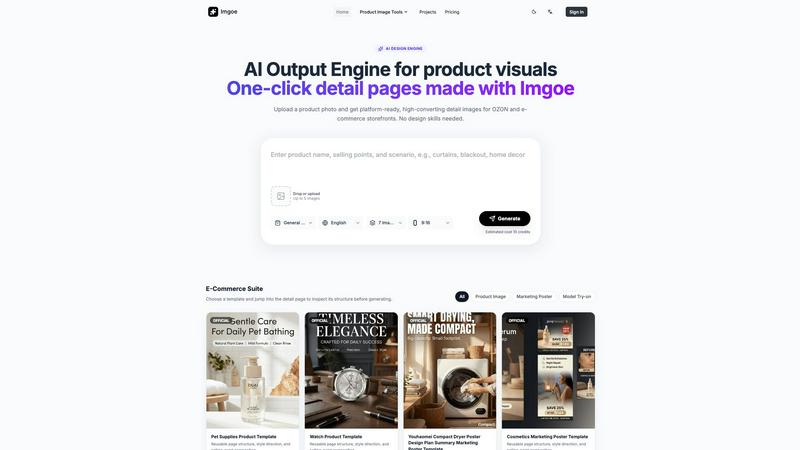
About Imgoe
Imgoe is a browser-based AI output engine designed specifically for e-commerce visuals. It helps online sellers, cross-border operators, DTC brands, product marketers, and small design teams turn simple product photos into store-ready product image assets without the need to build a full studio or start every design request from scratch. The core workflow is refreshingly simple: upload a clean product image or SKU photo, describe the product along with its selling points, scene, or platform requirement, choose an asset type or marketplace preset, and generate product visuals that can be used immediately across product pages, galleries, ads, and online store listings. Unlike general AI art tools, Imgoe focuses purely on e-commerce output, so the generated assets are organized around practical product-page roles such as hero images, gallery images, detail modules, feature images, comparison visuals, lifestyle scenes, and selling-point graphics. The platform supports common seller workflows for major marketplaces including Amazon, Shopify, Etsy, eBay, TikTok Shop, Temu, and OZON. Platform presets help users align aspect ratios, language, scene direction, and prompt constraints with how product images are typically published, while automatically avoiding marketplace logos, fake badges, unsupported claims, and misleading UI elements. Additionally, the website provides prompt and template examples that make it easy to generate product photos, detail page assets, and marketplace-ready visuals. With a template-first workflow, Imgoe acts more like a visual production workspace than a random image generator, giving teams consistent style, faster turnaround, and lower iteration costs for real design work.
Features of Imgoe
Template-Based Visual Production
Imgoe offers a library of reusable page structures, style directions, and selling-point compositions that serve as starting points for generating product visuals. Instead of beginning every design request from scratch, users can choose a template that closely matches their product category and desired output format, then adjust it to fit their specific product. This template-first approach ensures visual consistency across all generated assets, from hero images to detail modules and marketing posters. Templates are available for various categories including pet supplies, watches, cosmetics, curtains, sunglasses, and fashion accessories, each with pre-defined layouts optimized for e-commerce conversion.
Marketplace Platform Presets
The platform includes dedicated presets for major e-commerce marketplaces such as Amazon, Shopify, Etsy, eBay, TikTok Shop, Temu, and OZON. These presets automatically handle critical details like aspect ratio requirements, language preferences, scene direction, and prompt constraints specific to each marketplace. They also prevent common mistakes by avoiding marketplace logos, fake badges, unsupported claims, and misleading UI elements that could lead to listing rejections. This feature saves sellers significant time and reduces the risk of publishing non-compliant product images.
Multi-Asset Generation Workflow
Imgoe allows users to generate multiple types of product visuals from a single product photo upload. The output is organized around practical product-page roles including hero images, gallery images, detail modules, feature images, comparison visuals, lifestyle scenes, and selling-point graphics. Users can generate up to five images per session, with estimated credit costs displayed upfront. The system supports various aspect ratios such as 9:16 and generates visuals in multiple languages, making it suitable for cross-border e-commerce operations that need multi-language and multi-variant asset sets.
Iterative Editing and Style Consistency
The platform enables users to refine generated visuals through iterative edits while maintaining a consistent style across the entire product page set. By starting from one reference template, teams can keep model images, promo posters, and detail pages visually aligned. This feature is particularly valuable for fashion and lifestyle brands that need coherent visual storytelling across multiple asset types. The iteration cost is significantly lower than traditional design workflows, allowing small teams to make adjustments quickly without going through multiple review rounds.
Use Cases of Imgoe
Creating Marketplace-Ready Product Listings
E-commerce sellers and cross-border operators can upload a simple product photo and generate a complete set of platform-ready images for marketplaces like OZON, Amazon, or Shopify. The platform presets ensure that generated visuals meet each marketplace's specific requirements for aspect ratio, language, and content guidelines. For example, a footwear brand founder can take one clean product shot and quickly produce hero images, gallery photos, and detail modules that are optimized for conversion on their target marketplace. This use case eliminates the need for multiple review rounds and speeds up the listing process significantly.
Generating Multi-Language Visual Assets
Cross-border e-commerce teams that need to list products across different regions can use Imgoe to create multi-language and multi-variant asset sets from a single product photo. The platform allows users to specify language preferences and generate visuals with text and scene directions appropriate for each target market. A cross-border e-commerce lead can take one product and quickly turn it into several marketplace-ready visual sets for different countries, saving time and ensuring consistency across international listings. This capability is especially useful for teams managing large product catalogs across multiple platforms.
Producing Cohesive Product Page Sets
Fashion and lifestyle brands can use Imgoe to maintain visual alignment across all product page assets, including hero images, selling-point pages, scene pages, and marketing posters. By starting from one reference template, teams can ensure that model images, promo posters, and detail pages all share a consistent look and feel. A fashion e-commerce manager can use this workflow to keep their entire product page set visually coherent, which improves brand perception and customer trust. The template-first approach also makes it easy for content operators to produce assets in a logical sequence, starting with the hero image and moving to supporting visuals.
Accelerating Visual Production for Small Design Teams
Small design teams and DTC growth consultants can use Imgoe as a production line for product-page assets without needing to brief every page from scratch. The platform allows users to pick a close template, adjust it to the product, and generate launch-ready assets much faster than traditional workflows. A home goods content operator can use Imgoe to produce hero images first, then selling-point pages, then scene pages, with each iteration costing less than a traditional design process. This use case is ideal for smaller teams that need to produce high-quality product visuals quickly but lack the resources for a full in-house studio.
Frequently Asked Questions
How does Imgoe differ from general AI image generators?
Imgoe is specifically built for e-commerce visual production rather than general AI art. While general AI generators produce creative images that may not be suitable for product listings, Imgoe focuses on practical product-page roles such as hero images, gallery images, detail modules, and selling-point graphics. The platform also includes marketplace presets that align with specific platform requirements and avoid common mistakes like fake badges or unsupported claims. This makes Imgoe more like a visual production workspace than a random image generator, giving users assets that are ready for real e-commerce use.
What marketplaces does Imgoe support with its platform presets?
Imgoe supports common seller workflows for general e-commerce stores and major marketplaces including Amazon, Shopify, Etsy, eBay, TikTok Shop, Temu, and OZON. Each marketplace preset helps users align aspect ratios, language, scene direction, and prompt constraints with the way product images are typically published on that platform. The presets also automatically avoid marketplace logos, fake badges, unsupported claims, and misleading UI elements that could cause listing rejections. This ensures that generated visuals are compliant and ready for publication.
Can I generate multiple types of visuals from one product photo?
Yes, Imgoe allows you to generate multiple types of product visuals from a single product photo upload. You can create hero images, gallery images, detail modules, feature images, comparison visuals, lifestyle scenes, and selling-point graphics all from one source image. The platform supports up to five images per generation session, and you can specify different asset types or marketplace presets for each output. This multi-asset generation workflow is designed to help you produce a complete set of product page visuals quickly and efficiently.
How does the template system work in Imgoe?
Imgoe provides a library of reusable page structures, style directions, and selling-point compositions that serve as starting points for visual generation. You can browse templates by category such as product image, marketing poster, or model try-on, and preview them before generating. Once you select a template, you can adjust it to fit your specific product by uploading your product photo and describing the product, selling points, scene, or platform requirements. The template ensures that the generated visuals maintain consistent style and structure across all assets, making it easier to produce coherent product page sets.
Explore more in this category:
Similar to Imgoe

Enhance My Photo
Online AI photo enhancer that sharpens portraits, products, scenery, pets and text images and exports JPEG/PNG/WebP without watermarks.

Kamero
AI event photo sharing for photographers. Guests take a selfie and face recognition instantly finds every photo they appear in from weddings & events.

WhiteBackground.app
Make photo backgrounds pure white with private, free browser processing.

Rhinobird
AI video ads, UGC-style videos, and product visuals for cross-border sellers and e-commerce brands.

Ideogram 4.5
Ideogram AI 4.5 is an image generator and editor for precise, drift-free refinement, native 2K lettering, and Pixel Lock.

nanobanana 2.1
Nano Banana 2.1 is a fast AI image generation and editing model for realistic visuals, consistent characters, readable text, and precise creative cont

AI Rap Video Maker
Turn a photo into a rap performance — a silent stage clip or an original 10–15s rap video with your own lyrics, beat style and voice direction.

Vikas Editor
Upload a photo, pick a style prompt, get an AI edit. Credit-based Vikas Editor.