

imgpilot.app
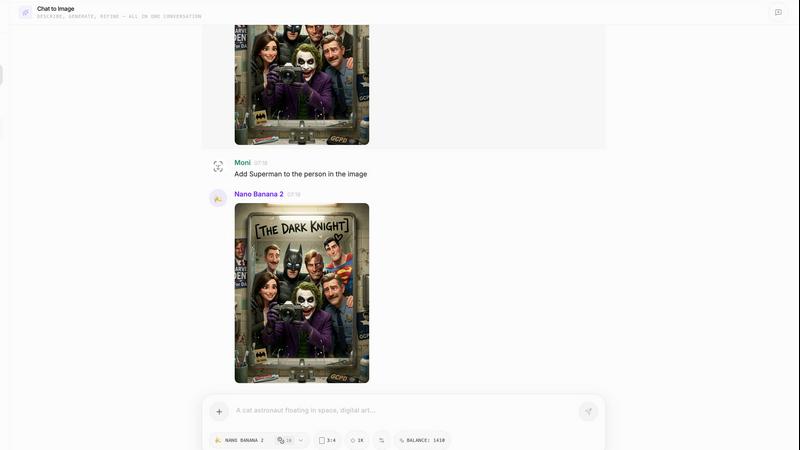
ImgPilot lets you chat to edit images or generate new ones from simple text descriptions, making image creation easy and interactive.
About imgpilot.app
ImgPilot is an innovative chat-powered AI image generator designed for individuals who have a clear vision of what they want but may struggle with articulating it effectively. Whether you are a digital artist, marketer, or simply someone who enjoys creating visuals, ImgPilot makes the process seamless and intuitive. Users can generate images quickly through straightforward text prompts or by uploading reference images for detailed edits. The platform’s unique chat-to-image workflow allows for an interactive experience where users can refine their images through natural conversation. This means you can make changes, swap styles, and add or remove elements without starting from scratch. With support for multiple AI models, including the advanced GPT-4o Image, ImgPilot caters to a wide range of creative needs and ensures that everyone, regardless of their prompting skills, can create stunning images effortlessly.
Features of imgpilot.app
Chat-to-Image Workflow
ImgPilot's standout feature is its chat-to-image workflow, which allows users to generate an initial image draft and then refine it through a conversational interface. This ensures that each edit builds on the previous version, making it easy to iterate without losing progress.
Instant Text-to-Image Generation
With ImgPilot, users can type a simple description and receive a finished AI-generated image in seconds. This feature is perfect for those who have a clear idea of what they want but want to avoid complex settings or templates.
Extensive Prompt Library
ImgPilot offers a built-in library of ready-made prompts categorized by image type. This feature is designed to help users who may not know how to start by providing proven structures they can easily send to the AI for image generation.
Multi-Turn Editing Capability
Users can upload an image and engage in multi-turn chat to make specific changes. Whether it’s swapping backgrounds, restyling elements, or adding new components, this feature allows for detailed and precise editing with each iteration.
Use Cases of imgpilot.app
Graphic Design Projects
Graphic designers can use ImgPilot for quick mockups or to generate unique visuals based on client feedback. The chat-to-image feature allows for real-time adjustments, streamlining the design process.
Marketing and Social Media Content
Marketers can leverage ImgPilot to create eye-catching images for promotional campaigns or social media posts. With the ability to refine images through conversation, they can ensure that the visuals align with brand messaging.
Art and Illustration
Artists can explore new styles and concepts by generating images from simple descriptions. The ability to edit continuously allows them to experiment with different elements and styles without starting over.
Education and Training Materials
Educators can utilize ImgPilot to create engaging visuals for presentations, training materials, or educational content. By refining images based on specific requirements, they can produce tailored graphics that enhance learning experiences.
Frequently Asked Questions
How does the chat-to-image workflow work?
The chat-to-image workflow allows users to generate an initial image by describing it in plain language. After the first image is created, users can continue to refine it by chatting with the AI to specify changes and enhancements.
Can I upload my own images for editing?
Yes, ImgPilot allows users to upload their own images. You can describe what you want to change, and the AI will edit the image based on your instructions, making it easy to achieve the desired result without starting from scratch.
What AI models does ImgPilot support?
ImgPilot supports several advanced AI models, including GPT-4o Image, Flux Kontext Pro/Max, Nano Banana, and Grok Image. This variety ensures that users have access to different styles and capabilities according to their creative needs.
Is there a free trial available for new users?
Yes, new users receive 50 free starter credits to explore ImgPilot's features. This allows them to try out the platform without any prompt expertise required, making it accessible for everyone to create stunning images.
Explore more in this category:
Similar to imgpilot.app

Bulin 47 AI
Turn one portrait into a vertical AI-generated freestyle performance video.

imgtxtapp.laviolab.com
imgtxtapp.laviolab.com is a Telegram-based image-to-text converter that turns photos, screenshots, scanned documents into editable text

SightRadar
Face recognition API, a drop-in replacement for AWS Rekognition. Index, search, compare and detect faces, billed per photo with no subscription.

Restore Old Photos - Retrocap
AI photo restoration app for iPhone and Android: repair scratches and tears, colorize black-and-white photos, sharpen faces and animate old portraits.

Bulin47
One photo → viral freestyle AI video. Join the Bulin 47 / Kevin Wai trend in seconds.

Bulin 47 AI
Bulin 47 AI puts your face into the viral Bulin 47 freestyle video from one photo. Get a 5–19-second vertical MP4 for TikTok and Reels.

AI Image Tools
Text to image, photo edits, background removal and restoration. Pick Nano Banana, FLUX, Seedream or GPT Image and see the price first.

ImageAICraft
GPT Image 2 AI Image Generator & Editor for Text-to-Image and Image-to-Image Creation