

Intrascope.app
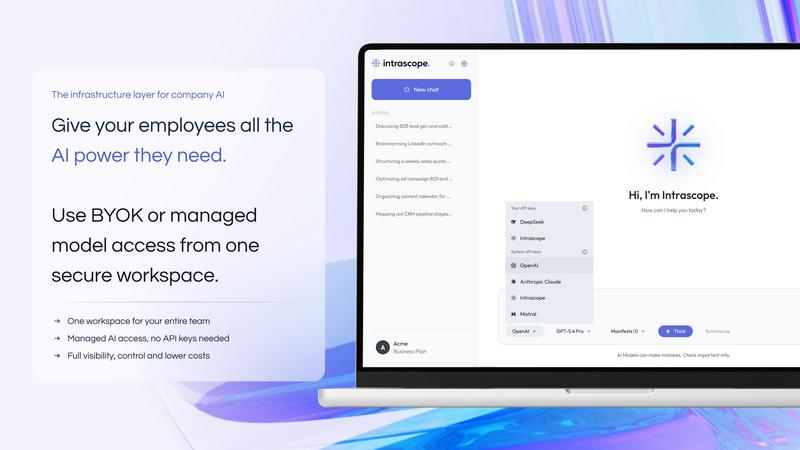
Intrascope is an AI workspace that lets teams manage models, permissions, costs, and usage analytics all in one place.
About Intrascope.app
Intrascope.app is a shared AI workspace built for teams that want to bring order and control to how artificial intelligence is used across their company. Instead of relying on a messy collection of personal AI accounts where employees use different tools like ChatGPT, Claude, or Gemini independently, Intrascope gives teams one centralized environment to manage everything. This includes users, projects, AI models, shared context, permissions, usage visibility, and cost control all in one place. The product is designed for organizations of all sizes that are facing the growing challenge of scattered AI usage, lost context, weak visibility, and uncontrolled spending. With Intrascope, teams can connect their own provider API keys through a Bring Your Own Key (BYOK) model for full billing control, or they can use managed AI access with a prepaid balance directly inside the workspace. This makes it easy to give employees access to leading AI models without sharing sensitive API keys, losing visibility into how AI is being used, or creating unmanaged costs. Intrascope supports multiple AI providers including OpenAI, Claude, DeepSeek, Gemini, xAI, Mistral, and Qwen, helping companies manage model access, monitor usage, control spending, organize work by projects, and keep AI collaboration structured, secure, and scalable. It is not just another chat interface; it is an operating layer for AI within your company.
Features of Intrascope.app
Centralized Workspace with Multi-Model Access
Intrascope provides one shared environment where your entire team can access leading AI models from multiple providers including OpenAI, Claude, DeepSeek, Gemini, xAI, Mistral, and Qwen. Instead of each team member juggling separate accounts and subscriptions, everyone works from a single platform. Admins can set up which models are available to which users, ensuring the right tools are accessible without the chaos of scattered personal logins. This centralization also means that important instructions, brand rules, and project knowledge are no longer buried in individual chat histories.
Bring Your Own Key (BYOK) and Managed Usage Options
Intrascope offers two flexible ways to run AI in your workspace. Technical teams can connect their own provider API keys for full control over billing and direct provider relationships. This option lets you keep your existing provider billing while using Intrascope as the shared workspace layer for projects, manifests, and analytics, potentially saving up to 85 percent compared to individual subscriptions. Alternatively, teams can use Intrascope managed usage by topping up a single workspace balance, which is ideal for teams wanting to start quickly without any API setup. This option gives you one balance for the whole workspace, clear usage visibility by model and user, and built-in model access control.
Usage Visibility and Analytics
One of the biggest pain points for teams adopting AI is the lack of visibility into who is using what, when, and at what cost. Intrascope solves this by providing detailed analytics and usage visibility across users, projects, and models. Managers can easily see how AI is being utilized, track spending by team member or project, and identify which models are being used most frequently. This transparency helps prevent bill surprises and ensures that AI resources are being used effectively and responsibly. The platform also tracks workspace sessions and tokens processed, giving you a clear picture of your team's AI activity.
Project-Based Organization and Shared Context
Intrascope allows teams to organize their AI work by projects, making it easy to keep conversations, context, and outputs tied to specific initiatives. Each project can have its own shared context, such as brand guidelines, instructions, or reference materials, ensuring that every team member working on that project has access to the same information. This eliminates the problem of lost context that occurs when people use personal AI accounts. Project-level permissions also allow admins to control who can access specific projects and models, adding an extra layer of security and structure to your AI collaboration.
Use Cases of Intrascope.app
Centralizing AI Access for Marketing and Content Teams
Marketing teams often use AI for copywriting, brainstorming, content creation, and social media management. Without Intrascope, each marketer might use their own ChatGPT or Claude account, leading to inconsistent brand messaging and lost context. With Intrascope, the marketing team can work in a shared workspace where brand guidelines, tone of voice instructions, and campaign details are stored as shared context for every project. The marketing manager can set up access to specific models, monitor usage costs, and ensure that the entire team is aligned. This centralization improves consistency, saves time, and prevents the chaos of scattered personal accounts.
Managing AI Usage for Engineering and Development Teams
Engineering teams frequently use AI models for code generation, debugging, documentation, and research. Intrascope allows these teams to connect their own provider API keys through BYOK, giving them full control over billing while using the shared workspace for collaboration. Developers can work on projects with shared context, such as codebase conventions or architecture guidelines, and managers can track which models are being used and at what cost. This setup is ideal for teams that want the flexibility of direct provider billing combined with the structure and visibility of a centralized platform.
Enabling Controlled AI Access for Customer Support
Customer support teams can benefit from AI for drafting responses, summarizing tickets, and finding information quickly. Intrascope allows a support manager to give agents access to specific AI models while controlling spending and monitoring usage. Shared context can include company policies, product information, and common response templates, ensuring that all support interactions are consistent and accurate. The manager can also set project-level permissions to keep sensitive customer data secure and track how much each agent is using AI, preventing unexpected costs and ensuring responsible use.
Structuring AI Research and Analysis for Product Teams
Product teams often use AI to analyze user feedback, generate product requirements, and explore competitive landscapes. With Intrascope, a product manager can create separate projects for each product line or research initiative, each with its own shared context and model access. The team can collaborate on analysis without losing context or duplicating efforts. Usage visibility helps the product manager understand which models are most effective for different tasks and control costs across multiple projects. This structured approach makes AI a more reliable and scalable tool for product development.
Frequently Asked Questions
How does Intrascope help with cost control?
Intrascope provides detailed usage visibility across users, projects, and models, so you can see exactly who is using which AI model and at what cost. You can choose between Bring Your Own Key (BYOK) for direct provider billing or managed usage with a single workspace balance. This transparency helps prevent bill surprises and allows managers to set spending limits or adjust model access based on usage patterns, potentially saving up to 85 percent compared to individual subscriptions.
Can I use my own API keys with Intrascope?
Yes, Intrascope supports Bring Your Own Key (BYOK). You can connect your own provider API keys from OpenAI, Claude, Gemini, and more. This option is ideal for technical teams who want full control over their provider billing and relationships. Intrascope then acts as the shared workspace layer for projects, manifests, and analytics, giving you the benefits of a centralized platform without losing billing control.
What AI providers are supported by Intrascope?
Intrascope supports a wide range of leading AI providers, including OpenAI, Claude, DeepSeek, Gemini, xAI, Mistral, and Qwen. This multi-model support allows your team to choose the best model for each task, all from a single workspace. Admins can control which models are available to which users, ensuring that the team has access to the right tools without unnecessary complexity.
How does Intrascope handle shared context and project organization?
Intrascope allows you to create projects within your workspace, each with its own shared context. This shared context can include important instructions, brand rules, reference materials, or any other information that your team needs to work consistently. When team members use AI within a project, they automatically have access to this context, eliminating the problem of lost information that occurs with personal AI accounts. Project-level permissions also let you control who can access each project and its associated models.
Explore more in this category:
Similar to Intrascope.app

@fuck.it - email with attitude
Private email. Pure. Secure. Exclusive. No ads, no tracking, no data selling. GDPR compliant, EU-hosted.

xfiles
Free PDF, image and audio tools that process your files locally in your browser. No account or added watermarks.

this+that
An AI agent that reads every email and chat message your team gets, turns requests into tasks, and does what they ask.

Toolbit.ai
Describe your task and Toolbit finds the right AI tool. Compare tools side by side, see top rankings, and follow daily AI news and guides.


TestNeo
TestNeo.ai is an AI-native engineering and release assurance platform that helps teams automate web and API testing using natural language.

RunMyWealth
Smart, private financial calculators for mortgage, FIRE, and debt. 100% free, runs locally in your browser, no signup required.

Nutrition Fact Label
Free FDA-compliant nutrition facts label generator with recipe-to-label nutrition, allergen checks and 152 label formats for 114 countries.