

KlipKap Pro
Record and polish screen videos on Windows or Mac with automatic zoom, smooth cursor movement, local AI captions and montage editing.
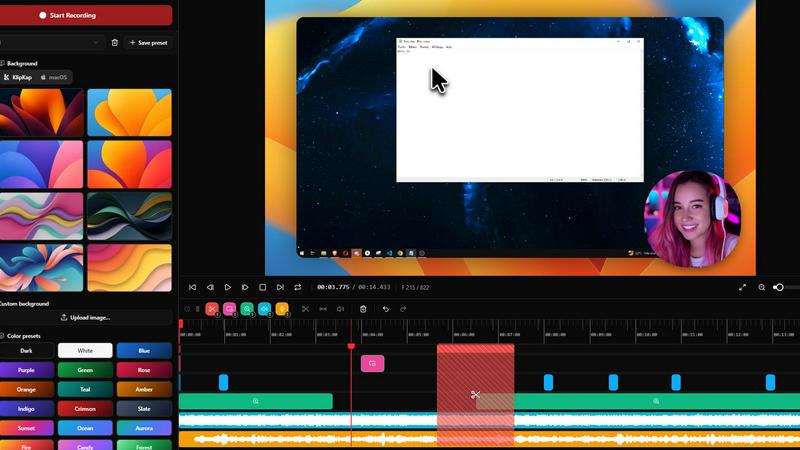
About KlipKap Pro
KlipKap Pro combines screen recording with automatic editing tools for people who make tutorials, software demos, lessons or product walkthroughs. It records a screen, microphone and webcam, then opens the take with auto-editing applied. Users can adjust zoom and cursor effects, add captions, arrange clips and title cards in a montage, add transitions or music, and export to MP4.
Check the free tier before upgrading
The free version includes recording, auto-zoom, captions, webcam placement and montage editing, with 720p exports and a watermark. Pro is a one-time purchase listed at $39.99 and adds watermark-free exports, higher resolutions including 4K, higher frame rates, GIF export and GPU rendering. The product page says recording, editing, subtitles and audio cleanup run on the user's computer; downloading, licence activation and Pro export require an internet connection. KlipKap is available for Windows 10/11 and macOS 13 Ventura or later, so it may suit cross-platform teams comparing Mac-focused recording apps.
Features of KlipKap Pro
- Records screen, microphone, system audio and webcam.
- Automatically applies zoom and smooth cursor movement.
- Creates word-level captions locally, with support for 50+ languages.
- Provides montage editing with title cards, transitions and music.
Use Cases of KlipKap Pro
- Record software demos, bug reproductions and product updates.
- Produce captioned tutorials for video platforms.
- Assemble lesson or course recordings into chapter-ready videos.
- Create product walkthroughs with webcam picture-in-picture.
Frequently Asked Questions
Is there a free version?
Yes. The page describes a permanent free tier with recording, editing and 720p exports that include a watermark.
Does KlipKap process recordings online?
The product page says recording, editing, AI subtitles and audio cleanup run locally. It lists downloading the app, activating a licence and exporting with a Pro account as tasks that need an internet connection.
Which operating systems are supported?
The page lists Windows 10/11 and macOS 13 Ventura or later.
Pricing of KlipKap Pro
KlipKap Pro is listed as a $39.99 one-time purchase. The free version has 720p exports with a watermark.
Explore more in this category:
Similar to KlipKap Pro

No Scrubs AI
Cast a white-studio dance video with one to three portraits, then download a 23-second MP4 in 480p or 720p.


MAGI-2
MAGI-2 video generation on Magi2Gen creates up to 30 seconds of 1080p video with native sound from a prompt, with optional image references.


Sensei
Sensei scores web pages and produces prioritized UX audits with fix recommendations, design psychology, and competitive benchmarking.

EYROVE
EYROVE pairs a free AI image generator with a searchable library of prompts and visual references organized by model, style, and use case.

companypedia.info
A free company directory with business profiles for contact details, links, reviews, social accounts, jobs and media in one place.

AI Christmas Card
AI Christmas Card blends uploaded photos or custom prompts into holiday cards, with preset looks, greetings, and print-size guidance.