

KPI Studio
KPI Studio transforms your data into stunning video animations in seconds, making visuals easy and engaging without design skills needed.
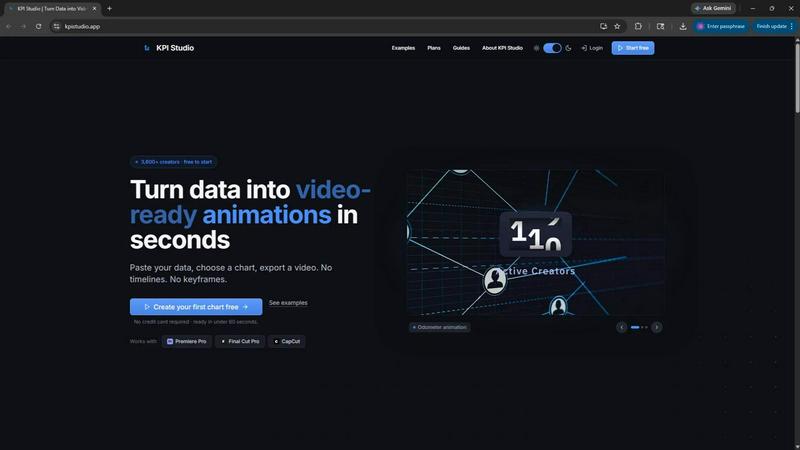
About KPI Studio
KPI Studio is a revolutionary tool designed specifically for data-driven video creators who require high-quality animated charts but find traditional methods too time-consuming or cumbersome. It caters to video content producers who need to incorporate precise data visuals into their work without the hassle of complex motion design workflows. With KPI Studio, you can transform raw data into stunning, video-ready animations in mere seconds. The platform simplifies the entire process: just paste your data, select your desired chart type, and export an animated visual ready for your editing software—no timelines or keyframes involved. This means that whether you are a YouTube creator, a social media manager, or involved in corporate communications, KPI Studio can help you deliver professional-grade visuals quickly, ensuring that your content remains engaging and visually appealing while you meet tight deadlines.
Features of KPI Studio
Easy Data Integration
KPI Studio allows users to simply paste their data into the platform, making it incredibly user-friendly. This feature eliminates the need for complex data input methods, enabling creators to focus on what matters most—crafting compelling content.
Quick Animation Export
With KPI Studio, exporting fully animated visuals takes less than 60 seconds. This feature streamlines your workflow by providing instant access to high-quality animations, allowing you to incorporate them into your videos without delays.
Versatile Export Options
The platform supports various export formats, including MP4, MOV, GIF, and PNG, with transparency options. This versatility ensures that your animated charts can be easily integrated into any video editing software, such as Premiere Pro, Final Cut Pro, or CapCut.
Advanced JSON Export
For those who want to take their editing to the next level, KPI Studio offers a JSON export feature. This allows for deeper customization and integration into complex workflows, making it an ideal tool for advanced users and teams with specific needs.
Use Cases of KPI Studio
Social Media Content Creation
KPI Studio is perfect for social media managers and content creators who need to produce engaging posts quickly. By turning data into animated visuals, they can enhance their storytelling and boost audience engagement.
YouTube Video Production
For YouTube creators, KPI Studio provides a fast and efficient way to include data-driven graphics in their videos. This can help maintain viewer interest and convey complex information visually, all while saving time during the editing process.
Corporate Presentations
Businesses can utilize KPI Studio to create compelling visual reports and presentations. By animating key performance indicators, companies can present data in a more digestible format, making meetings and presentations more impactful.
E-learning and Educational Content
Educators can leverage KPI Studio to create animated charts and visuals that enrich online courses. By illustrating data trends and statistics, instructors can enhance the learning experience, making it easier for students to grasp complex concepts.
Frequently Asked Questions
How does KPI Studio work?
KPI Studio works by allowing users to paste their data into the platform, choose a chart type, customize it if desired, and then export a fully animated visual ready for video editing. This process eliminates the need for traditional motion design.
What types of charts can I create with KPI Studio?
KPI Studio offers a variety of chart types, including growth counters, bar charts, line charts, and more. This selection allows users to choose the most effective way to visualize their specific data sets.
Can I integrate KPI Studio with other video editing software?
Yes! KPI Studio exports visuals in multiple formats, including MP4, MOV, and GIF, which can be seamlessly integrated into popular video editing software like Premiere Pro, Final Cut Pro, and CapCut.
Is there a free trial available for KPI Studio?
Yes, KPI Studio offers a free plan that allows users to start creating animated visuals without any credit card requirements. This is a great opportunity for creators to explore the tool's capabilities before committing to a paid plan.
Similar to KPI Studio

Leadeon
AI growth tool for X and LinkedIn: write posts in your voice, schedule at your best times, find leads on X and see what works.

ViewMax Studio
AI video generator that turns one prompt into shorts, UGC-style ads and faceless videos, with script, voiceover and captions.

Dola AI
Dola AI video generator online: make Seedance 2.5 videos from text or a photo in your browser. No app, no watermark, free credits.

Gas Station Dance AI
Turn your photos into a viral gas station dance video with AI

ToonBee AI
ToonBee AI turns a script or a one-line idea into a narrated cartoon video, keeping the same character in every scene. 10+ styles, 16:9 or 9:16.

Bulin 47 AI
Turn one portrait into a vertical AI-generated freestyle performance video.

Klype AI
Writes LinkedIn and social posts in your own measured voice and checks every draft for AI tells and invented claims.

Bulin47
One photo → viral freestyle AI video. Join the Bulin 47 / Kevin Wai trend in seconds.