

LinkedIn Translator
Turn rough notes into credible LinkedIn drafts or decode professional jargon into plain English with this two-way editing tool.
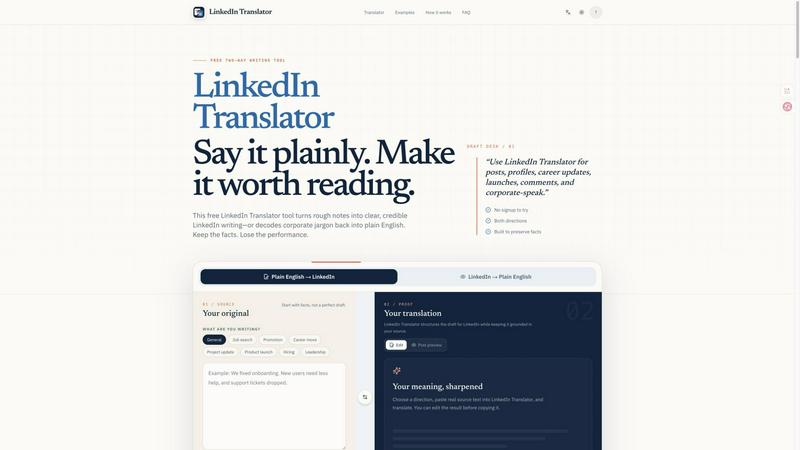
About LinkedIn Translator
LinkedIn Translator helps turn rough notes into professional LinkedIn writing and translate polished corporate language back into plain English. Choose a direction, then provide source text and select a format such as a post, profile section, comment, or message. Tone, rewrite strength, and output language options help shape the result for its intended audience.
The tool is best treated as an editor: it can organize and reframe what you provide, but the source facts and final review remain yours. Check names, dates, figures, and claims before publishing, and avoid entering confidential or unreleased information. It is designed for written content and jargon decoding; it does not translate or transcribe speech. The product is independent and is not affiliated with LinkedIn or Microsoft.
Choose the direction before drafting
Use the writing mode to structure rough material, or the decoding mode when polished wording obscures the point. For a job update, project result, or product launch, include the verified details you want retained. If the output adds unsupported information, revise it before sharing.
Features of LinkedIn Translator
- Two-way workflow: shape plain notes into LinkedIn writing or decode jargon into direct language.
- Formats include posts, About sections, headlines, comments, and messages or replies.
- Offers tone, rewrite strength, and output language choices.
- Editable results can be previewed before copying.
Use Cases of LinkedIn Translator
- Draft a measured career change, promotion, or job search update from supplied facts.
- Make a project result or product launch easier to read without inflating its impact.
- Decode corporate phrasing in public text or wording you own.
- Refine a profile section, comment, or professional reply for its destination.
Frequently Asked Questions
Does it translate spoken LinkedIn content?
No. It edits written text and decodes professional language; it does not record or transcribe audio.
Can I publish the result as-is?
Treat it as a draft. Verify every claim and edit the wording so it reflects your voice before publishing.
Should I paste confidential information?
No. The product advises against entering confidential client, salary, legal, medical, or unreleased company information.
Pricing of LinkedIn Translator
Free to try; the official page states no signup is needed.
Explore more in this category:
Similar to LinkedIn Translator

Pankh by Nixly
Pankh checks CVs against job descriptions and helps job seekers in India and the UAE create tailored, fact-checked applications.

HitDM
HitDM automates Instagram comment, story, and keyword replies, sending tracked links and capturing leads through Meta's official messaging API.

IntelCue
IntelCue monitors market and competitor signals, then turns them into ranked content opportunities and drafts for marketers and small teams.

Subtitle AI
Subtitle AI transcribes, times, formats, and translates subtitles to house rules, with review tools and broadcast-ready export formats.


Probeli AI
Probeli AI researches buyer keywords, writes SEO articles and publishes them to your blog on a schedule, with an autopilot option for small teams.

NarraScout
NarraScout helps short-form creators revise scripts using evidence-linked feedback, brief checks, and word and timing budgets.

Shardo
Shardo turns podcasts and videos into captioned clips and ready-to-post content for five social platforms, with a transcript-only option.