

Lurner
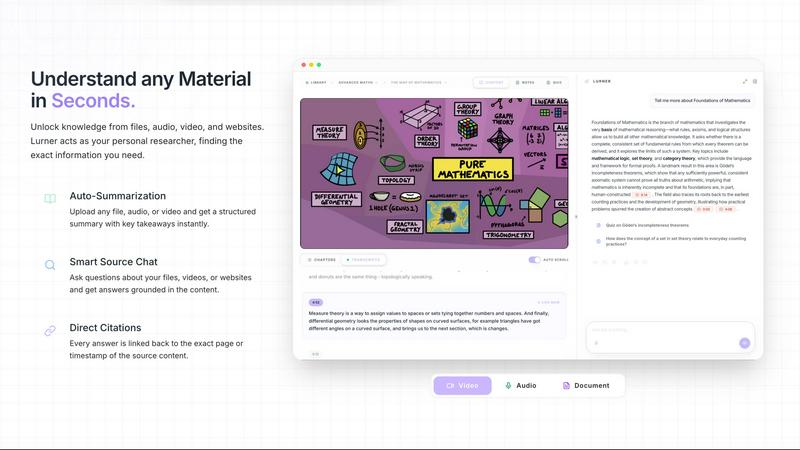
Lurner is an AI notebook that turns your messy content into a searchable, source-cited knowledge base and helps you write from it.
About Lurner
Lurner is an AI-powered notebook designed to transform how you learn, work, and write. It turns boring lectures, slides, and PDFs into engaging, step-by-step courses with interactive exercises that help you ace your exams and retain information long-term. Think of it as your personal learning assistant that organizes chaos into clarity. Whether you are a student drowning in messy lecture recordings or a professional needing to extract key insights from meetings and documents, Lurner is built for you.
The core value proposition is simple: stop wasting time on disorganized notes and passive studying. With Lurner, you can record lectures or jot down quick thoughts, and the AI automatically transcribes, formats, and structures them into beautiful, searchable notes. It goes a step further by allowing you to ask questions grounded in your uploaded files, videos, and articles, providing answers with exact citations to prevent AI hallucinations. You can also transform your notes into personalized drafts, rephrase paragraphs, and polish your writing style, all while staying 100% connected to your original sources. Lurner also features Active Mastering, which converts passive study time into active learning sessions with flashcards, fill-in-the-blanks, and quizzes designed to build long-term memory. Loved by students and professionals alike, Lurner is your all-in-one tool for thinking, writing, and getting work done effectively. It is currently free for the first 1,000 users, with mobile apps coming soon to iOS and Android.
Features of Lurner
Messy to Structured
This feature lets you focus entirely on the moment without worrying about organization. Record your lectures or write quick thoughts, and Lurner automatically transcribes, formats, and structures them into beautiful, clean notes. For example, a chaotic recording about electricity becomes a neatly formatted note with definitions, formulas, and key concepts like electric current and circuit. You can tag, stop, and format your content easily, turning a messy stream of information into a structured, searchable knowledge base.
Personalized Drafting
Drafting essays, rephrasing paragraphs, and polishing your writing style becomes effortless with Lurner. Your notes are automatically refined while staying 100% grounded in your sources, meaning you never lose the original context. For instance, if you have notes on resistors in series and parallel, Lurner can help you write a clear summary or expand on those concepts without introducing errors. This feature is perfect for students writing papers or professionals crafting reports.
Source Grounded
Ask questions and get answers you can actually trust. Lurner queries your uploaded files, videos, and articles, citing exact pages and timestamps for every response. This prevents AI hallucinations and ensures you always know where the information comes from. Whether you are studying from a PDF, watching a video lecture, or reading an article, Lurner provides reliable, cited answers that you can verify instantly.
Active Mastering
Transform passive study time into active learning sessions. Lurner converts your notes into interactive exercises like flashcards, fill-in-the-blanks, and quizzes designed to build long-term memory with ease. For example, after studying a lesson on electricity, you can take a quick check quiz that asks about the SI unit of electric current, helping you reinforce what you have learned. This feature turns studying from a chore into an engaging, effective experience.
Use Cases of Lurner
Exam Preparation for Students
Students can use Lurner to turn boring lectures, slides, and PDFs into short, step-by-step courses with fun, interactive exercises. By recording lectures and letting the AI format them into structured notes, students can focus on understanding rather than frantic note-taking. The Active Mastering feature then helps them test their knowledge with quizzes and flashcards, ensuring they are fully prepared for exams and can achieve top grades.
Professional Meeting Summaries
Professionals can record meetings or upload documents, and Lurner will automatically transcribe and structure the key points into organized notes. The Source Grounded feature allows them to ask questions about the meeting content and get answers with exact timestamps, making it easy to review decisions, action items, and important discussions. This saves hours of manual note-taking and ensures nothing is missed.
Writing and Drafting Assistance
Whether you are writing an essay, a report, or a blog post, Lurner helps you draft, rephrase, and polish your writing style. Your notes are automatically refined while staying grounded in your sources, so you can create high-quality content without worrying about plagiarism or factual errors. This is ideal for students working on research papers or professionals preparing presentations.
Personalized Knowledge Base Creation
Users can build a personal knowledge base by uploading various sources like videos, audio files, and documents. Lurner indexes all this content, allowing you to ask questions and get cited answers across all your materials. This is perfect for lifelong learners, researchers, or anyone who wants to organize their learning materials into a single, searchable, and interactive library that grows with them.
Frequently Asked Questions
What is Lurner and how is it different from a standard AI chatbot?
Lurner is an AI notebook specifically designed for thinking, writing, and work, with a strong focus on learning and knowledge management. Unlike a standard AI chatbot that provides general answers, Lurner is source-grounded. It only answers questions based on your uploaded files, videos, and articles, citing exact pages and timestamps. This prevents hallucinations and ensures you get reliable, verifiable information tailored to your specific study or work materials.
Is Lurner free to use?
Yes, Lurner is free for the first 1,000 users. You can get started and use all its features without any cost. This makes it an excellent opportunity for students and professionals to try out the platform and experience its benefits before any potential pricing changes in the future. Check the website for the latest details on availability.
How does Lurner prevent AI hallucinations?
Lurner prevents AI hallucinations by grounding all its responses in your specific sources. When you ask a question, it queries your uploaded files, videos, and articles, and provides answers with exact citations, including page numbers or timestamps. This ensures that every piece of information Lurner gives you can be traced back to a verified source, eliminating the guesswork and inaccuracies common with standard AI chatbots.
What types of sources can I add to my knowledge base?
You can add a wide variety of sources to your Lurner knowledge base, including video files, audio recordings, and documents such as PDFs. This makes it versatile for different learning styles and professional needs. Whether you are recording a lecture, uploading a research paper, or saving a meeting transcript, Lurner can index and query all these formats to help you extract and organize knowledge.
Can I use Lurner for professional meetings and work?
Absolutely. Lurner is loved by professionals as well as students. You can record meetings and let Lurner automatically transcribe and structure the key points into organized notes. The Source Grounded feature allows you to ask questions about the meeting content and get answers with exact timestamps, making it easy to review decisions, action items, and important discussions. It is a powerful tool for improving productivity in any work environment.
Does Lurner help with writing and drafting?
Yes, Lurner has a dedicated Personalized Drafting feature. It helps you draft essays, rephrase paragraphs, and polish your writing style instantly. Your notes are automatically refined while staying 100% grounded in your sources, so you can create high-quality written content without worrying about introducing errors or losing the original context. This is perfect for academic writing, reports, and professional communication.
Can I share my knowledge with teammates or the public?
Yes, Lurner allows you to share your knowledge with teammates or the public. This feature is useful for collaborative projects, study groups, or publishing your learning materials. You can build a knowledge base and grant access to others, making it easy to work together on research, share study guides, or disseminate information within an organization.
What platforms is Lurner available on?
Lurner is currently available as a web application, with mobile apps coming soon. The full Lurner experience will soon be available on your favorite devices, including iOS (App Store) and Android (Google Play). This will allow you to sync your notes, extract knowledge, and learn on the go, making it even more convenient to use Lurner wherever you are.
Similar to Lurner

this+that
An AI agent that reads every email and chat message your team gets, turns requests into tasks, and does what they ask.

TestNeo
TestNeo.ai is an AI-native engineering and release assurance platform that helps teams automate web and API testing using natural language.

Assistly
An AI receptionist on your website that answers visitors 24/7 from your own content and captures every lead.

Vedic AstroGPT
explore your vedic birth chart, check compatibility and ask ai-assisted astrology questions with free tools and optional paid credits.

VideoAnalyzerAI
Generate recreation image and video prompts for an AI Video or generate creation prompts for an AI Video Idea you have.

VoiceVibe
Talk to your computer: dictate, rewrite, ask about your screen, launch AI agents.

Booksmaker.ai
Books Maker AI is the AI-powered platform that turns your idea into a professional book.

Toolara Music
Describe a song in plain text and get a complete track — vocals or instrumental, custom lyrics, up to 120 seconds, MP3 download