

Magic Eraser
Magic Eraser uses AI to instantly remove objects, people, text, and backgrounds from your photos for free with no signup needed.
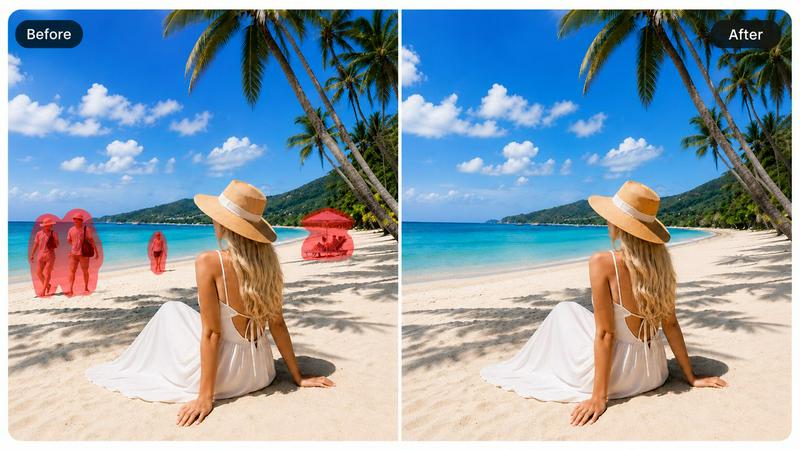
About Magic Eraser
Magic Eraser is a free, browser-based AI photo editing tool that makes removing unwanted objects, people, text, watermarks, and backgrounds from any image incredibly simple and fast. Think of it as your personal digital cleanup crew: you just brush over the part of the photo you want gone, and the AI intelligently fills that area with natural-looking content, all without needing any manual cloning or Photoshop skills. It runs entirely in your browser, works on photos of any size, and requires no signup or download, making it accessible to anyone with an internet connection. Magic Eraser is built for creators, e-commerce sellers, marketers, and everyday users who want to produce professional-quality visuals without a steep learning curve or expensive software. Whether you are cleaning up a cluttered product photo for your online store, removing a tourist from a vacation shot, or erasing a watermark from a graphic, Magic Eraser handles the heavy lifting with AI. The platform includes a suite of powerful tools: one-click object removal, background removal and replacement, AI Fill for reconstructing selected areas, AI Enhance for improving image quality, and even an AI Expand feature for extending image borders. Trusted by over 10 million active users and with more than 100 million photos enhanced, Magic Eraser has earned a 4.9 rating on app stores thanks to its speed, accuracy, and ease of use. It is the perfect solution for anyone who needs fast, clean, and professional photo edits without the complexity.
Features of Magic Eraser
Object Removal
Remove unwanted objects, people, text, and clutter from your photos in seconds with just a brush stroke. The AI analyzes the surrounding area and fills the selection with natural-looking content, seamlessly blending textures, colors, and patterns. This means you can clean up backgrounds, erase photobombers, or delete distracting elements without any manual retouching or cloning tools.
Background Removal and Replacement
Instantly remove backgrounds from any image with one click, achieving clean, accurate results suitable for product photos, portraits, and social media graphics. You can then replace the removed background with a solid color, a studio backdrop, or a completely new scene. The AI handles complex edges like hair and fine details, giving you professional-grade cutouts every time.
AI Fill
Use AI Fill to automatically rebuild missing or selected areas of your image with natural-looking results. Whether you need to fill empty space after removing a large object or reconstruct a damaged part of a photo, the AI generates content that matches the surrounding context. This feature is perfect for restoring old photos, expanding backgrounds, or creating seamless composites.
AI Enhance
Improve your photo's quality in a single click with AI-powered enhancement. The tool sharpens details, boosts clarity, corrects lighting and color balance, and recovers facial features and fine textures. It is ideal for fixing dim or blurry photos, making product shots pop, or giving portraits a polished, professional finish without manual editing.
Use Cases of Magic Eraser
E-commerce Product Photography
Create clean, professional product photos without needing a studio setup. Remove distracting backgrounds, erase price tags or watermarks, and clean up any clutter around your items. Magic Eraser helps you present your products in the best light, increasing buyer confidence and saving you the cost of hiring a photographer or renting a studio.
Real Estate Listings
Enhance property photos by removing unwanted objects, people, or vehicles from shots. Clean up cluttered rooms, erase distracting signs or furniture, and replace dull backgrounds with bright, inviting scenes. This makes your listings more appealing to potential buyers and helps properties stand out in a competitive market.
Social Media Content Creation
Quickly edit photos for your social media feeds by removing photobombers, text overlays, or watermarks. You can also enhance image quality and apply creative filters to make your posts more engaging. Magic Eraser helps you maintain a polished, consistent aesthetic across all your platforms without spending hours in editing software.
Everyday Photo Cleanup
Fix personal photos by erasing unwanted elements like trash cans, power lines, or strangers in the background. Remove date stamps, logos, or other text from images you want to frame or share. With Magic Eraser, you can rescue imperfect shots and turn them into keepsakes you are proud to show off.
Frequently Asked Questions
Do I need to download anything to use Magic Eraser?
No, Magic Eraser runs entirely in your web browser. There is no software to download or install, and you do not need to create an account or sign up. Simply visit the website, upload your photo, and start editing immediately. The tool works on any device with a modern browser, including computers, tablets, and phones.
Is Magic Eraser really free to use?
Yes, Magic Eraser offers a free tier that allows you to remove objects, erase backgrounds, and enhance photos without paying anything. You can process photos of any size and use the core features at no cost. For advanced needs or higher volume usage, there are optional paid plans available, but the free version is powerful enough for most everyday tasks.
How accurate is the AI at removing objects and filling the background?
The AI is highly accurate and continuously improves with updates. It analyzes the surrounding pixels, textures, and patterns to generate a natural fill that blends seamlessly with the rest of the image. For most standard objects and backgrounds, the results are nearly indistinguishable from manual editing. Complex edges like hair or intricate patterns may require a second pass, but the tool handles the vast majority of cases with excellent precision.
Can I use Magic Eraser on my phone or tablet?
Absolutely. Magic Eraser is fully responsive and works in any mobile browser, so you can edit photos directly from your phone or tablet. There are also dedicated native apps available for iOS (iPhone and iPad) on the Apple App Store and for Android on Google Play, offering the same powerful features with a touch-optimized interface.
Similar to Magic Eraser

Vikas Editor AI
AI photo and video creative studio for Indian creators and global users, with cinematic portraits, fashion edits, festival greetings, and photo-to-vid

MoodLens
Understand any photo in seconds — objects, plants, food, faces, birth charts & more.

Pavo AI
Pavo AI turns text prompts into polished AI images in seconds, then refines them with image-to-image editing.

showcase
Create photorealistic product images, lifestyle scenes and videos for furniture and home & living from your existing product photos.

ModelSnap
AI fashion model generator for clothing product photos, lookbooks, and social visuals.

trykissai
AI kiss generator: add a photo of each person, pick a kiss scene, and get a kiss photo or a 5–7 second clip. 30 free credits.

MoveFrame
Turn any photo into a 5 or 10 second AI video. Free daily credits, no sign-up, 9:16 for TikTok and Reels, MP4 download.

Zipic
Native image compression for Mac and Windows (Windows beta), with a local CLI and AI skill for automated image workflows.