

MCPize
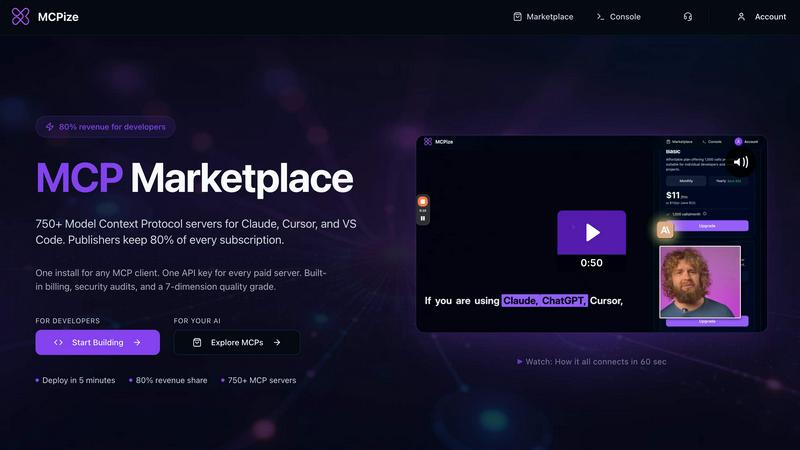
MCPize is a marketplace where developers can discover, install, and manage 1,000+ premium MCP servers while publishers keep 80% of revenue.
About MCPize
MCPize is the complete platform for Model Context Protocol (MCP) servers, designed to bridge the gap between AI agents and the tools they need to be truly useful. Think of it as the App Store for AI, but purpose-built for the new world of agentic workflows. At its core, MCPize is a vibrant marketplace featuring over 1,000 vetted MCP servers that integrate seamlessly with popular AI tools like Claude, Cursor, VS Code, Windsurf, and ChatGPT. Every single server on the platform undergoes a rigorous 7-dimension quality audit that checks for protocol compliance, OAuth security, reliability, and safety, so you never have to worry about plugging in a shady or broken tool. For developers, MCPize is a launchpad. You can publish and deploy a new MCP server in about 30 seconds using GitHub auto-deploy, and you get to keep 80 percent of every subscription dollar you earn. For users, it is a dream of simplicity. Instead of juggling a dozen different API keys and billing accounts, you get one unified API key, one consolidated bill, and one dashboard to track usage, costs, and set alerts. There is even a generous free tier that gives you 25,000 requests per month with no credit card required. Whether you are a solo developer building a niche tool or a large team looking to supercharge your AI workflows, MCPize provides the infrastructure, the audience, and the trust layer to make it all work.
Features of MCPize
Vetted MCP Marketplace with 1,000+ Servers
Browse a curated collection of over 1,000 Model Context Protocol servers, each one passing a strict 7-dimension quality audit. This audit covers protocol compliance, OAuth implementation, reliability, and safety, ensuring that every server you install is secure and functional. You can filter by category, rating, and use case to find exactly what you need, from astrology APIs to sophisticated AI senior developer assistants.
One-Click Integration with One API Key
Say goodbye to vendor management headaches. MCPize gives you a single API key that works with every paid server on the marketplace. Whether you are connecting to Claude, Cursor, VS Code, or Windsurf, the integration is seamless. The platform handles all the credential management and authentication behind the scenes, so you can focus on building, not configuring.
Unified Dashboard for Monitoring and Billing
Track everything from one place. The MCPize dashboard gives you a real-time view of your usage across all servers, your monthly costs, and any alerts you have set up. Consolidated billing means you get one simple invoice instead of a dozen separate charges. This makes it easy to manage budgets, spot unusual activity, and keep your AI operations running smoothly.
Rapid Publishing with 80% Revenue Share for Developers
Developers can publish and deploy a new MCP server in under 30 seconds using the GitHub auto-deploy feature. Once your server is live, you keep 80 percent of every subscription dollar it generates. MCPize handles the infrastructure, billing, security audits, and customer acquisition, leaving you to focus on building great tools. The platform already has over 1,000 developers and has paid out more than $200,000 to vendors.
Use Cases of MCPize
Supercharging Your AI Coding Assistant
Connect a specialized MCP server like the AI Senior Developer Assistant to your VS Code or Cursor environment. This server can debug your code, refactor entire functions, review pull requests, and even automate GitHub workflows. Instead of manually hunting for bugs or writing boilerplate, your AI assistant becomes a true pair programmer that can execute complex tasks on your behalf.
Automating Digital Marketing Workflows
A marketing team can use the Digital Marketing AI MCP server to transform their entire workflow. This single server provides over 100 professional tools for content creation, paid advertising, SEO optimization, social media management, and brand development. Your AI agent can generate high-converting ad copy, optimize blog posts for search engines, and schedule social media campaigns, all from a single integration.
Building Localized Fintech Applications
Developers building e-commerce or fintech apps for the Bangladesh market can use the Bangladesh Payment Orchestrator MCP server. This server provides programmatic access to local payment gateways like bKash and Nagad. Your AI agent can initiate transactions, check payment statuses, and manage payouts, allowing you to integrate local payment infrastructure without writing complex code or managing multiple APIs.
Conducting Real-Time Social Media Research
Researchers and content creators can use the mcp-x-intelligence server to search viral content on X/Twitter, analyze any account, get trending topics by country, and discover niche leaders. Since it is read-only and does not post, it is perfect for market research and trend analysis. You can ask your AI assistant to summarize the top trends in your industry or find key influencers, all from within your favorite AI tool.
Frequently Asked Questions
What is the Model Context Protocol (MCP) and why do I need it?
MCP is an open standard that allows AI models like Claude or ChatGPT to interact with external tools and data sources. Think of it as an API for AI agents. Instead of an AI being limited to its training data, MCP lets it query databases, call APIs, run code, and access real-time information. MCPize is a marketplace and infrastructure platform that makes it easy to find, install, and manage these MCP servers.
How does the 7-dimension quality audit work?
Every server listed on MCPize undergoes a thorough review before it goes live. The audit checks seven key dimensions: protocol compliance (does it follow the MCP spec?), OAuth security (are authentication flows secure?), reliability (does it handle errors gracefully?), safety (does it avoid harmful actions?), performance, documentation quality, and code quality. This ensures that you are only installing servers that are safe, stable, and well-built.
Do I need a credit card to get started?
No. MCPize offers a generous free tier that includes 25,000 requests per month with no credit card required. This allows you to explore the marketplace, test servers, and see if the platform fits your workflow before committing to anything. If you need more requests or access to premium servers, you can upgrade to a paid plan at any time.
How do I publish my own MCP server on MCPize?
Publishing is incredibly fast. You start by building your MCP server using any language or framework you prefer. Then, you connect your GitHub repository to MCPize and enable the auto-deploy feature. The platform will automatically build, test, and deploy your server in about 30 seconds. Once it is live, you set your pricing, and MCPize handles all billing, customer management, and security audits. You keep 80 percent of every subscription dollar.
Pricing of MCPize
MCPize offers a free tier that includes 25,000 requests per month with no credit card required. For users who need more, the platform offers usage-based billing and subscription plans that scale with your needs. Developers who publish servers can set their own pricing and keep 80 percent of all subscription revenue. Specific paid plan pricing is available on the MCPize website and is subject to change based on usage volume and selected servers.
Similar to MCPize


shardstitch
ShardStitch helps recover and hand off AI coding work, with a visual website editor and SEO Guardrails MCP in development.

GetYouTubeTranscript
YouTube transcripts, search and channel data via one API

stackledge
The human-curated directory of verified AI tools, active SaaS, and custom n8n workflows. Discover dependable software free from bot-scraped spam.


laya.tools
Free directory of 950+ projects built on Laya, the open-source model that turns text into typed decisions in milliseconds.

Sprite Sheet Maker
A free browser-based toolkit for creating, cutting, converting, and previewing sprite sheet animations.