

MCP Playground Online
Build, test, and deploy MCP AI agents in your browser with no setup, real-time debugging, and 40+ models to compare side by side.
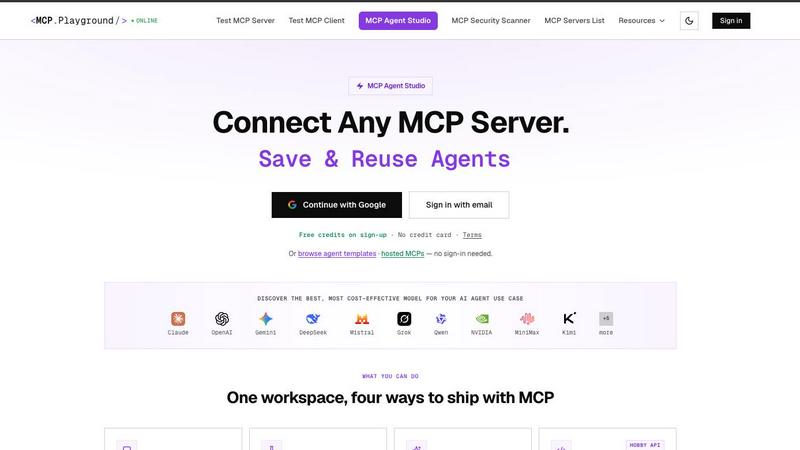
About MCP Playground Online
MCP Playground Online is a free, browser-based platform designed to simplify how developers build, test, and deploy AI agents powered by the Model Context Protocol (MCP). Instead of wrestling with local installations, SDKs, or complex infrastructure, you can jump straight into your browser and start connecting to any MCP server in seconds. Whether you are testing a remote server, debugging a client implementation, or building a full-fledged AI agent, MCP Playground Online gives you all the tools you need in one place.
The platform is built for developers of all skill levels. You can test any remote MCP server by simply entering its URL, explore available tools, prompts, and resources, and execute calls while watching real-time JSON-RPC logs. For more advanced work, the Agent Studio lets you connect multiple servers simultaneously, compare over 40 AI models head to head, and inspect every tool call with full request and response details. You can also export any agent as a production-ready API with a stable endpoint and bearer authentication.
MCP Playground Online also includes a comprehensive MCP Server List with over 10,000 servers, a Security Scanner, a Token Counter, and tutorials to help you learn. The best part? You do not need a credit card to get started. Free credits are available on sign-up, and many core testing features work without any account at all. It is the fastest way to go from idea to working AI agent, all from your browser.
Features of MCP Playground Online
Test Any MCP Server or Client Instantly
You can connect to any remote Model Context Protocol server directly from your browser without any setup or installation. Simply enter the server URL, and the platform automatically discovers its tools, prompts, and resources. You can execute tool calls, fetch prompts, read resources, and see every JSON-RPC interaction in real time. This makes debugging protocol implementations fast and transparent. The same applies to testing MCP clients, giving you a complete testing environment for both sides of the protocol.
Agent Studio with Multi-Server Support
The Agent Studio lets you build sophisticated AI agents by connecting up to four MCP servers at once. These servers can use any transport method including HTTP, SSE, Streamable HTTP, or even local stdio and CLI processes. All tools from connected servers are merged automatically into a single chat interface. This means you can give your agent access to multiple data sources and actions simultaneously, like querying a database and sending an email, all within one conversation.
Compare 40+ AI Models Side by Side
Run the same prompt across up to four different AI models in parallel and see the results instantly. The platform automatically computes winner ribbons for the fastest response, the cheapest option, and the most accurate answer. This lets you make informed decisions about which model to use for your specific task. You can test models like Claude Sonnet, GPT variants, and many others, all from the same interface without managing multiple API keys.
Live JSON Inspector and Debug Logs
Every tool call your agent makes is fully transparent. You can inspect the complete request and response JSON for each call, see per-call latency, and track credit costs step by step. There are no black boxes. This feature is invaluable for debugging why an agent behaves a certain way, optimizing performance, or understanding exactly how your tools are being used. The real-time logs update as your agent works, giving you full visibility into its decision making process.
Use Cases of MCP Playground Online
Testing and Debugging MCP Server Implementations
If you are building your own MCP server, you need a reliable way to test it before deploying to production. MCP Playground Online lets you connect to your server from the browser, explore all its tools and resources, and execute test calls while watching the raw JSON-RPC protocol messages. You can validate that your implementation handles requests correctly, returns proper responses, and follows the MCP specification. This saves hours of manual debugging and eliminates the need to write custom test scripts.
Building Multi-Tool AI Agents for Business Workflows
Developers can create AI agents that combine multiple services into a single workflow. For example, you could connect a GitHub server, a Stripe server, and a PostgreSQL server all at once. Your agent could then look up open issues, check payment status, and update a database record in one conversation. The Agent Studio handles merging tools from all servers automatically, so you can focus on designing the agent's behavior rather than managing connections.
Comparing AI Model Performance for Specific Tasks
Choosing the right AI model for your application is critical. With MCP Playground Online, you can run the same prompt across multiple models simultaneously and compare their outputs, speed, and cost. This is especially useful when you need to balance accuracy against latency or budget. The automatic winner ribbons make it easy to see which model performs best for your particular use case, whether that is code generation, data analysis, or natural language understanding.
Exporting Agents as Production-Ready APIs
Once you have built and tested an agent in the playground, you can export it as a stable API endpoint with just a few clicks. The export preserves your server connections, model selection, and system prompt. The resulting endpoint uses bearer authentication and a server-side locked prompt, making it secure and reliable for production use. This bridges the gap between prototyping and deployment, letting you move from idea to live service in minutes rather than days.
Frequently Asked Questions
Do I need to install any software to use MCP Playground Online?
No installation is required. MCP Playground Online runs entirely in your browser. You do not need to download SDKs, set up local environments, or manage infrastructure. Just open the website and start testing or building. For local stdio and CLI servers, you will need those running on your machine, but the playground connects to them through your browser without any additional setup.
Can I test both remote and local MCP servers?
Yes, you can test both types. For remote servers, simply enter the server URL and connect. For local servers, the platform supports stdio and CLI processes. You can run tools like npx or uvx locally and inject environment variables for authentication directly through the playground UI. This flexibility means you can test servers running anywhere, from cloud deployments to your local development machine.
How many servers can I connect to at once in the Agent Studio?
You can connect up to four MCP servers simultaneously in the Agent Studio. These can use different transport methods including HTTP, SSE, Streamable HTTP, or local stdio. All tools from connected servers are merged into a single chat interface, allowing your agent to access multiple data sources and actions in one conversation. This is ideal for building complex agents that need to interact with several services.
Is there a free tier or do I need a credit card to get started?
MCP Playground Online offers free credits on sign-up with no credit card required. Many core features, including testing MCP servers and clients, work without any account at all. The free credits let you explore the Agent Studio, compare models, and build agents. There is no upfront payment or subscription needed to start using the platform.
Explore more in this category:
Similar to MCP Playground Online

UX Critic
AI design critic: scored UX reviews with every issue pinned to the exact region of your screenshot.


Compresser PDF
Lighter PDFs. Your files stay with you.

Bulin 47 AI Video Generator
Upload one photo and star in the viral Bulin 47 street freestyle. AI replaces the lead performer with you while the crowd, camera and red lights stay

CustomerFlows
A modern, AI-native CRM built for lead-driven businesses. Qualify leads 24/7, track pipelines, and measure true ad ROI with flat-rate pricing.

Engineering on Web
Free browser CAD, FEA and SPC with an AI assistant: model by text or voice, AI-tuned solvers, AI result interpretation. No install, no account.
