

morse code translator
Turn text into Morse code or decode Morse to English instantly with clean audio playback and helpful live stats.
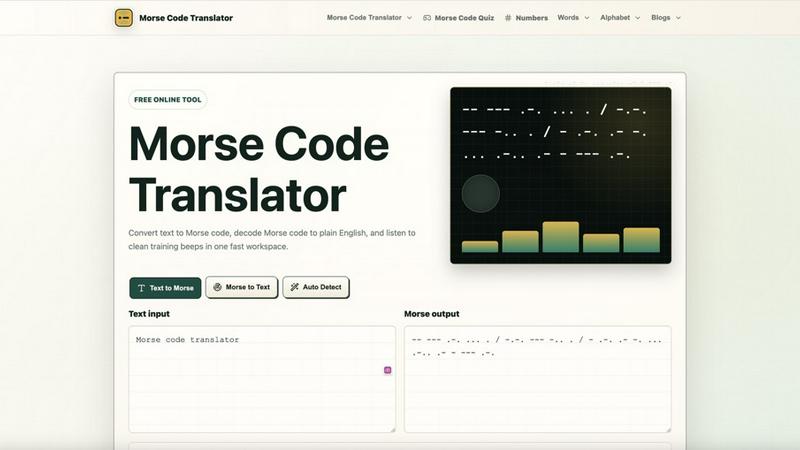
About morse code translator
Morse Code Translator is a free, browser-based online tool that converts plain text into Morse code and decodes Morse code back into readable English. It goes far beyond a simple letter-to-symbol replacement. This tool is built for anyone who needs to work with the International Morse system, whether you are a student learning the code for the first time, a teacher preparing classroom materials, a radio hobbyist practicing signal recognition, a puzzle solver deciphering clues, or an escape room creator designing immersive experiences. The core value proposition is speed and clarity: type any message, see dots and dashes appear instantly, listen to clean audio beeps, and copy or share the result. But what makes this translator truly useful is its attention to detail. It handles proper spacing between letters and words, supports punctuation and numbers, provides an alphabet chart for reference, and includes a live statistics panel that shows word count, input characters, Morse symbols, playback time, and training difficulty. You do not need an account, and there is no software to install. Open your browser, start typing, and the translator works immediately. It is designed to be equally approachable for beginners who need explanations and frequent users who want fast, reliable conversions. The tool also includes advanced settings to customize output formatting, dot and dash symbols, audio waveform, and even a dark theme. Whether you are sending a secret message, practicing for a ham radio license, or just curious about this historic communication code, Morse Code Translator gives you a complete workspace to learn, practice, and share.
Features of morse code translator
Text to Morse and Morse to Text Conversion
The translator offers dual-direction conversion with an auto-detect mode. Type any English text, including letters, numbers, and common punctuation, and the tool instantly generates the corresponding Morse code using the International Morse standard. Alternatively, paste a Morse code message using dots, dashes, spaces, and slashes, and the tool decodes it back into readable words. The auto-detect feature intelligently determines whether your input is text or Morse, saving you a manual selection step. This seamless bidirectional functionality makes the tool ideal for both encoding messages and deciphering received signals.
Audio Playback with Customizable Controls
Hear the Morse code as clean, training-grade beeps. The audio playback feature converts the visual dots and dashes into an audible signal, which is essential for learning the rhythmic patterns of Morse code. You can adjust the playback speed from slow practice tempos up to 18 words per minute, change the tone frequency from a low hum to a high pitch, and control the volume level. The waveform can be set to sine or square, and the audio output is clean without distracting noise. This feature transforms the translator into a personal practice tool, helping you build the auditory recognition skills needed for real-world radio communication.
Live Statistics and Training Feedback
A dedicated statistics panel provides real-time feedback on your translation. It shows the number of words in your message, total input characters including spaces and punctuation, the exact count of Morse symbols (dots and dashes) before spacing, estimated playback time at your current speed setting, and a training difficulty rating. This data is invaluable for learners who want to track their progress and for teachers who need to gauge the complexity of a message. The statistics help you understand how message length and composition affect transmission time, which is a key skill for efficient Morse communication.
Advanced Customization and Output Options
Beyond basic translation, the tool offers extensive customization. You can change the dot and dash symbols from the standard to other characters, select different letter and word separators, and choose between International Morse and other systems. The output formatting can be adjusted for standard spacing or compressed. A dark theme option reduces eye strain during extended use. The tool also includes practical output actions: copy the result to your clipboard, play the audio, download the audio as a WAV file, activate a flashlight signal for visual practice, share a link to your translation, or clear the workspace. These options make the translator adaptable for classroom demonstrations, radio practice, puzzle creation, and personal study.
Use Cases of morse code translator
Learning and Practicing Morse Code for Beginners
Students and self-learners use the translator to build foundational skills. Start by typing simple words like "HELLO" or "SOS" and see the dots and dashes appear. Listen to the audio while watching the visual pattern to connect the sound with the symbol. Use the alphabet chart to memorize each character. The live statistics show your progress, and the adjustable speed lets you start slow and gradually increase. This structured approach turns the translator into a personal tutor for mastering Morse code.
Creating Puzzles and Escape Room Clues
Escape room designers and puzzle creators rely on the translator to generate coded messages for their games. You can encode a riddle answer, a room number, or a directional hint into Morse code. The tool ensures proper spacing so the clue is decipherable by players. You can also decode a Morse clue you have written to verify it is correct. The ability to download audio as a WAV file or use the flashlight signal adds sensory dimensions to your puzzle, making the experience more immersive and engaging for participants.
Ham Radio and Emergency Communication Practice
Radio hobbyists and emergency preparedness enthusiasts use the translator to practice sending and receiving Morse code. Type a common radio shorthand like "73" (best regards) or "CQ" (calling any station) and listen to the audio at realistic speeds. The tool helps you internalize the rhythm of standard phrases. You can also paste a recorded Morse message to decode it, sharpening your ear for real-world signals. The clean audio and adjustable tone frequency mimic the conditions of an actual radio transmission, making it a valuable practice tool.
Classroom Teaching and STEM Education
Teachers and educators use the translator as an interactive whiteboard tool for lessons on communication history, binary encoding, and signal processing. Display a word on the screen, translate it to Morse, and play the audio for the entire class. Students can see the direct relationship between text and code. The statistics panel helps explain concepts like information density and transmission time. The tool requires no setup or accounts, making it perfect for quick demonstrations. It also supports lesson plans where students create and exchange coded messages with classmates.
Frequently Asked Questions
How accurate is the Morse code translation?
The translator uses the standard International Morse code system, which is the global standard for radio communication. Every letter A-Z, numbers 0-9, and common punctuation marks like periods, commas, question marks, and slashes are supported. The tool applies correct letter spacing (one dash length between dots and dashes within a letter, three dash lengths between letters) and word spacing (seven dash lengths between words). Unsupported characters, such as some special symbols, are flagged in the live statistics panel so you know exactly what cannot be converted cleanly.
Can I use this translator on my phone or tablet?
Yes, the Morse Code Translator is fully responsive and works in any modern web browser on smartphones, tablets, laptops, and desktop computers. There is no app to download. Simply open the website on your device, and the interface adapts to your screen size. All features, including text input, audio playback, and copy functions, work on touch screens. This makes it convenient for quick translations while on the go or for use in a classroom setting with mobile devices.
Is there a limit to how much text I can translate?
No, there is no character limit or usage cap. You can translate single letters, entire sentences, paragraphs, or even longer messages. The translator processes your input instantly regardless of length. The live statistics panel will update to show the word count, character count, and estimated playback time, which helps you manage longer messages. Since the tool is free and runs entirely in your browser, you can use it as much as you need without any restrictions.
How do I adjust the audio speed for learning?
You can control the playback speed using the slider in the advanced settings section. The speed is measured in words per minute (WPM). For beginners, start at a slow speed like 5-8 WPM to clearly hear each dot and dash. As you become more comfortable, gradually increase the speed. The default is 18 WPM, which is a common practice speed. You can also adjust the tone frequency (default 650 Hz) and volume to suit your preference. The estimated playback time in the statistics panel updates automatically when you change the speed.
Pricing of morse code translator
Morse Code Translator is completely free to use. There are no paid plans, subscription tiers, or hidden charges. All features, including text to Morse conversion, Morse to text decoding, audio playback, live statistics, advanced customization, and the complete learning guide, are available at no cost. You do not need to create an account or provide any personal information. The tool is supported independently and designed to remain accessible to everyone.
Explore more in this category:
Similar to morse code translator

Try OC Maker
Create OCs from text or images, customize their look, and turn them into animated videos with AI.

IconCreator
IconCreator is an AI-powered logo and app icon generator. Create professional logos, app icons, favicons, and brand assets in minutes.

Reword Image
Change the text already printed inside a photo, screenshot or poster, without the original design file.

IdeaAize Free AI Tools
IdeaAize Free AI Tools is a suite of 50+ free online utilities that run 100% in your browser — no registration, no file uploads, no watermarks.

Spaceora
Turn room and outdoor photos into AI interior, virtual staging, garden and landscape design concepts.

Artcraft AI
AI image and video studio in your browser: generate and edit images, turn photos into videos, edit clips by sentence.

PXDMD
Free AI image editor: remove backgrounds, erase objects and watermarks, and color-grade photos in seconds.

AFFLIGO
AFFLIGO is a free online toolkit for everyday file tasks. Easily edit PDFs, compress images, convert file formats, and get things done.