

PC Bottleneck Calculator
The PC Bottleneck Calculator helps you analyze your components to identify and fix performance bottlenecks for smoother gaming and multitasking.
About PC Bottleneck Calculator
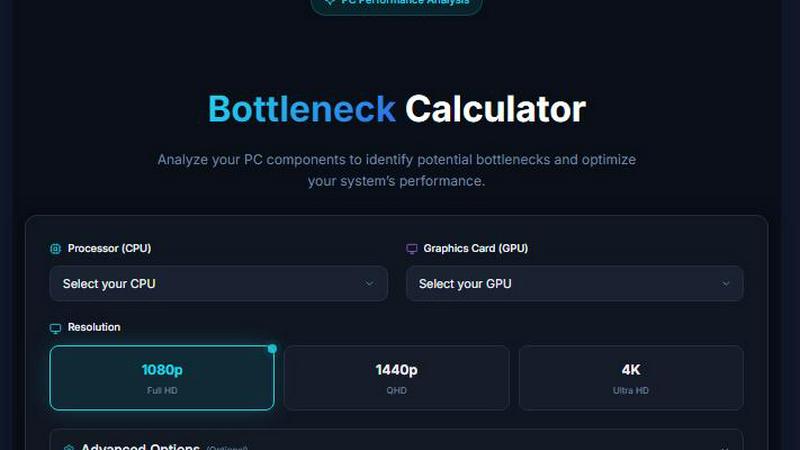
PC Bottleneck Calculator is a fast, web-based performance analysis tool designed specifically for developers and PC builders. Its primary function is to help users identify potential CPU-GPU bottlenecks in their systems, enabling them to optimize configurations for high-performance workloads. Whether you're a gamer looking to enhance your gaming experience or a professional in need of a robust workstation, this tool provides accurate insights without the hassle of guesswork or complex benchmarking. With a user-friendly interface, you can select your CPU and GPU from an extensive list, allowing for quick assessments of how well your components work together. The tool's main value proposition lies in its ability to streamline performance analysis, ensuring your system operates at peak efficiency.
Features of PC Bottleneck Calculator
Comprehensive Component Database
The PC Bottleneck Calculator features an extensive database of CPUs and GPUs, providing users with a variety of options to choose from. This allows for tailored performance analysis based on specific components, ensuring accurate bottleneck identification.
User-Friendly Interface
Designed with simplicity in mind, the calculator offers an intuitive interface that makes it easy for users of all experience levels to navigate. Selecting components and interpreting results is straightforward, making performance analysis accessible to everyone.
Real-Time Performance Analysis
The tool delivers real-time performance analysis, allowing users to see how their selected CPU and GPU interact under various conditions. This feature helps in making informed decisions about upgrades or adjustments for optimal system performance.
Optimization Recommendations
After identifying potential bottlenecks, the PC Bottleneck Calculator provides actionable recommendations on how to optimize system configurations. This feature empowers users to enhance their setups without requiring advanced technical knowledge.
Use Cases of PC Bottleneck Calculator
Gaming Performance Optimization
Gamers can use the PC Bottleneck Calculator to evaluate their current hardware and see if any upgrades are needed to achieve smoother gameplay. By identifying bottlenecks, they can make informed choices about new graphics cards or processors.
Content Creation Enhancements
Content creators often require high-performance systems for video editing, 3D rendering, and graphic design. This tool helps them assess their current setups and optimize configurations to improve rendering times and overall efficiency.
System Upgrades Planning
For users considering hardware upgrades, the calculator serves as an essential tool to analyze the compatibility and performance of new components. This ensures that any investment in new hardware will yield the desired performance improvements.
Educational Purposes
Students and professionals in IT and computer engineering can use the PC Bottleneck Calculator as a learning tool. It helps them understand how different components interact and the importance of balanced system configurations for performance.
Frequently Asked Questions
What is a CPU-GPU bottleneck?
A CPU-GPU bottleneck occurs when the performance of one component (either the CPU or GPU) limits the overall system performance. This means that one component cannot keep up with the other, resulting in decreased efficiency and performance.
How does the PC Bottleneck Calculator work?
The calculator analyzes your selected CPU and GPU based on their specifications and performance scores. It identifies potential bottlenecks by comparing their capabilities and provides recommendations for optimization.
Is the PC Bottleneck Calculator free to use?
Yes, the PC Bottleneck Calculator is a free web-based tool, allowing users to analyze their system performance without any cost. This makes it accessible to anyone looking to improve their PC configurations.
Can the calculator help with custom-built PCs?
Absolutely! The PC Bottleneck Calculator is designed for both pre-built and custom-built PCs. Users can input their specific components to get tailored insights and recommendations for optimizing their unique setups.
Explore more in this category:
Similar to PC Bottleneck Calculator

VoiceVibe
Talk to your computer: dictate, rewrite, ask about your screen, launch AI agents.

BlazePhoenix
On-chain DEX aggregator: the swap route is computed inside the transaction that executes it. No API key, no signup.

imgtxtapp.laviolab.com
imgtxtapp.laviolab.com is a Telegram-based image-to-text converter that turns photos, screenshots, scanned documents into editable text

AFFLIGO
AFFLIGO is a free online toolkit for everyday file tasks. Easily edit PDFs, compress images, convert file formats, and get things done.

Goatboard
GoatBoard is a competitive startup billboard where founders showcase their products, earn votes, climb the rankings, and compete to become the GOAT.

SightRadar
Face recognition API, a drop-in replacement for AWS Rekognition. Index, search, compare and detect faces, billed per photo with no subscription.


Tapetide
AI-first stock research platform and MCP server for every NSE & BSE listed stock.