

PhotoCV
PhotoCV turns your selfies into professional AI headshots in minutes with studio quality, trusted by over 22,000 satisfied customers.
About PhotoCV
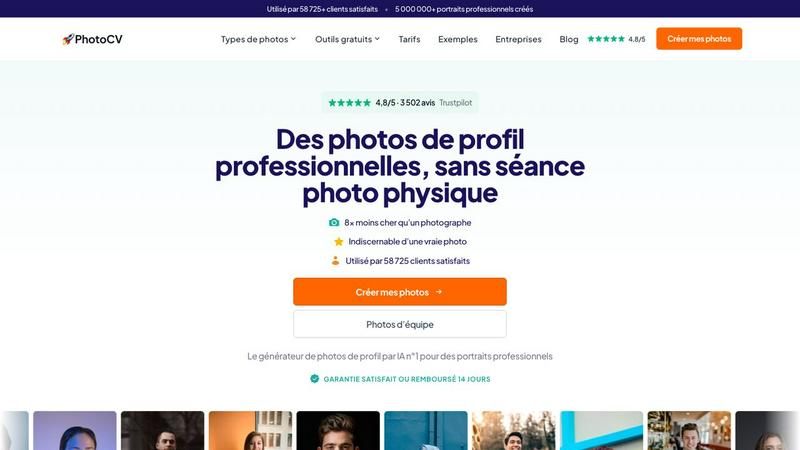
PhotoCV (formerly HeadshotIA Pro) is an AI-powered tool that turns your everyday selfies into studio-quality professional headshots. Instead of booking a photographer, renting a studio, and spending hours posing, you simply upload a few photos of yourself, choose your preferred styles and backgrounds, and let the AI do the rest. In about ten minutes, you receive dozens of realistic portraits that look like they were taken by a professional photographer. The service is designed for anyone who needs a polished profile picture for LinkedIn, CVs, company websites, social media, or email signatures. Over 22,000 satisfied customers have already created more than 1.5 million professional portraits using PhotoCV. The main value proposition is simplicity and affordability. You save time, money, and effort. A traditional photo shoot can cost around 230 euros and take days from booking to delivery. PhotoCV costs as little as 29 euros for a one-time pack and delivers results in minutes. The AI produces images that are indistinguishable from real photographs, and you keep full commercial rights to every portrait you download. Your privacy is also protected. Your original photos are automatically deleted within 30 days, and the service is fully compliant with GDPR regulations, meaning your data stays in Europe. Whether you are a freelancer updating your online presence, a small business owner creating team photos, or part of a large organization needing consistent portraits for hundreds of employees, PhotoCV offers a fast, reliable, and cost-effective solution. The platform is rated 4.8 out of 5 stars on Trustpilot, with over 1,100 reviews praising its realism, speed, and value.
Features of PhotoCV
Upload and Forget
You start by uploading a few selfies or existing photos. The process takes about five minutes. You do not need to worry about lighting, background, or camera quality. Just use your best existing photos or take a few quick selfies. Once uploaded, the AI takes over. It analyzes your facial features, skin tone, and expressions to generate portraits that look natural and professional. You do not need any technical skills or photo editing experience. The upload process is straightforward and works on any device.
AI Portrait Generation
After you upload your photos, the AI works for about ten to thirty minutes. It studies your most photogenic traits and creates hundreds of portrait variations. Each portrait is generated with studio-quality lighting, professional framing, and realistic details. The AI is trained to produce images that are indistinguishable from real photographs. You can choose from over 315 different outfits and 465 different backgrounds. Each combination of outfit and background gives you ten unique portraits. This means you get a massive selection of professional images without ever stepping into a studio.
Style and Background Selection
You have full control over the final look of your portraits. You can pick from a wide range of professional outfits like a navy suit, white shirt, or blazer. You can also choose from various backgrounds such as an office, library, or café. The AI applies your selections consistently across all your portraits. This feature is especially useful for teams that need uniform headshots. Everyone can have the same background and outfit style, creating a cohesive professional image for your company website or marketing materials.
Full Commercial Rights and Privacy
Every portrait you generate with PhotoCV comes with full commercial rights. You can use your photos on LinkedIn, your CV, your company website, social media profiles, email signatures, and any other professional platform. There are no licensing fees or usage restrictions. Additionally, your privacy is a top priority. Your original upload photos are automatically deleted from the servers within 30 days. The service is fully GDPR compliant, meaning all your data is processed and stored within the European Union. You get a professional invoice with your purchase, which is deductible for business expenses.
Use Cases of PhotoCV
Updating Your LinkedIn Profile
Your LinkedIn profile picture is often the first impression you make on recruiters, clients, and colleagues. A professional headshot can significantly increase your profile views and connection requests. With PhotoCV, you can generate a polished, modern headshot that makes you look approachable and competent. You get dozens of options to choose from, so you can pick the one that best represents your personal brand. The process takes minutes, and the result is a photo that looks like it was taken by a top-tier photographer. This is ideal for job seekers, consultants, sales professionals, and anyone who wants to stand out on the platform.
Creating Consistent Team Portraits
Companies and organizations often struggle to get consistent headshots for their team members. Traditional photo shoots require scheduling, travel, and significant expense. PhotoCV solves this problem by allowing every team member to upload their own selfies and generate portraits with the same background and outfit style. The result is a uniform, professional look across your entire team. This is perfect for law firms, consulting agencies, real estate offices, and any business that wants to present a cohesive image on their website and marketing materials. The platform also offers discounts of up to 60 percent for team purchases.
Refreshing Your CV and Resume
Your CV is a key tool in your job search. Including a professional photo can help you make a stronger impression, especially in industries where personal branding matters. PhotoCV gives you access to hundreds of high-quality portraits, so you can pick the one that best fits the tone of your application. Whether you are applying for a corporate role, a creative position, or a startup job, you will have a photo that looks appropriate and professional. The images are realistic and natural, so they enhance your CV without looking artificial or overly edited.
Building Your Personal Brand Online
If you are a freelancer, entrepreneur, or content creator, your online image is crucial. You need consistent, high-quality photos for your website, social media profiles, email signatures, and online portfolios. PhotoCV provides you with a library of professional portraits that you can use across all your platforms. You can generate photos in different outfits and backgrounds to match different contexts. For example, you might use a formal portrait for your LinkedIn and a more casual one for your Instagram. This versatility helps you build a strong, cohesive personal brand without the expense and hassle of multiple photo shoots.
Frequently Asked Questions
How many photos do I need to upload?
You should upload at least five to ten clear selfies or photos of yourself. The more variety you provide, the better the AI can understand your facial features and generate accurate portraits. Make sure the photos have good lighting and show your face clearly. Avoid photos with sunglasses, heavy shadows, or other people in the frame. The upload process takes about five minutes, and you can use existing photos from your phone or computer.
How long does it take to get my portraits?
The AI processing time is usually between ten and thirty minutes. In most cases, you will have your portraits ready within two hours. This is significantly faster than a traditional photo shoot, which can take days from booking to delivery. You will receive a notification when your portraits are ready for download. You can then browse through the hundreds of generated images and select your favorites.
Can I use these photos for commercial purposes?
Yes, absolutely. Every pack from PhotoCV includes full commercial rights to all the portraits you download. You can use them on LinkedIn, your CV, your company website, social media, email signatures, marketing materials, and any other professional or commercial platform. There are no additional fees or licensing restrictions. You own the images completely.
Is my data safe and private?
Yes, your privacy is a top priority for PhotoCV. The service is fully compliant with GDPR regulations, meaning all your data is processed and stored within the European Union. Your original upload photos are automatically deleted from the servers within 30 days of your portrait generation. The company does not share your photos with third parties. You also receive a professional invoice with your purchase, which is deductible for business expenses.
Pricing of PhotoCV
PhotoCV offers one-time packs starting from 29 euros. Each pack includes a set number of portraits based on the package you choose. You keep full commercial rights to all downloaded images. There are also discounts of up to 60 percent available for team purchases, making it affordable for businesses of all sizes. All purchases come with a 14-day satisfaction guarantee. If you are not happy with your portraits, you can request a full refund. A professional invoice is provided with every purchase, which is deductible for business expenses.
Explore more in this category:
Similar to PhotoCV

Enhance My Photo
Online AI photo enhancer that sharpens portraits, products, scenery, pets and text images and exports JPEG/PNG/WebP without watermarks.

Kamero
AI event photo sharing for photographers. Guests take a selfie and face recognition instantly finds every photo they appear in from weddings & events.

Hotel Lobby AI
Hotel Lobby AI turns two portraits into a duet video in an orange recording booth with motion, lip-sync, and audio.

Tiny Desk AI Video Maker
Turn three photos into a vertical Tiny Desk-style concert video with original sound.

ZombieTrend AI
ZombieTrend AI turns two photos into a cinematic zombie love story video with sound, no watermark, and a free preview.

WhiteBackground.app
Make photo backgrounds pure white with private, free browser processing.

Rhinobird
AI video ads, UGC-style videos, and product visuals for cross-border sellers and e-commerce brands.

GenX
All-in-one AI workspace to generate images, videos, and audio with multiple leading AI models.