

ProcessSpy
ProcessSpy is a powerful Mac process monitor that offers in-depth insights and real-time tracking of system performance with advanced filtering.
About ProcessSpy
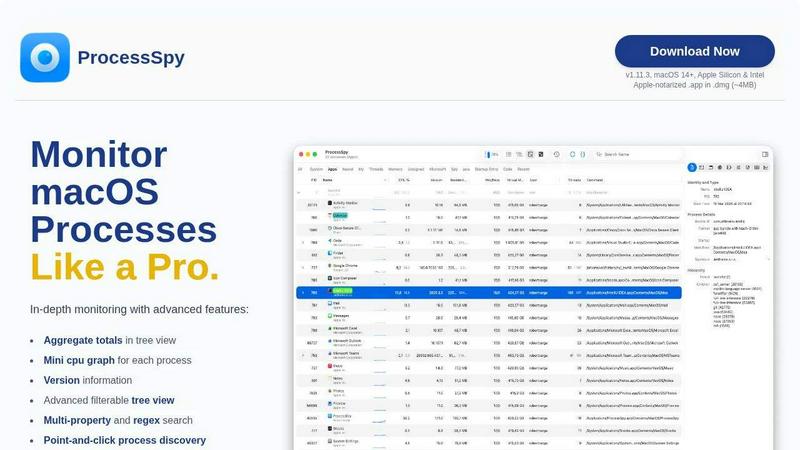
ProcessSpy is a powerful macOS application designed to provide in-depth insight into running processes, making it the perfect tool for developers, system administrators, and tech enthusiasts. Unlike the standard Activity Monitor, ProcessSpy reveals critical information that is often hidden, such as full command-line arguments, process paths, and version details, enabling users to understand their system's behavior better. With its intuitive interface and native macOS design, users can visualize process trees, inspect open files, and view environment variables effortlessly. The application is particularly useful for those who need to manage multiple applications or troubleshoot issues, providing advanced filtering options and real-time monitoring. Designed for macOS 14 and later, ProcessSpy integrates seamlessly with both Apple Silicon and Intel architecture, ensuring a smooth and responsive experience.
Features of ProcessSpy
Advanced Tree View
ProcessSpy's advanced tree view allows users to visualize processes hierarchically, making it easy to see relationships and dependencies. The view includes real-time filtering and search options, enabling quick access to specific processes while displaying aggregate totals for CPU, memory, and threads.
Javascript Filters
One of the standout features of ProcessSpy is its ability to utilize Javascript for creating complex filters. Users can define multiple conditions to refine their searches, allowing for a more tailored monitoring experience that meets specific needs or preferences.
Process History Recording
With the paid version of ProcessSpy, users can record historical data for CPU, memory, and thread usage. This feature allows for detailed analysis of process behavior over time, with the option to export results to CSV for further examination or reporting.
Environment Variables
For users who require deeper insights, ProcessSpy provides the ability to view environment variables associated with any given process. This feature is particularly valuable for developers who need to understand the context in which their applications are running, helping facilitate debugging and optimization.
Use Cases of ProcessSpy
Monitoring Resource Usage
Developers can use ProcessSpy to monitor resource consumption by their applications in real time. By visualizing CPU and memory usage, they can identify bottlenecks and make informed decisions about performance optimization.
Debugging Applications
When troubleshooting application issues, ProcessSpy provides access to crucial information such as command-line arguments and environment variables. This data helps developers understand the context of their applications, leading to quicker resolution of bugs and errors.
Managing Multiple Processes
For users juggling several applications, especially those running on different JDK versions, ProcessSpy simplifies the task of identifying and managing processes. With detailed information displayed, users can easily distinguish between similar processes and manage them effectively.
Learning About macOS Processes
Tech enthusiasts and students can utilize ProcessSpy as a learning tool to better understand how macOS processes operate. By exploring the various properties and behaviors of processes, they can gain valuable insights into system performance and application management.
Frequently Asked Questions
Is ProcessSpy safe to install on my Mac?
Yes, ProcessSpy is Apple-notarized and distributed as a signed application within a .dmg file. This ensures that it is safe to use on both Intel and Apple Silicon Macs, providing peace of mind for users.
Does ProcessSpy support older versions of macOS?
ProcessSpy is specifically designed for macOS 14 and newer versions. Users with older macOS versions will need to upgrade to utilize the features and capabilities of ProcessSpy.
What is the license model?
The license for ProcessSpy is valid for one user across unlimited devices, allowing for flexibility in usage. This model includes lifetime updates and access to new features as they are released, ensuring users always have the latest tools at their disposal.
How can I unlock the advanced features of ProcessSpy?
To unlock the advanced features of ProcessSpy, users can purchase a license on Gumroad for $24.99. This one-time fee provides lifetime updates and support for unlimited devices, making it a valuable investment for anyone needing enhanced monitoring capabilities.
Similar to ProcessSpy

APIKO AI API
One OpenAI-compatible endpoint for text, image and video models from OpenAI, Anthropic, Google, DeepSeek and more.

BlazePhoenix
On-chain DEX aggregator: the swap route is computed inside the transaction that executes it. No API key, no signup.

SiteScoper
AI Website UX Auditor & Instant SEO Checker

AFFLIGO
AFFLIGO is a free online toolkit for everyday file tasks. Easily edit PDFs, compress images, convert file formats, and get things done.

SightRadar
Face recognition API, a drop-in replacement for AWS Rekognition. Index, search, compare and detect faces, billed per photo with no subscription.


LinkIntel
MCP server giving your AI assistant your X post results and X’s ranking weights, with sources.
