

PromptIn
PromptIn organizes and optimizes your AI prompts to save time across ChatGPT, Claude, and more.
About PromptIn
PromptIn is your intelligent command center for the AI age, designed to solve the modern problem of prompt chaos. If you've ever lost a brilliant prompt in a sea of browser tabs, struggled to recreate a successful AI interaction, or wasted time tweaking the same instructions, PromptIn is your solution. It's a powerful Chrome extension that acts as a sleek, searchable hub where you can save, organize, optimize, and instantly reuse your best prompts across all your favorite AI tools like ChatGPT, Claude, Gemini, and more. Built for creators, marketers, developers, and teams, PromptIn turns scattered ideas into a streamlined workflow. Its core value is profound efficiency—saving you hours every week by eliminating repetitive work and ensuring you always have your most effective prompts at your fingertips. With a perfect 5-star rating from hundreds of users, PromptIn doesn't just store your prompts; it helps you make them better with AI-smart tagging and optimization suggestions, turning good inputs into consistently great outputs.
Features of PromptIn
Smart Organization & Tagging
Never lose a prompt again. Effortlessly structure your ideas into folders and use comprehensive, AI-powered tagging for instant clarity. This system allows you to categorize prompts by type, project, or performance, making it simple to cut through the noise and find the exact prompt you need in seconds, turning a messy collection into a well-organized library.
Step-by-Step Workflows
Design smooth, automated prompt sequences that work exactly the way you do. Instead of manually copying and pasting between chats, you can chain prompts together to create complex, repeatable processes. This feature eliminates chaos and manual steps, perfect for content creation pipelines, data analysis, or structured brainstorming sessions.
Intelligent Validation & Benchmarking
Stop guessing what makes a prompt effective. PromptIn uses AI-powered checks to validate that your prompts are sharp and accurate. Furthermore, the benchmarking feature gives you clear performance insights, allowing you to compare versions and improve your prompts with data-driven confidence, ensuring they consistently deliver high-quality results.
QuickSave Assistant & Version Control
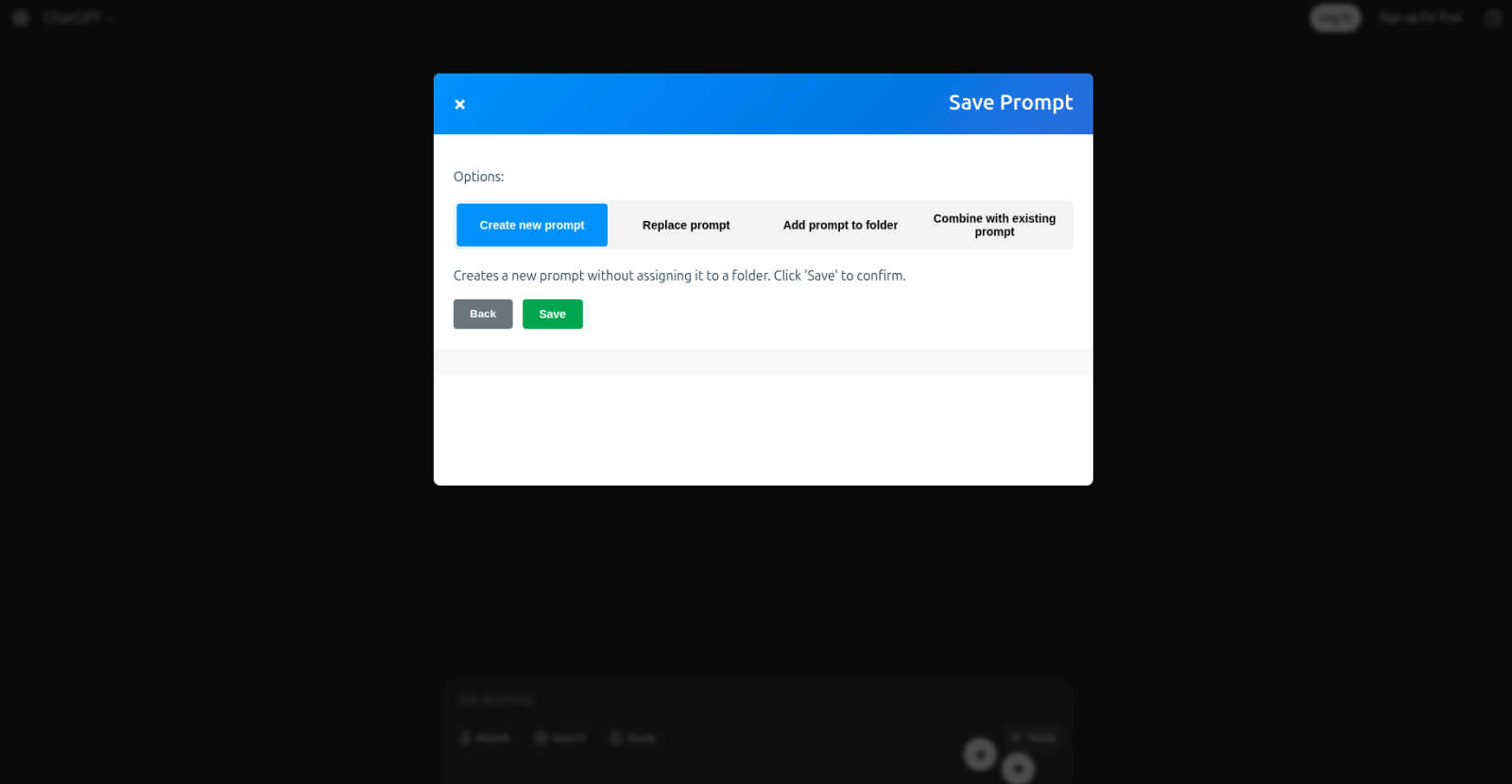
Capture inspiration instantly. The QuickSave Assistant lets you save prompts from any AI tool in seconds and then refine them—replace old ones, combine them into workflows, or drop them into folders. Coupled with full version control, you can track every change, compare iterations, and restore previous versions so no valuable idea is ever lost.
Use Cases of PromptIn
For Content Creators & Marketers
Content teams can save hours by building a library of high-performing prompts for blog outlines, social media posts, and ad copy. With folders for different campaigns and clients, and the ability to benchmark which prompts generate the best engagement, creators can ensure consistent, high-quality output across all their channels without starting from scratch each time.
For Developers & Technical Users
Developers can streamline their workflow by saving and organizing prompts for code generation, debugging, and documentation across tools like GitHub Copilot and ChatGPT. The version control feature is invaluable for tracking improvements to complex coding prompts, while workflows can automate multi-step processes like code review or API integration tasks.
For Researchers & Analysts
Researchers dealing with large amounts of information can use PromptIn to manage prompts for data summarization, trend analysis, and literature reviews. The advanced filtering and tagging make it easy to retrieve specific query patterns, and the text anonymizer protects sensitive data before sharing prompts or findings with collaborators securely.
For Teams & Collaboration
Teams can empower their entire group by sharing a centralized library of the organization's best prompts. This fosters consistency, saves onboarding time for new members, and creates a collaborative environment where everyone can learn from and build upon proven successful interactions with AI, dramatically boosting collective productivity.
Frequently Asked Questions
What AI platforms does PromptIn work with?
PromptIn offers universal compatibility with all major AI platforms. This includes ChatGPT, Claude, Gemini, Grok, Perplexity, GitHub Copilot, Microsoft Copilot, Mistral, DeepSeek, and many more. It's designed as a central hub, so there's no lock-in—your prompts are organized and accessible wherever you choose to work.
Is PromptIn free to use?
Based on the provided context, specific pricing plans or tiers are not detailed. The extension is available to "Add to Chrome/Edge," and it is trusted by over 600 users. For the most accurate and current information regarding any costs or premium features, please refer to the official PromptIn website or the Chrome Web Store listing.
How does the AI-powered optimization work?
PromptIn's intelligent validation analyzes your saved prompts for clarity, structure, and potential effectiveness. It can provide real-time suggestions to sharpen your instructions, remove ambiguity, and incorporate best practices. This helps you refine raw ideas into prompts that are more likely to generate the high-quality outputs you're looking for from any AI model.
Can I use PromptIn with my team?
Absolutely! Collaboration is a core feature. You can easily share your best prompts and workflows with team members instantly. This creates a shared knowledge base, ensures everyone uses the most effective prompts, and helps your team learn from each other's successes, leading to more consistent and improved results across all projects.
Explore more in this category:
Best Customer Support AI tools
Best Personal Development AI tools
Similar to PromptIn


ErgoAssessment
See your posture the way an ergonomist beside your desk would. Your camera, five body angles, plain fixes. Free, no signup.

AI Email Filter
AI Email Filter sorts incoming mail into folders using plain-language prompts you write. Works with any IMAP mailbox; bring your own LLM if you want.

BetterKnocks
One powerful software for D2D (Door to door) fields reps to manage their sales and their teams to easily track territories and complete powerhouse CRM


StrictDNS
Block adult content, gambling and more on all your devices, with a friend as your accountability partner who is notified.

Sayble
AI copilot that tells you what to say next on live sales calls, then writes the recap and follow-up.

GetYouTubeTranscript
YouTube transcripts, search and channel data via one API