

QuickSigner
QuickSigner enables you to eSign documents quickly and securely online, making agreements effortless and legally binding from any device.
About QuickSigner
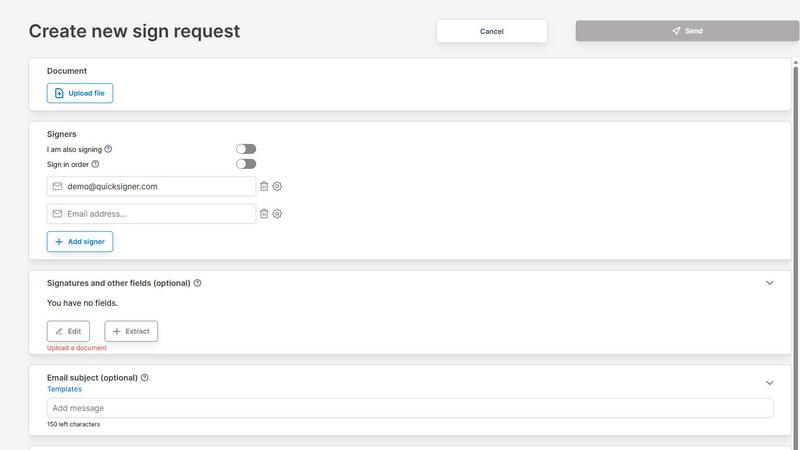
QuickSigner is a powerful online platform designed to simplify the process of signing, sending, and finalizing documents. By utilizing advanced electronic signature technology, QuickSigner transforms what once took days of back-and-forth communication into mere minutes. This tool is ideal for businesses and individuals who require a fast, reliable, and legally binding way to handle agreements. With features such as Adobe Approved Trust List electronic signatures and ISO 27001 certification, QuickSigner ensures that your documents are secure and compliant with international standards. Its user-friendly interface allows anyone to upload documents, add recipients, and track the signing process effortlessly. Whether you are a small business, a freelancer, or part of a larger organization, QuickSigner streamlines your document workflow, enhances collaboration, and boosts productivity.
Features of QuickSigner
Easy Document Upload
QuickSigner allows users to effortlessly upload documents by simply dragging and dropping files. It supports both PDF and Word formats, making it incredibly versatile for various document types.
Customizable Signer Fields
With QuickSigner, you can customize the signing experience by adding recipients and placing signature, date, or text fields exactly where they are needed. This feature ensures that all required information is captured efficiently.
Secure Online Signing
Recipients can sign documents from any device without needing to create an account or install additional software. This convenience enhances user experience while maintaining security through a secure signing link.
Real-Time Tracking and Notifications
Keep tabs on the signing process with QuickSinger's real-time tracking feature. Users receive instant notifications once a document is signed, allowing for immediate action and finalization.
Use Cases of QuickSigner
Streamlining Client Contracts
Freelancers and small businesses can use QuickSigner to streamline client contracts. By reducing the time spent on document exchanges, they can focus more on delivering quality services and maintaining client relationships.
Efficient Internal Approvals
Organizations can manage internal approvals for various documents, such as expense reports and project proposals. QuickSigner simplifies the process, allowing team members to quickly review and sign off on essential documents.
Real Estate Transactions
Real estate agents can utilize QuickSigner to expedite the signing of agreements between buyers, sellers, and agents. This efficiency helps close deals faster and enhances the overall client experience.
Educational Institutions
Schools and universities can use QuickSigner for handling consent forms, enrollment agreements, and other important documents. The ease of signing electronically helps in managing the administrative workload effectively.
Frequently Asked Questions
How secure is QuickSigner?
QuickSigner is ISO 27001 certified, ensuring that it adheres to strict international security standards. Additionally, it employs encryption and secure access protocols to protect your documents and personal information.
Can I use QuickSigner on my mobile device?
Yes! QuickSigner is designed to be mobile-friendly, allowing users to sign documents and manage their tasks from any device, whether it be a smartphone, tablet, or computer.
Is there a limit to the number of documents I can sign?
The free plan allows for three documents per month, while the business plan offers unlimited documents. This flexibility ensures that users can choose a plan that fits their specific needs.
What types of documents can I sign with QuickSigner?
You can sign various document types, including contracts, agreements, and consent forms. QuickSigner supports both PDF and Word formats, catering to different user requirements.
Explore more in this category:
Similar to QuickSigner

@fuck.it - email with attitude
Private email. Pure. Secure. Exclusive. No ads, no tracking, no data selling. GDPR compliant, EU-hosted.

xfiles
Free PDF, image and audio tools that process your files locally in your browser. No account or added watermarks.

this+that
An AI agent that reads every email and chat message your team gets, turns requests into tasks, and does what they ask.

Toolbit.ai
Describe your task and Toolbit finds the right AI tool. Compare tools side by side, see top rankings, and follow daily AI news and guides.


RunMyWealth
Smart, private financial calculators for mortgage, FIRE, and debt. 100% free, runs locally in your browser, no signup required.

Nutrition Fact Label
Free FDA-compliant nutrition facts label generator with recipe-to-label nutrition, allergen checks and 152 label formats for 114 countries.
