

Qwen Image Edit
Qwen Image Edit creates and refines stunning images with advanced AI precision and speed.
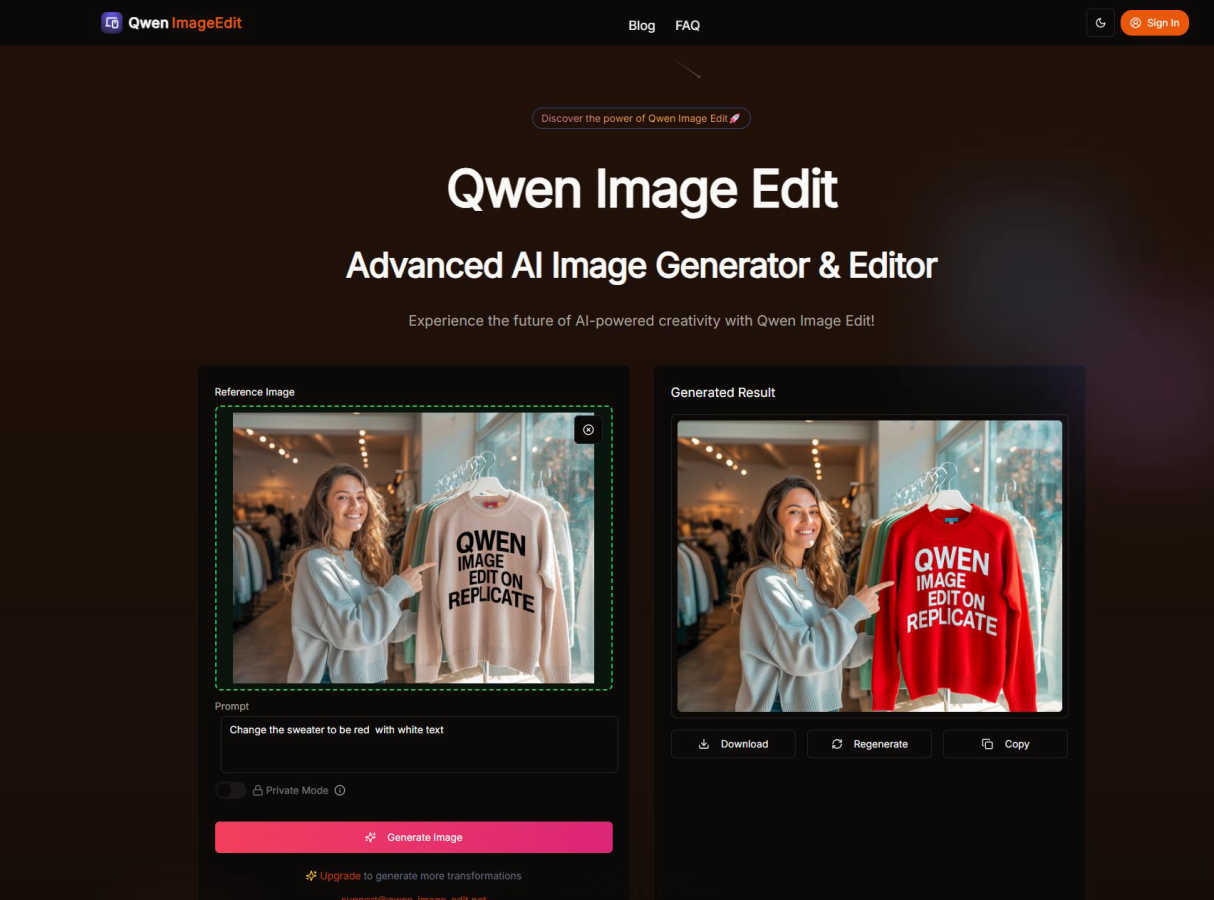
About Qwen Image Edit
Qwen Image Edit is a revolutionary AI platform that transforms the way you create and edit images. It seamlessly blends powerful AI image generation with intelligent, semantic-based editing, allowing you to bring your most creative ideas to life with incredible precision and ease. Whether you're starting from a text prompt or uploading an existing photo, this tool understands your vision and helps you execute it flawlessly. It's designed for a wide audience, from professional graphic designers and marketers needing high-quality assets for campaigns, to social media creators, bloggers, and hobbyists who want to enhance their personal projects without a steep learning curve. The core value of Qwen Image Edit lies in its versatility and user-friendliness. You get the power of advanced AI—like multilingual text editing within images and high-resolution output—packaged in an intuitive interface. Plus, with commercial usage rights and a focus on privacy, you can use your creations with confidence for any purpose. It's more than just an editor; it's a creative partner that empowers you to produce stunning visuals effortlessly and quickly.
Features of Qwen Image Edit
Advanced Semantic & Appearance Editing
This feature is the heart of Qwen Image Edit. It goes beyond simple filters by understanding the content and context of your images. You can instruct it to change specific elements based on meaning—like turning a summer scene into winter, replacing an object with something else, or altering the style of a building—while intelligently preserving the overall composition and lighting. It interprets your creative vision with remarkable accuracy for edits that feel natural and intentional.
Multilingual Text Editing & Diverse Art Styles
Qwen Image Edit excels at both adding and editing text within images, supporting multiple languages including English and Chinese while maintaining the original font style and layout. Furthermore, it can generate and transform images across a vast spectrum of artistic styles. Whether you need photorealistic product shots, abstract art, anime characters, or vintage photography, the AI is trained to master and apply these styles consistently to match your prompt.
High-Resolution Output & Commercial Rights
Create with the confidence that your images are ready for professional use. Qwen Image Edit generates crisp, detailed high-resolution images suitable for everything from digital ads and website banners to print materials. Every image you create or edit comes with full commercial usage rights, meaning you can freely use them in client projects, marketing campaigns, or even sell them as part of your products without worrying about licensing issues.
Lightning-Fast AI Processing & Intuitive Interface
Speed and simplicity define the user experience. The platform's optimized AI infrastructure processes even complex generation and editing tasks in seconds, not minutes, streamlining your creative workflow. This power is accessible through a clean, user-friendly interface. You don't need any technical expertise; just describe your idea or upload an image, and the tool guides you through a simple process to achieve stunning results.
Use Cases of Qwen Image Edit
Social Media Content Creation
Keep your social feeds fresh and engaging by quickly generating unique graphics, editing photos to fit your aesthetic, or creating eye-catching promotional images with custom text. Perfect for influencers, small businesses, and community managers who need to produce a high volume of quality visual content consistently and efficiently.
Marketing & Advertising Material
Develop professional marketing assets in-house. Generate original hero images for websites, edit product photos to highlight different features or colors, and create cohesive campaign visuals across multiple formats (banners, social posts, emails) all while maintaining brand consistency and saving on costly stock photography or designer fees.
Concept Art & Brainstorming
Visualize ideas rapidly during the brainstorming phase. Writers can generate scenes from their stories, product developers can mock up concepts, and designers can explore different artistic styles and compositions before committing to final artwork. It's an excellent tool for prototyping and communicating creative concepts.
Personal Project Enhancement
Elevate your personal hobbies and projects. Restore or creatively alter old family photos, design custom invitations or holiday cards, illustrate a blog post, or create unique artwork for your home. It empowers casual creatives to achieve professional-looking results for any personal endeavor.
Frequently Asked Questions
What kind of images can I upload for editing?
You can upload JPEG, PNG, WebP, and AVIF image files. The maximum file size for uploads is 5MB. The tool is designed to work with a wide range of existing images, from photographs to digital artwork, as a starting point for your semantic edits.
Do I own the images I create with Qwen Image Edit?
Yes, you do. Qwen Image Edit provides full commercial usage rights for all images generated or edited on the platform. You are free to use them for personal projects, commercial marketing, client work, or even sell them as part of your products without any additional licensing requirements.
How does the "semantic editing" feature work?
Semantic editing means the AI understands the content and meaning of your image and your text instructions. Instead of just applying a blanket filter, you can describe the change you want (e.g., "make the dog wear a hat," "change the car to red," "set the scene at night"), and the AI will intelligently modify those specific elements while keeping the rest of the image coherent and realistic.
Is Qwen Image Edit suitable for beginners?
Absolutely. One of its core strengths is an intuitive, user-friendly interface designed to make advanced AI image technology accessible to everyone. You don't need any prior design or editing experience. The process is as simple as typing what you want to see or uploading an image and describing your edits—the AI handles the complex technical work.
Explore more in this category:
Similar to Qwen Image Edit

Restore Old Photos - Retrocap
AI photo restoration app for iPhone and Android: repair scratches and tears, colorize black-and-white photos, sharpen faces and animate old portraits.

LinkIntel
MCP server giving your AI assistant your X post results and X’s ranking weights, with sources.

Ask Versa AI
AI verdicts for any two Amazon products, in seconds. Live specs plus real buyer reviews, scored 0-100, one clear winner. Free, no account.

Bulin47
One photo → viral freestyle AI video. Join the Bulin 47 / Kevin Wai trend in seconds.

AI Image Tools
Text to image, photo edits, background removal and restoration. Pick Nano Banana, FLUX, Seedream or GPT Image and see the price first.

ImageAICraft
GPT Image 2 AI Image Generator & Editor for Text-to-Image and Image-to-Image Creation

Verla AI
AI academic assistant for writing, research, presentations, and coding

TryThatTool
Discover AI tools worth trying. Compare options, explore practical reviews, and build your own AI stack based on your goals and budget.