

Receipt Taxer
Receipt Taxer uses AI OCR to instantly scan receipts and export organized data to CSV, Excel, or PDF, making bookkeeping and tax prep a breeze.
About Receipt Taxer
Receipt Taxer is your friendly, AI-powered assistant for turning a chaotic pile of receipts into a neat, organized digital record, ready for tax season. Designed for freelancers, small business owners, and anyone who needs to file a Schedule C, this tool eliminates the dread of manual data entry. Instead of sorting through shoeboxes of paper or digital images, you simply upload your receipt photos (JPEG or PNG, up to 10 MB each). Our advanced OCR (Optical Character Recognition) technology, powered by Receipt AI, instantly reads the amounts, dates, and merchant names from each receipt. It then intelligently categorizes each expense into groups like Dining, Transportation, Office, or Lodging. The result is a clean, editable list of your expenses, complete with estimated deductible tax amounts. You can review, correct, and modify any data before exporting. Once you are satisfied, export your organized data as a CSV, Excel, or PDF file. This file is perfectly formatted for manual entry into TurboTax for your Schedule C filing, or for your own bookkeeping and reimbursement records. With simple, transparent pricing at $9.99 per period and no hidden fees, Receipt Taxer provides a stress-free, efficient path to a more organized tax filing process, saving you hours of tedious work.
Features of Receipt Taxer
AI-Powered Receipt Parsing
Upload your JPEG and PNG receipt images, and our integrated OCR and AI technologies work together to instantly extract key data. The system reads the total amount, the date of purchase, and the merchant name from each receipt. It then automatically categorizes the expense into predefined categories like Dining, Transportation, Office, and Lodging. This feature transforms a simple image into a structured, editable row of data, eliminating the need for manual typing and reducing the risk of human error. The entire process is designed to be fast and intuitive, handling multiple receipts in a single batch.
Intelligent Categorization and Review
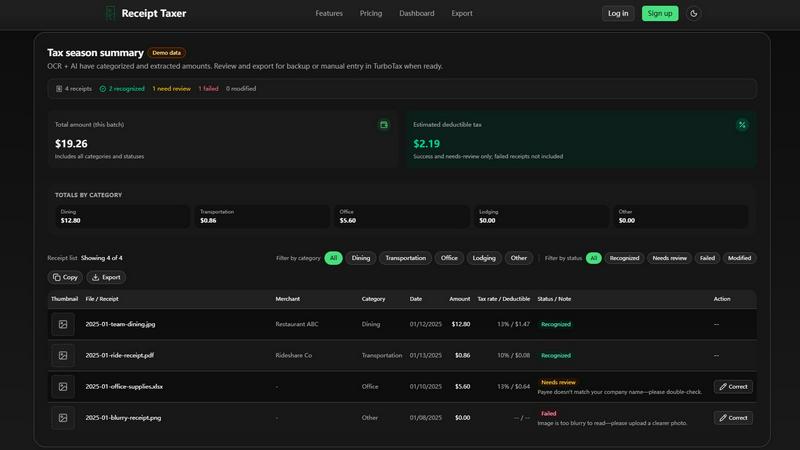
After parsing, Receipt Taxer doesn't just dump data into a list. It presents a comprehensive dashboard that gives you a bird's-eye view of your tax season summary. You can see totals by category, the total amount in the batch, and the estimated deductible tax. Each receipt is assigned a status: "Recognized" for successful parses, "Needs review" for potential issues like a mismatched payee name, or "Failed" for unreadable images. This intelligent review system allows you to quickly identify and correct any problematic entries, ensuring your final export is accurate and reliable before you send it to TurboTax.
Flexible Data Export for TurboTax
Once you have reviewed and corrected your receipt data, Receipt Taxer makes it simple to export it in a format that works for you. You can choose from CSV (recommended for analytics and TurboTax entry), Excel (for editing and reports), or PDF (for archiving and printing). The tool allows you to select a specific date range for your export, ensuring you only include the receipts relevant to your filing period. You can also choose to include or exclude a summary row, giving you full control over the structure of your output file. The exported file is designed to be a clean, organized reference for manually entering your Schedule C data into TurboTax.
Simple, Transparent Pricing
Receipt Taxer believes in straightforward, no-surprise pricing. There is a single, simple plan: $9.99 per period. This plan includes 200 receipt parses per period, covering the needs of most freelancers and small business owners. You can cancel your subscription at any time, with no hidden fees or long-term commitments. This transparent approach means you know exactly what you are paying for, making it an easy and affordable investment to save you time and stress during tax season. The "period" is a rolling timeframe, like May 14 to June 14, providing continuous access to the service.
Use Cases of Receipt Taxer
Freelancer Tax Preparation
Imagine a freelance graphic designer who has dozens of receipts for software subscriptions, coffee shop meetings, and Uber rides to client sites. Instead of spending a weekend manually entering each one into a spreadsheet, they can upload all their receipt images to Receipt Taxer. The AI instantly categorizes the software as "Office," the coffee as "Dining," and the Ubers as "Transportation." After a quick review to correct any mis-categorizations, they export a CSV file and use it to fill out their Schedule C in TurboTax, saving hours of tedious work.
Small Business Expense Tracking
A small business owner with a home office frequently buys office supplies, pays for business lunches, and travels for conferences. They can use Receipt Taxer throughout the year to keep a running digital log of all business expenses. By uploading receipts as they get them, they build a clean, organized database. At tax time, they can simply log in, select the date range for the tax year, and export a single, comprehensive report. This proactive approach prevents the last-minute scramble for lost receipts and ensures every deductible expense is captured.
Employee Reimbursement Reporting
A sales representative who travels frequently for work needs to submit expense reports to their employer. Instead of filling out a manual form, they can upload all their hotel, meal, and transportation receipts to Receipt Taxer. They can review the automatically generated list, correct any details, and then export an Excel spreadsheet. They can then submit this clean, professional report to their finance department for reimbursement. The tool's ability to categorize expenses makes it easy to justify each line item.
Personal Finance and Budgeting
An individual who wants to better track their spending can use Receipt Taxer for personal finance management. By uploading receipts for all their purchases, they can see a clear breakdown of their spending by category (Dining, Transportation, etc.). This provides valuable insights into their spending habits without any manual data entry. The exported data can be imported into personal budgeting software or a simple spreadsheet, helping them make more informed financial decisions and stick to their budget.
Frequently Asked Questions
What file types and sizes does Receipt Taxer accept?
Receipt Taxer accepts JPEG and PNG image files. Each file must be 10 MB or smaller. For best results, ensure your receipt images are clear, well-lit, and in focus. Blurry or low-resolution images may result in a "Failed" status, requiring you to upload a clearer photo. The tool is optimized for these common image formats to ensure fast and accurate OCR processing.
How does Receipt Taxer work with TurboTax?
Receipt Taxer is designed to be a perfect companion for TurboTax, specifically for filing Schedule C. The tool does not directly integrate with TurboTax's software. Instead, it organizes your receipt data and allows you to export it as a CSV, Excel, or PDF file. You then use this file as a reference or for manual data entry when you are filling out your Schedule C in TurboTax. This workflow ensures your data is accurate and organized before you begin the final filing process.
What happens if a receipt is not recognized or fails to parse?
When a receipt fails to parse, it will be given a "Failed" status, and the tool will provide a reason, such as "Image is too blurry to read." Receipts that need manual review will be marked with a "Needs review" status, often with a note like "Payee doesn't match your company name." You can then click the "Correct" button next to the receipt to manually edit the extracted data, fix the issue, and change its status to "Modified." This ensures you have full control over the final accuracy of your data.
Can I cancel my subscription at any time?
Yes, absolutely. Receipt Taxer offers a simple, no-commitment subscription. You can cancel your $9.99 per period plan at any time with no hidden fees or penalties. The pricing is transparent and straightforward, designed to give you flexibility. When you cancel, you will retain access to the service until the end of your current billing period.
Pricing of Receipt Taxer
Receipt Taxer offers a single, straightforward pricing plan. The Starter plan is priced at $9.99 per period (e.g., May 14 to June 14). This plan includes 200 receipt parses per period, which is sufficient for most freelancers and small business owners. There are no hidden fees, and you can cancel your subscription at any time. This simple, one-plan approach makes it easy to budget for and ensures you get core paid features without any confusing tiers or upsells.
Explore more in this category:
Similar to Receipt Taxer

RunMyWealth
Smart, private financial calculators for mortgage, FIRE, and debt. 100% free, runs locally in your browser, no signup required.


sakuttoAI
A free suite of online tools for everyday tasks like PDF compression, image conversion, text diff and CSV to Excel.


Tapetide
AI-first stock research platform and MCP server for every NSE & BSE listed stock.

ColdCrow
AI cold email writer: turn one line about a prospect into personalized outreach with a deliverability score in seconds. Free trials, no credit card.

invoala
Invoala is an AI-powered invoicing platform that helps businesses create, manage, send, and track professional invoices with less time and effort.

FalcoScan
A market map of 7,000+ AI products across 30 markets, with each product's closest rivals.