

sam tts
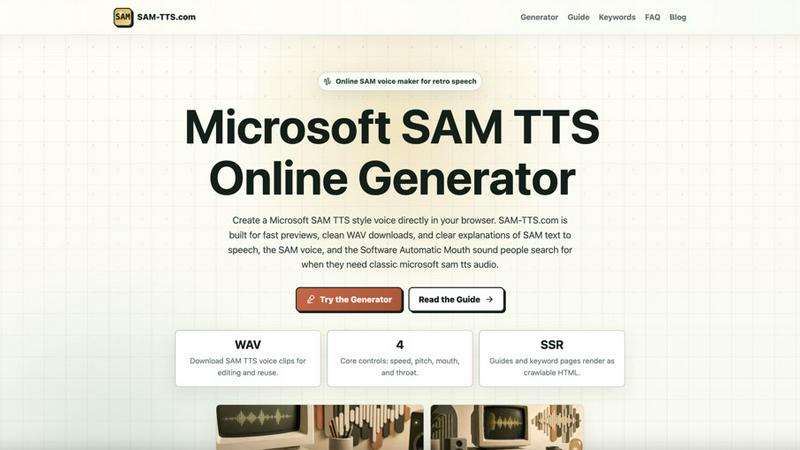
Turn any text into a classic retro computer voice with this easy online SAM TTS generator that lets you download WAV files.
About sam tts
SAM TTS is a free online text-to-speech tool that brings back the classic, retro robotic voice of the Software Automatic Mouth (SAM) and Microsoft Sam. Accessible directly in your browser at SAM-TTS.com, this generator lets you type any text and instantly hear it spoken in that iconic, mechanical, old-computer voice that defined early desktop computing and internet culture. Whether you are a content creator looking for a funny robot narrator for your next meme video, a game developer needing vintage computer speech for a character, a student working on a school demo, or just someone feeling nostalgic for the sound of Windows accessibility tools, SAM TTS makes it incredibly easy to turn your words into classic synthetic voice clips. The platform is designed for speed and simplicity, requiring no complex setup or software downloads. You can preview your audio instantly, download clean WAV files for editing and reuse, and even tweak core settings like speed, pitch, mouth, and throat to shape the perfect retro sound. Beyond just the classic Microsoft Sam voice, the tool offers a wide selection of SAPI4 voices, including Microsoft Mike, Microsoft Mary, BonziBUDDY, and many more, each with their own unique character. SAM TTS is more than a simple generator; it is a comprehensive resource for understanding and using classic TTS technology, complete with guides, presets, and a batch rendering feature for efficient workflow. It is the go-to destination for anyone who needs that bright, clipped, and memorable synthetic speech sound for their projects.
Features of sam tts
Wide Selection of SAPI4 Voices
SAM TTS goes far beyond just the classic Microsoft Sam voice. It provides access to a comprehensive library of over 30 different SAPI4 voices. You can choose from familiar Windows voices like Microsoft Mike and Mary, the quirky BonziBUDDY, and even specialized presets like Adult Male and Female variants, RoboSoft voices, and environment-specific effects like "Mike in Hall" or "Mary in Space." This vast selection allows you to find the perfect character for any project, from a standard narration to a unique, atmospheric effect.
Core Voice Controls for Custom Sound
The tool puts you in the director's chair with four essential voice controls: Pitch, Speed, Mouth, and Throat. Adjusting the pitch and speed lets you create a higher or lower voice, or make it speak faster or slower. The Mouth and Throat settings are where the real magic happens for creating special effects. By tweaking these parameters, you can simulate everything from a classic robot voice to a hall echo, a telephone effect, or even a whisper, giving you incredible creative freedom over the final audio output.
Instant Preview and WAV Download
SAM TTS is built for a seamless workflow. After typing your text and selecting your desired voice and settings, you can instantly preview the audio right in your browser. Once you are happy with the result, you can download a clean, high-quality WAV file with a single click. This makes it incredibly easy to incorporate the generated speech into your video editing software, game development tools, or any other creative project without any conversion hassles.
Batch Line Rendering for Efficiency
For users who need to generate multiple audio clips, the batch line rendering feature is a powerful time-saver. Simply put each separate take on its own line in the text input box. Then, with one click, you can download multiple individual WAV files, each generated with the same voice and settings you have chosen. This is perfect for creating dialogue for a game character, multiple lines for a video script, or a series of sound effects without having to manually generate and download each one separately.
Use Cases of sam tts
Meme and Video Content Creation
The distinctive, robotic charm of the Microsoft Sam voice is a staple in internet meme culture. Content creators can use SAM TTS to quickly generate funny narrations, unexpected dialogue for characters, or classic "troll" voiceovers for their videos on platforms like YouTube, TikTok, and Twitch. The tool's instant preview and WAV download make it a perfect fit for fast-paced content production, allowing creators to add that perfect retro touch to their next viral hit.
Game Development and Prototyping
Indie game developers and hobbyists can leverage SAM TTS to add voice acting to their projects without the need for professional voice actors or complex audio middleware. The retro voice is perfect for creating characters in nostalgic, pixel-art, or sci-fi games. It is also an excellent tool for prototyping, allowing developers to quickly add placeholder dialogue to test game mechanics and narrative flow before investing in final voice recordings.
Educational Demonstrations and Projects
Teachers, students, and educators can use SAM TTS for fun and engaging classroom demonstrations about computer history, speech synthesis technology, or programming. The tool provides a clear and tangible example of how early text-to-speech engines worked. Students can also use it for creative school projects, such as creating a robot narrator for a presentation or adding a vintage computer voice to a short film or animation.
Nostalgic Experiments and Accessibility
For those who grew up with early Windows operating systems, SAM TTS is a delightful trip down memory lane. Users can experiment with the classic voices they remember from their childhood, reliving the experience of the Microsoft Narrator or other accessibility tools. It also serves as a simple, free, and browser-based TTS tool for anyone who needs a clear, synthetic voice to read text aloud for accessibility purposes or just for a fun, nostalgic experiment.
Frequently Asked Questions
What is the difference between SAM and Microsoft Sam?
This is a common point of confusion. SAM stands for Software Automatic Mouth, a classic speech synthesizer from the early 1980s. Microsoft Sam was a later speech voice included with Windows. Online searches often merge these ideas. SAM-TTS.com provides the classic SAPI4 Microsoft Sam voice, which is the one most people remember from Windows accessibility tools and internet memes, along with other SAPI4 voices.
Do I need to download any software to use SAM TTS?
No, not at all. SAM TTS is a completely free online tool that runs directly in your web browser. There is no complex setup, no software to install, and no plugins required. Simply visit SAM-TTS.com, type your text, choose your voice and settings, and you can instantly preview and download your audio clip.
What audio format does SAM TTS provide for download?
The tool provides downloads in the WAV audio format. WAV is a high-quality, uncompressed audio format that is widely supported by all major audio editing software, video editors, and game development engines. This makes it the perfect format for further editing, mixing, and reuse in your creative projects.
Can I use the voices for commercial projects?
Yes, the SAPI4 voices provided by SAM TTS are classic, system-level voices that are widely available and used in many commercial and non-commercial projects. The tool is designed to help you generate audio clips for memes, games, videos, animations, and other creative works. It is always a good practice to double-check the specific licensing for any assets you use in a commercial product, but these classic voices are generally considered safe for use.
Similar to sam tts

xfiles
Free PDF, image and audio tools that process your files locally in your browser. No account or added watermarks.


Toolara Music
Describe a song in plain text and get a complete track — vocals or instrumental, custom lyrics, up to 120 seconds, MP3 download

Euphona
Turn raw recordings into release-ready sound with AI: mastering, stem separation, restoration, vocal tuning, mixing and spatial audio.


Piano to Sheet Music
Turn a piano recording into sheet music, MIDI and MusicXML, with the first 30 seconds free in your browser.

VibTV
AI creative studio for music videos, UGC ads, product films, and viral marketing videos.

Producer Tag Generator
Give your beats a name people know. Use our free producer tag generator to write a short line and choose effects. Open Advanced Mode to pick a voice s