

ShadeTerm
A Windows SSH client with integrated terminals, SFTP, remote code editing, and Shade AI—all organized into server workspaces.
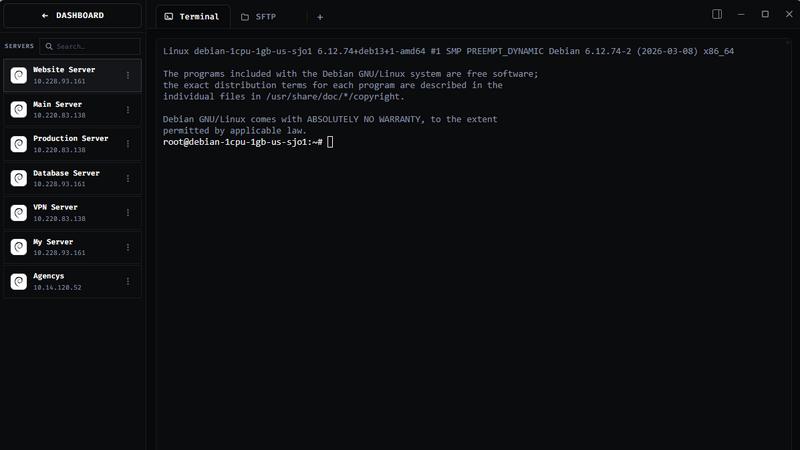
About ShadeTerm
ShadeTerm is a modern SSH client for Windows that brings everything you need to manage remote servers into one desktop application.
Instead of switching between separate terminals, file managers, and code editors, ShadeTerm gives every server its own workspace.
Key features:
- Shade AI: An integrated AI assistant that helps with SSH commands, troubleshooting, and server-related questions.
- Multi-Tab SSH Terminal: Run multiple terminal sessions within the same server workspace.
- Built-in SFTP Manager: Browse, upload, download, and manage remote files.
- Remote Code Editor: Edit server files directly with Monaco-powered syntax highlighting.
- Server Workspaces: Organize your servers by project, client, or environment.
- SSH Key Management: Manage SSH authentication and connection profiles.
- SSH Port Forwarding: Create secure SSH tunnels to access remote services.
- Server Monitoring: View essential server resource information.
ShadeTerm uses a local-first approach. SSH credentials and server configurations stay on your device by default, and no server-side agent is required.
Available for Windows 10 and 11, ShadeTerm offers a 17-day free trial with no credit card required. Paid plans start at $4.99/month.
Similar to ShadeTerm

MediaToURL
Convert images, videos, audio, and documents into permanent, embed-ready CDN URLs with zero login required.

SpiderFoot OSINT Tool
Browser-based OSINT workspace for username, email, and IP intelligence research.


CheatProof
Detect AI cheating in technical interviews: shared IDE, desktop proctoring and one evidence report for interviewers.


Testsy
Your AI agent says it works. Make it prove it, on web and mobile. Get your free 10 tests.

MCP Field Guide
Hand-verified directory of 43 MCP servers for video, image, PDF and downloaders, with install, hosting and pricing.