

ShadowLock
ShadowLock gives IT teams the visibility and controls to stop sensitive data leaks into unapproved AI tools.
About ShadowLock
ShadowLock is a comprehensive shadow AI detection and governance platform designed specifically for Managed Service Providers (MSPs) and internal IT teams who need to regain visibility and control over how their employees use artificial intelligence tools. As AI adoption explodes across every industry, employees are increasingly using personal accounts and unapproved AI services to process sensitive company data, including customer records, intellectual property, and confidential documents. ShadowLock addresses this growing blind spot by providing real-time monitoring and enforcement capabilities that cover the full spectrum of AI usage, from browser-based chatbots like ChatGPT and Claude to desktop applications like Ollama and LM Studio, and even AI features embedded within approved SaaS platforms. The platform operates through three integrated layers: a lightweight Windows endpoint agent that deploys silently via your existing RMM tools, a browser extension that intercepts and classifies risky pastes and file uploads to AI sites, and a Microsoft 365 scanner that detects connected AI applications. All of this is managed from a single, multi-tenant dashboard that lets MSPs audit, block, or allow specific AI activities across every client environment with audit-ready compliance reports. ShadowLock is private by design, meaning it never logs keystrokes, never transmits the actual content of what employees type or paste, and focuses purely on metadata and risk classification. This makes it an ideal solution for organizations that need to balance productivity with security, compliance with HIPAA, GDPR, CCPA, and other privacy frameworks, and operational simplicity with powerful governance.
Features of ShadowLock
Real-Time Browser Extension Enforcement
The ShadowLock browser extension automatically configures itself once the endpoint agent is installed on a Windows device. It actively intercepts pastes, file uploads, and sensitive data typed directly into AI tool prompts, classifying each action based on your organization's policies. The extension enforces data-sharing opt-out settings on each AI platform and displays clear, user-facing messages when an action is blocked or requires approval. This gives employees immediate feedback while preventing sensitive data from ever leaving the endpoint.
Silent Endpoint Agent Deployment
ShadowLock includes a Windows agent that deploys silently through your existing RMM tools without requiring any user interaction or complex configuration. Once installed, the agent continuously monitors for AI-related activity, scans for browser extensions, detects locally running AI applications like Ollama, LM Studio, and Claude Desktop, and locks down the AI features built into Chrome, Edge, Brave, and Firefox. This agent-based approach ensures coverage even on devices where users have administrative rights.
Multi-Tenant Governance Dashboard
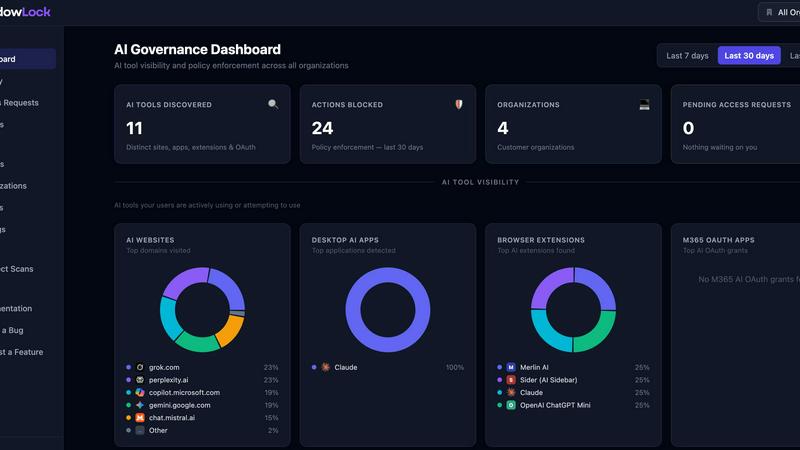
The centralized dashboard provides MSPs and IT teams with a single pane of glass to manage AI governance across every client environment. You can view real-time activity, configure granular policies for blocking or allowing specific AI tools and actions, and generate audit-ready compliance reports that demonstrate due diligence. The dashboard supports role-based access, allowing you to delegate control to client administrators while maintaining overall oversight and policy enforcement.
Microsoft 365 AI App Detection Scanner
ShadowLock connects directly to each client's Microsoft 365 environment to scan for and identify connected AI applications that may have been authorized by individual users without organizational approval. This scanner detects embedded AI features within approved SaaS tools like Copilot and AI writing assistants, as well as third-party AI applications that have been granted permissions to access corporate data. It provides visibility into the full AI application landscape, including tools that operate outside traditional browser-based controls.
Use Cases of ShadowLock
Healthcare HIPAA Compliance Enforcement
A regional hospital network uses ShadowLock to prevent clinical staff from pasting patient ePHI into public AI chatbots like ChatGPT or Gemini. The browser extension intercepts any attempt to paste protected health information into unapproved AI tools, blocking the action and logging the incident for compliance reporting. The IT team can generate HIPAA audit reports showing that no patient data was transmitted to unauthorized AI vendors, protecting the organization from regulatory exposure and potential fines.
MSP Multi-Client AI Governance
A managed service provider with over 50 small to medium business clients deploys ShadowLock across all managed endpoints using their existing RMM tool. The multi-tenant dashboard allows the MSP to create different policies for each client based on their industry and compliance requirements, such as blocking all AI coding assistants for a legal firm while allowing limited use for a marketing agency. The MSP can generate monthly compliance reports for each client, demonstrating proactive governance and reducing liability exposure.
Enterprise Intellectual Property Protection
A software development company implements ShadowLock to prevent proprietary source code from being submitted to AI coding assistants like GitHub Copilot and Cursor. The endpoint agent detects all locally installed AI development tools and enforces policies that block code submissions to unauthorized services. The IT team can see exactly which developers attempted to use which AI tools, and the audit trail provides defensible evidence that trade secret protections were maintained.
Financial Services Regulatory Compliance
A financial advisory firm uses ShadowLock to ensure compliance with SEC and FINRA regulations regarding the use of third-party AI tools. The platform detects and blocks the use of meeting transcription AI tools like Otter.ai and Fireflies during client calls, preventing sensitive financial discussions from being processed through unapproved vendors. The M365 scanner identifies any AI applications that have been granted access to client data through Microsoft 365, and the compliance team can generate reports showing controlled AI usage for regulatory audits.
Frequently Asked Questions
How does ShadowLock protect privacy while monitoring AI usage?
ShadowLock is designed with privacy as a core principle. The platform never logs keystrokes, never records what employees type or paste, and never transmits the actual content of user interactions with AI tools. Instead, it analyzes metadata and classifies actions based on risk patterns, such as detecting when sensitive data formats like credit card numbers or HIPAA identifiers are being pasted. This means you get full visibility into AI usage without compromising employee privacy or creating new data security risks.
Can ShadowLock be deployed without interrupting employee workflows?
Yes, ShadowLock is built for silent, non-disruptive deployment. The Windows agent deploys through your existing RMM tools with zero user interaction required, and the browser extension self-configures once the agent is installed. The system uses clear, user-facing messages when an action is blocked or requires approval, so employees understand exactly why their action was prevented. You can also configure policies to allow certain AI tools while blocking others, ensuring that approved productivity tools continue to work normally.
What types of AI tools and applications does ShadowLock detect and govern?
ShadowLock covers the full spectrum of AI usage, including public AI chatbots like ChatGPT, Claude, and Gemini accessed via personal accounts, AI browser extensions like sidebar assistants and email rewriters, desktop AI applications like Claude Desktop, ChatGPT app, Ollama, and LM Studio, AI coding assistants like GitHub Copilot and Cursor, meeting and transcription AI tools like Otter.ai and Fireflies, and embedded AI features within approved SaaS applications. The platform currently detects and governs over 100 different AI tools, services, and desktop applications, with new additions being added regularly.
How does ShadowLock integrate with existing MSP tools and workflows?
ShadowLock is designed to work seamlessly with your existing MSP infrastructure. The Windows agent deploys silently through any RMM tool, including ConnectWise, NinjaRMM, Datto, Kaseya, and others. The multi-tenant dashboard integrates with your PSA and billing systems, and audit-ready reports can be generated in formats compatible with compliance frameworks like HIPAA, GDPR, SOC 2, and CCPA. The platform also supports API access for custom integrations and automated workflows, allowing you to incorporate AI governance into your existing security stack without requiring dedicated engineering resources.
Similar to ShadowLock


TestNeo
TestNeo.ai is an AI-native engineering and release assurance platform that helps teams automate web and API testing using natural language.

sakuttoAI
A free suite of online tools for everyday tasks like PDF compression, image conversion, text diff and CSV to Excel.

SightRadar
Face recognition API, a drop-in replacement for AWS Rekognition. Index, search, compare and detect faces, billed per photo with no subscription.


JustTools
JustTools offers a growing collection of free online tools that run directly in your browser, with no sign-up and no uploads.


Dravyaa
Dravyaa is an AI-powered ERP platform that helps manufacturers, traders, and distributors manage sales, purchases, inventory, production, accounting,