

socialplod
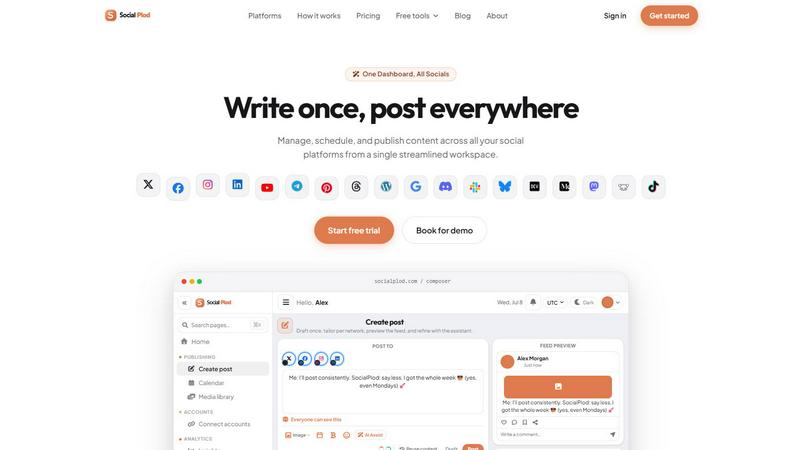
Post your content once on Socialplod and schedule it across all your social media accounts from one simple dashboard.
About socialplod
Socialplod is a social media management system designed to simplify the way content creators, brands, and agencies handle their online presence. At its core, Socialplod allows you to write a post once and publish it across all your connected social media accounts from a single, unified dashboard. This means no more logging into multiple platforms, copying and pasting the same content, or struggling to keep your posting schedule consistent. Whether you are a solo creator trying to maintain a presence on X, Facebook, Instagram, LinkedIn, YouTube, and more, or a team managing multiple brand accounts, Socialplod centralizes your workflow. The platform supports a wide range of networks including Twitter, Facebook, Instagram, LinkedIn, YouTube, Telegram, Pinterest, Threads, WordPress, Google Business, Discord, Slack, Bluesky, Dev.to, Medium, Mastodon, and Lemmy, with TikTok coming soon. Beyond simple cross-posting, Socialplod empowers you to tailor your content for each platform, preview how it will look before publishing, and use an AI assistant to refine your message. It also features a visual content calendar for drag-and-drop scheduling, workspace-level analytics to measure performance, and developer tools like a REST API and MCP server for advanced integrations. Trusted by over 500 creators and brands, Socialplod is built for anyone who wants to post consistently, save time, and grow their audience without the manual grind. Its friendly and intuitive interface, complete with a seamless light or dark mode, makes social media management approachable for beginners and powerful for professionals.
Features of socialplod
Master Draft with Per-Platform Tailoring
Socialplod lets you create one master draft for your post, but you are not stuck with a single version. You can tailor the copy, media, and formatting for each connected platform individually. For example, you might write a longer, more professional version for LinkedIn while keeping a punchy, concise version for Twitter. This ensures your content matches the best practices and audience expectations of each network, all from a single composing session.
AI Content Assistant
The built-in AI assistant works like a live chat interface integrated into the composer. As you write your post, you can ask the AI for suggestions, rephrasing, or tone adjustments. It applies intelligent recommendations directly to your content preview, helping you refine your message quickly. This feature is perfect for overcoming writer's block or optimizing your copy for engagement without leaving the dashboard.
Visual Content Calendar with Drag-and-Drop Scheduling
Plan your entire week or month of content using a visual calendar view. You can drag and drop posts between days, move them back to an unscheduled queue, and schedule them at the best times for your audience based on built-in recommendations. The calendar supports your preferred timezone, making it easy to coordinate posting schedules for global audiences or team workflows.
Feed Preview Across Networks
Before you hit publish or schedule, Socialplod provides read-only mockups of how your post will appear on each selected platform. You can see the exact layout, character count, and media placement for X, Facebook, LinkedIn, YouTube, and more. This prevents embarrassing formatting errors and lets you optimize the visual presentation for each channel, ensuring your brand looks polished everywhere.
Use Cases of socialplod
Solo Content Creator Managing Multiple Platforms
A freelance blogger or YouTuber can use Socialplod to write one announcement about a new video and publish it simultaneously to Twitter, Facebook, Instagram, and LinkedIn. They can tailor the caption for each platform, schedule posts for optimal times, and use the AI assistant to generate engaging hooks. This saves hours of manual work each week and helps maintain a consistent posting schedule.
Social Media Agency Handling Multiple Client Accounts
An agency managing five different brand accounts can use Socialplod's workspace-level features to keep each client's content organized. Team members can collaborate on drafts, use the visual calendar to plan campaigns, and track performance with insights. The ability to connect a wide range of platforms, including Discord and Slack, makes it a versatile tool for agencies with diverse client needs.
Small Business Owner Promoting Products and Events
A local business owner can schedule a week's worth of promotional posts for a new product launch across Facebook, Instagram, and Google Business Profile. They can use the drag-and-drop calendar to plan posts around store hours and events, and preview how each post looks on mobile and desktop. The AI assistant helps them write compelling calls-to-action that drive foot traffic or online sales.
Developer Building Custom Social Media Workflows
A developer or tech-savvy marketer can integrate Socialplod into their existing tools using the REST API or MCP server. For example, they can connect an AI assistant like Claude or Cursor to automatically schedule posts based on a content feed, or build a custom dashboard that pulls insights into their own analytics platform. This use case is ideal for teams that need automation beyond the standard interface.
Frequently Asked Questions
What social media platforms does Socialplod support?
Socialplod supports a wide range of platforms including X (Twitter), Facebook, Instagram, LinkedIn, YouTube, Telegram, Pinterest, Threads, WordPress, Google Business Profile, Discord, Slack, Bluesky, Dev.to, Medium, Mastodon, and Lemmy. TikTok is listed as coming soon. This extensive list covers most major social networks and community platforms, making it a versatile tool for diverse content strategies.
Can I schedule posts for different times on different platforms?
Yes, absolutely. While you can write a single master draft, Socialplod allows you to set individual publishing times for each platform. You can also use the visual content calendar to drag and drop posts to specific days and times. The platform even provides recommendations for the best times to post based on your audience's activity, helping you maximize engagement across each network.
How does the AI content assistant work?
The AI assistant is integrated directly into the post composer. It appears as a live chat interface where you can type requests like "make this more professional" or "shorten this for Twitter." The AI then generates suggestions and applies them to your content preview in real time. You can accept, reject, or further refine these suggestions, giving you full control over the final copy while speeding up the writing process.
Is Socialplod suitable for teams and agencies?
Yes, Socialplod is built for teams. It offers workspace-level features including shared content calendars, collaborative draft editing, and insights that track performance across all team members and accounts. The platform also supports connecting multiple social accounts per workspace, making it ideal for agencies managing several clients or brands. Developer tools like the API and MCP server further enable custom team workflows and integrations.
Explore more in this category:
Similar to socialplod

Influence
Influence helps creators write social captions with AI & keep the next week’s posts organized.

TypeFire
Type a few letters, get the whole reply. Markdown notes as files you own. Find anything you copied.

DodoLaunch
The Product Hunt alternative for SaaS. Launch free every week, get a permanent page and backlink, and get found on Google and AI.

Compresser PDF
Lighter PDFs. Your files stay with you.

Bulin 47 AI Video Generator
Upload one photo and star in the viral Bulin 47 street freestyle. AI replaces the lead performer with you while the crowd, camera and red lights stay

CustomerFlows
A modern, AI-native CRM built for lead-driven businesses. Qualify leads 24/7, track pipelines, and measure true ad ROI with flat-rate pricing.

Engineering on Web
Free browser CAD, FEA and SPC with an AI assistant: model by text or voice, AI-tuned solvers, AI result interpretation. No install, no account.

ReplyBash
ReplyBash combines AI-powered customer support, lead generation, and appointment booking in one easy-to-use website chatbot platform.