

SparkPix-ai Photo Editor
Transform your photos effortlessly by typing your edits, removing backgrounds, and enhancing images with SparkPix-ai.
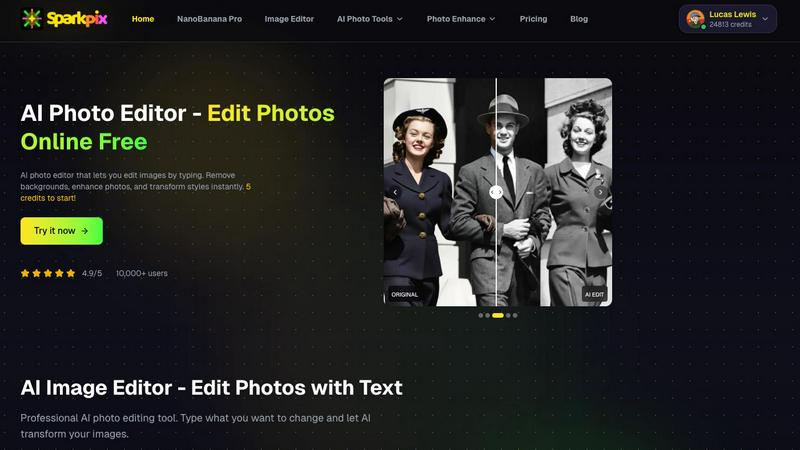
About SparkPix-ai Photo Editor
SparkPix.ai is a cutting-edge, free online AI photo editor designed to provide users with professional-grade image enhancements in mere seconds. Leveraging advanced artificial intelligence technology, SparkPix.ai empowers designers, photographers, e-commerce sellers, and social media creators to effortlessly edit images and achieve stunning results without the need for extensive expertise. With its user-friendly interface, you can perform complex editing tasks such as unblurring, upscaling, and background removal with just a few clicks. The platform also features an innovative text-based editing system, allowing users to describe their desired changes in simple terms. This makes it accessible for everyone, regardless of their technical skills or background. Best of all, users can start editing right away with 5 free credits, providing a risk-free opportunity to explore its robust capabilities.
Features of SparkPix-ai Photo Editor
Unblur Photo
The Unblur Photo feature allows users to fix motion blur and restore clarity to old or unclear photographs effortlessly. With just one click, you can transform blurry images into sharp, clear versions, making it ideal for restoring precious memories or refining professional photography work.
Photo Upscaler
SparkPix.ai’s Photo Upscaler increases the resolution of your images up to 4K while preserving intricate details. This is particularly useful for e-commerce sellers who need high-quality images for product listings. The upscaling maintains the integrity of the original photo, ensuring that images look stunning in larger formats.
Background Remover
The Background Remover tool enables users to eliminate backgrounds instantly from product photos and portraits. This function is essential for creating clean, professional images that focus on the subject, making it a favorite among social media creators and marketers looking to enhance their visual content quickly.
AI Image Editor
With the AI Image Editor, users can edit their photos simply by typing out the changes they want. This user-friendly feature allows for creative freedom and quick adjustments without needing to navigate complex editing interfaces. Whether you want to change colors, add effects, or modify elements, this tool makes it easy.
Use Cases of SparkPix-ai Photo Editor
Professional Photography
Photographers can utilize SparkPix.ai to refine their images quickly before delivering them to clients. Features like unblurring and background removal can enhance the quality of shots, ensuring that the final product meets professional standards without consuming excessive time.
E-commerce Product Listings
E-commerce sellers can benefit significantly from the Photo Upscaler and Background Remover features. By enhancing product images and creating clean, attention-grabbing visuals, sellers can improve their online presence and increase conversion rates.
Social Media Content Creation
For social media creators, SparkPix.ai offers a quick way to generate eye-catching content. The AI Image Editor allows for rapid alterations, making it easy to produce engaging posts that resonate with audiences, while the Style Transfer feature can give images a unique artistic flair.
Restoring Old Memories
Individuals looking to preserve family history can use SparkPix.ai to restore old or damaged photographs. The Unblur Photo and AI Image Editor features can help bring faded memories back to life, making it a valuable tool for genealogy enthusiasts and anyone wishing to cherish their past.
Frequently Asked Questions
Is SparkPix.ai really free to use?
Yes, SparkPix.ai is free to use with an initial offering of 5 credits. Users can edit images without any watermark or the need for registration, making it accessible for everyone.
What types of editing can I perform with SparkPix.ai?
You can perform a variety of editing tasks, including unblurring photos, upscaling images, removing backgrounds, and applying artistic styles. You can even edit images by simply typing your desired changes.
Do I need to register to use the features?
No registration is required to start using SparkPix.ai. You can access its features right away with 5 free credits, allowing you to explore the platform without any commitments.
How can I enhance an image if I run out of credits?
If you run out of credits, you can sign in to receive an additional 5 free credits plus one daily credit. This allows you to continue editing images without needing to purchase credits immediately.
Explore more in this category:
Similar to SparkPix-ai Photo Editor

xfiles
Free PDF, image and audio tools that process your files locally in your browser. No account or added watermarks.

IconCreator
IconCreator is an AI-powered logo and app icon generator. Create professional logos, app icons, favicons, and brand assets in minutes.

Reword Image
Change the text already printed inside a photo, screenshot or poster, without the original design file.

Bulin 47 AI Videos
One photo in, a 15-second Bulin 47 street freestyle video with sound out: original dembow beat, lip-synced Spanish verse, crowd.

Leadeon
AI growth tool for X and LinkedIn: write posts in your voice, schedule at your best times, find leads on X and see what works.

IdeaAize Free AI Tools
IdeaAize Free AI Tools is a suite of 50+ free online utilities that run 100% in your browser — no registration, no file uploads, no watermarks.

Bulin 47 AI
Turn one photo into the viral 19-second Bulin 47 freestyle, with original sound and a watermark-free vertical MP4.

Spaceora
Turn room and outdoor photos into AI interior, virtual staging, garden and landscape design concepts.