

stampdrcom
Design custom stamps online with drag and drop tools, templates, and instant print-ready downloads, no signup required.
About stampdrcom
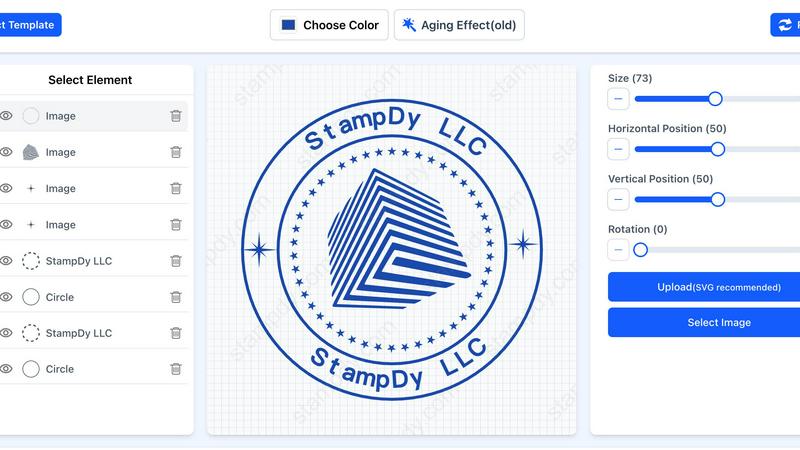
Stampdrcom is an online stamp maker that lets you design custom stamps directly in your browser, with no downloads, no design skills, and no expensive software required. It is a web-based tool built for anyone who needs a professional stamp quickly, whether you run a small business, work as a freelancer, or handle official documents. The core value proposition is simplicity: you open the tool, pick a shape like round, square, or rectangular, add your text, and optionally upload your logo. Everything updates live as you edit, so you see exactly what your final stamp will look like before you download it. Over 50,000 stamps have been created using this tool, and it serves more than 10,000 happy customers. The platform offers over 100 ready-made templates across 24 categories, making it easy to get started even if you are in a hurry. You can design a stamp in under five minutes, and the output files are print-ready at 300+ DPI resolution, available in PNG, JPG, SVG, or PDF formats. No signup is required to start designing, and the tool works on any device with a web browser. Stampdrcom also provides a blog with fresh stamp design ideas and templates, plus a support team of real people ready to help if you get stuck. It covers a wide range of stamp types, including business stamps, address stamps, logo stamps, signature stamps, date stamps, notary stamps, school stamps, medical stamps, wedding stamps, and more. Whether you need a simple text stamp or a detailed corporate seal, stampdrcom handles it all with a friendly, approachable interface that removes the hassle from stamp creation.
Features of stampdrcom
Simple Drag and Drop Editor
The stamp maker uses a drag and drop interface that lets you move elements like text, logos, and shapes around your canvas until everything looks right. There are no complicated menus or confusing options to wade through. You can position your company name, adjust your logo placement, or resize text boxes with a simple click and drag motion. This feature makes the tool accessible to anyone, regardless of their technical background or design experience. You can also rotate elements and align them precisely without needing any special training.
Pre-made Templates Library
With over 100 ready-to-use templates spread across 24 categories, you can save significant time when you need a stamp quickly. Templates cover common stamp types like business seals, notary stamps, address stamps, and signature stamps. You simply pick a template that is close to what you want, change the text, adjust the colors to match your brand, and the stamp is ready. If you prefer to start from a blank canvas, that option is always available too. The templates serve as a helpful starting point that eliminates the blank page problem.
Print-Ready File Downloads
Every stamp you create can be downloaded in high resolution at 300+ DPI, ensuring your local print shop will be happy with the quality. You can choose from multiple file formats including PNG, JPG, SVG, and PDF, so you can pick whichever format your printer prefers. The files are crisp and clear, with no pixelation or blurriness even when scaled up. Most print shops can turn these digital files into physical stamps within a day or two, making the process from design to finished product very fast.
Live Preview Functionality
As you make changes to your stamp design, the preview updates in real time so you can see exactly what you are getting. There are no surprises when you download the final file. If you change the font, the preview updates immediately. If you adjust the color of the border, you see the new shade right away. This live feedback loop means you can experiment with different styles and layouts without wasting time. You can be confident that the stamp you design on screen will match the physical stamp you receive.
Use Cases of stampdrcom
Small Business Branding and Documentation
Small business owners frequently use stampdrcom to create company stamps that include their business name, logo, and contact information. These stamps are essential for official documents like invoices, contracts, and purchase orders. With the drag and drop editor, you can upload your company logo, choose your brand colors, and select a professional font that matches your identity. The process takes under five minutes, and you can download a print-ready file to take to your local print shop. This eliminates the need to order custom stamps from specialized vendors or wait for shipping.
Freelancer Signature and Address Stamps
Freelancers and independent contractors often need signature stamps for signing documents quickly, or address stamps for sending mail and packages. Stampdrcom makes it easy to create a simple stamp with your name, title, and contact details. You can also design a stamp that includes a digital version of your handwritten signature. The tool supports various shapes, so you can choose a rectangular stamp for a professional look or a round stamp for a more traditional feel. The live preview ensures the size and placement of your signature look natural and balanced.
Official Document Notary and Date Stamps
Professionals who handle official documents, such as notaries, accountants, and legal assistants, rely on stampdrcom for date stamps and notary stamps. These stamps require precise text placement and clear, legible fonts. The tool allows you to create stamps with specific wording like "Notary Public" or "Received" along with date fields. You can adjust the font size and spacing to ensure every character is readable when stamped on paper. The high-resolution output guarantees that the stamp will be crisp and professional, meeting the standards required for legal and financial documents.
Educational and Organizational Stamps
Schools, libraries, and other organizations use stampdrcom to create stamps for marking books, documents, and correspondence. Examples include library seals, school stamps, and departmental stamps for approving paperwork. The template library includes options specifically for these use cases, so you can start with a design that already has the right layout. You can customize the text to include your institution name, department, and any required identification numbers. The ability to download in multiple file formats means you can print the stamp yourself using a home printer or send it to a professional print shop.
Frequently Asked Questions
Do I need to sign up to use stampdrcom?
No, you do not need to sign up or create an account to start designing stamps. You can open the stamp maker directly in your browser and begin creating immediately. This makes it convenient for quick projects where you just need one stamp. If you want to save your designs for later, you may have the option to do so, but it is not required to use the basic functionality.
What file formats are available for download?
You can download your finished stamp in PNG, JPG, SVG, and PDF formats. All downloads are provided at 300+ DPI resolution, which is the standard required by professional print shops for crisp, clear results. You can choose the format that best suits your needs, whether you need a vector file for scaling or a raster file for quick printing.
Can I use my own logo in the stamp design?
Yes, you can upload your own logo and place it anywhere on your stamp. The drag and drop editor allows you to resize, rotate, and position the logo exactly where you want it. This is especially useful for business stamps where you want your company branding to appear prominently. The tool supports common image formats for upload.
How long does it take to design a stamp?
Most stamps can be designed in under five minutes. If you use one of the pre-made templates, you can complete the process even faster by simply changing the text and adjusting colors. The live preview feature means you can see your changes instantly, so there is no guesswork or waiting. From opening the tool to downloading your file, the entire process is designed to be quick and efficient.
Pricing of stampdrcom
The context provided does not include any specific pricing information, plans, tiers, or costs for stampdrcom. Therefore, this section is omitted as per the instructions.
Explore more in this category:
Similar to stampdrcom

xfiles
Free PDF, image and audio tools that process your files locally in your browser. No account or added watermarks.

IconCreator
IconCreator is an AI-powered logo and app icon generator. Create professional logos, app icons, favicons, and brand assets in minutes.

Reword Image
Change the text already printed inside a photo, screenshot or poster, without the original design file.

PageLint
AI copy audit for landing pages: 55 checks, each finding quotes your page and cites its source. Free 16-check audit, no signup.

Bulin 47 AI Videos
One photo in, a 15-second Bulin 47 street freestyle video with sound out: original dembow beat, lip-synced Spanish verse, crowd.

Posy
A link-in-bio page that looks hand-made. Pick a look, add your links and publish in a minute. Free, open source, and your AI can edit it for you.

Ozil Goal AI
Make the Ozil goal AI video from one photo. You chip the keeper and score. 15 s, 9:16, 720p, no watermark. Ready for TikTok.

IdeaAize Free AI Tools
IdeaAize Free AI Tools is a suite of 50+ free online utilities that run 100% in your browser — no registration, no file uploads, no watermarks.