

StatPecker
StatPecker gives you fast, private AI insights and stunning visuals from your data.
About StatPecker
StatPecker is your friendly AI-powered sidekick for transforming boring numbers into beautiful, insightful stories. At its heart, it's a smart data visualization tool that takes raw data—whether from online sources or your own CSV files—and turns it into engaging infographics, charts, and reports in seconds. It's built for anyone who needs to communicate data clearly and compellingly, without needing a degree in design or data science. Think of content creators looking to spice up their blog posts, marketers needing to showcase campaign results, educators simplifying complex topics for students, or business analysts who want to share insights quickly with their team. The core value of StatPecker is its simplicity and power: you ask a question or upload your data, and it handles the heavy lifting of analysis and design, saving you hours of manual work in tools like spreadsheets or graphic editors. It’s about making data storytelling accessible, fast, and impactful for everyone.
Features of StatPecker
Ask Your Query
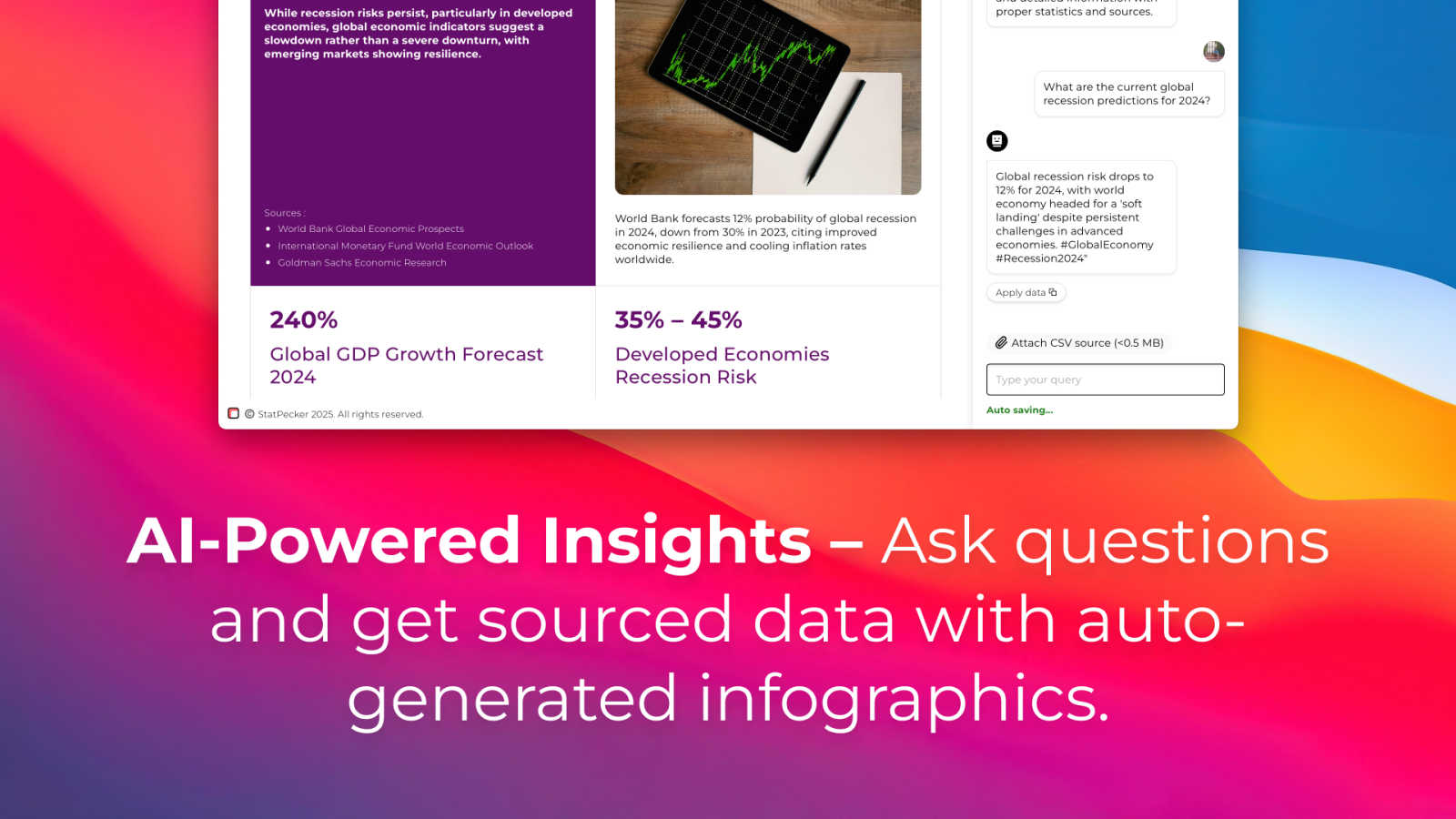
Simply type a question in plain English, and StatPecker's AI will find the answer from validated sources and present it as a ready-to-use visual. There's no need to learn complex query languages or data tools. Want to know the global smartphone market share or the GDP growth of a country? Just ask, and get a clean chart or infographic instantly, perfect for dropping into your content.
Upload & Analyze CSVs
With the Local SQL Agent feature, you can upload your private CSV files (up to 50MB) and explore them with natural language questions. The best part? Your data never leaves your computer. The entire analysis runs locally on your device, ensuring complete privacy. It prepares your data, generates SQL queries behind the scenes, and delivers key insights as beautiful, shareable visuals.
Publish & Embed
Once you've created a visual, you can make it interactive and seamlessly embed it into your website, blog, or article with a simple snippet of code. This feature allows your audience to engage directly with the data, making your content more dynamic and informative. It’s designed for easy integration, so your stunning visuals work anywhere you publish.
Download & Use Anywhere
Need your infographic for a presentation, report, or social media? StatPecker lets you export your creations as high-quality image files. This gives you the flexibility to use your data visuals across any platform or medium—PowerPoint decks, PDF reports, print materials, or team newsletters—ensuring your insights look professional everywhere.
Use Cases of StatPecker
For Content Creators & Bloggers
Writers and bloggers can use StatPecker to quickly find and visualize supporting data for their articles. Instead of describing statistics with text, they can embed interactive charts that illustrate their points, making posts more authoritative and engaging for readers, which helps boost time-on-page and shareability.
For Business Analysts & Marketers
Analysts and marketing teams can use the CSV upload feature to analyze sales data, campaign performance, or customer surveys privately. They can generate instant visuals for weekly reports or presentations, identifying trends like top-performing regions or product categories without manual chart building, speeding up decision-making.
For Educators & Researchers
Teachers and academics can simplify complex datasets or historical trends for students by converting them into easy-to-understand infographics. Researchers can also use it to visualize their findings for papers or lectures, making abstract data concrete and memorable for their audience.
For Journalists & Reporters
Journalists on tight deadlines can use the "Ask Your Query" feature to rapidly gather and visualize current statistics for their stories, from election polls to economic indicators. This allows them to create credible, data-rich narratives that enhance their reporting with clear, publish-ready graphics.
Frequently Asked Questions
Is my data safe when I upload a CSV file?
Absolutely. When you use the Local SQL Agent feature, your data privacy is the top priority. Your CSV file is processed entirely on your own device. Nothing is sent to StatPecker's servers, meaning your sensitive business or personal data stays completely private and secure on your computer during analysis.
What kind of questions can I ask the AI?
You can ask a wide range of data-driven questions! The AI pulls from validated public sources to answer queries about business, economics, demographics, technology trends, and more. Examples include "What is the renewable energy capacity in Europe?" or "Show me the top 5 countries by internet penetration." Think of it as a research assistant for facts and figures.
Do I need to know how to code or use SQL?
Not at all. StatPecker is designed for ease of use. You interact with it using simple, natural language. Whether you're asking a question or exploring your CSV file, you just type what you want to know (e.g., "Which product had the highest sales last quarter?"), and the tool handles all the complex query generation and coding in the background for you.
Can I try StatPecker for free?
Yes! StatPecker offers a generous Free Tier that allows you to explore its core capabilities at no cost. This includes creating unlimited projects, making a number of AI queries, and uploading several CSV files. It's a great way to see how the tool can fit into your workflow before considering any paid plan.
Pricing of StatPecker
StatPecker offers straightforward pricing to suit different needs. The Free Tier ($0) is perfect for getting started, offering unlimited projects, manual embeds, 25 AI queries, and 10 CSV uploads. For users who want full, unrestricted access, the Lifetime Access plan is a one-time payment of $150 (with a limited-time 25% discount at checkout). This plan includes lifetime access to all features, unlimited AI queries and CSV uploads, unlimited projects and embeds, priority feature requests, and comes with a 10-day money-back guarantee.
Explore more in this category:
Best Analytics & Data AI tools
Best Business Intelligence AI tools
Similar to StatPecker


PageLint
AI copy audit for landing pages: 55 checks, each finding quotes your page and cites its source. Free 16-check audit, no signup.

Leadeon
AI growth tool for X and LinkedIn: write posts in your voice, schedule at your best times, find leads on X and see what works.

Assistly
An AI receptionist on your website that answers visitors 24/7 from your own content and captures every lead.

Bulin 47 AI
Turn one photo into the viral 19-second Bulin 47 freestyle, with original sound and a watermark-free vertical MP4.

FollowX Today
Swipe to match with verified solo founders in your niche. Form 7-day mutual follow pacts, earn points, and grow a feed full of builders who engage in

TokenSave
Free AI token counter and cost calculator for ChatGPT, Claude and Gemini, plus a private Claude Code usage analyzer.