

StrictDNS
StrictDNS blocks chosen sites across devices with a DNS filter and lets a trusted partner know when filtering changes or stops.
About StrictDNS
StrictDNS is a DNS filter for people who want to limit access to selected online content across their devices. You choose categories such as adult content, gambling, social media or gaming, and can add individual apps or sites. The service says it works across apps and browsers, with setup through apps on Apple devices and Android or a private DNS address for Windows, Linux and routers.
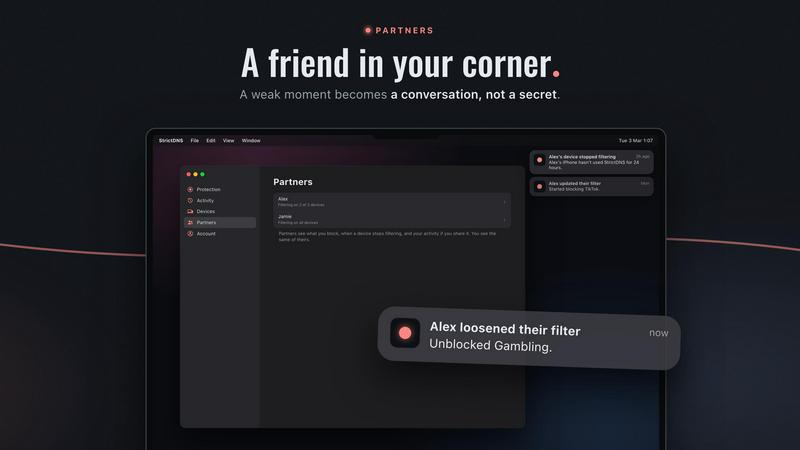
A trusted partner adds an accountability layer: they can be notified when you loosen a filter or a device stops filtering, but they do not see browsing activity unless you choose to share an activity log. The service is designed for self-directed use, rather than monitoring someone else. It also plainly acknowledges that a person can bypass DNS filtering by changing DNS settings or using a VPN; those services are blocked by default, and a partner can be notified if filtering stops. Consider whether that accountability arrangement fits your needs.
Features of StrictDNS
- Blocks selectable categories, individual apps and custom sites across supported devices.
- Offers apps for iPhone, iPad, Mac and Android; Windows, Linux and routers use a personal DNS address.
- Lets a chosen partner receive alerts when filters change or a device stops filtering.
- Blocks VPNs, proxies and other DNS services by default; adult content filtering also enables SafeSearch.
Use Cases of StrictDNS
- Reduce access to online categories you have chosen to avoid, such as gambling or social media.
- Apply a filter across browsers and apps on several devices.
- Add accountability by asking a trusted friend, spouse, sponsor or mentor to receive alerts.
- Begin with one device and adjust categories or custom sites as your needs change.
Frequently Asked Questions
What can a partner see?
A partner can see what you block, filter changes and whether devices are still filtering. Browsing sites are not shared unless you choose to share your activity log.
Can the filter be bypassed?
Yes. The site says changing DNS settings or using a VPN can route lookups elsewhere. VPNs and other DNS services are blocked by default, and your partner may be notified when filtering stops.
Which devices are supported?
The site lists apps for iPhone, iPad, Mac and Android. Windows, Linux and routers can use a personal DNS address from the web app.
Pricing of StrictDNS
Monthly subscription: $2.99 per month after a 14-day free trial, or $29.99 per year after a 14-day free trial. Prices are in U.S. dollars; app stores show local currency.
Explore more in this category:
Similar to StrictDNS

TrueLaunch
TrueLaunch is a free app and game launch community for publishing products, scheduling launches, and collecting structured user reviews.

EU Funds Tracker
EU Funds Tracker matches startup and SME profiles with EU funding programmes and tenders, then emails ranked opportunities with risks and next steps.

CrmLeaf
CrmLeaf brings CRM, project delivery, resource planning, time tracking and billing together for professional services teams.

LongevLab
LongevLab turns wearable and lab data into biological age, wellbeing scores, daily protocols, and personalized AI health guidance.

YT to Text
YT to Text turns available YouTube captions into searchable, timestamped transcripts you can copy or download in common formats.

InfoNestHub
Free online tools with Maryam, an AI chatbot assistant — word counter, image tools, QR generator and calculators, all in your browser.

LaunchFilter
LaunchFilter pairs a curated startup directory library with an AI-agent queue and tracking for founders managing launch submissions.
