

Structura
Publish 3 SEO-optimized blog posts a day — without writing a word. Native WordPress publishing or a Content API for any stack.
About Structura
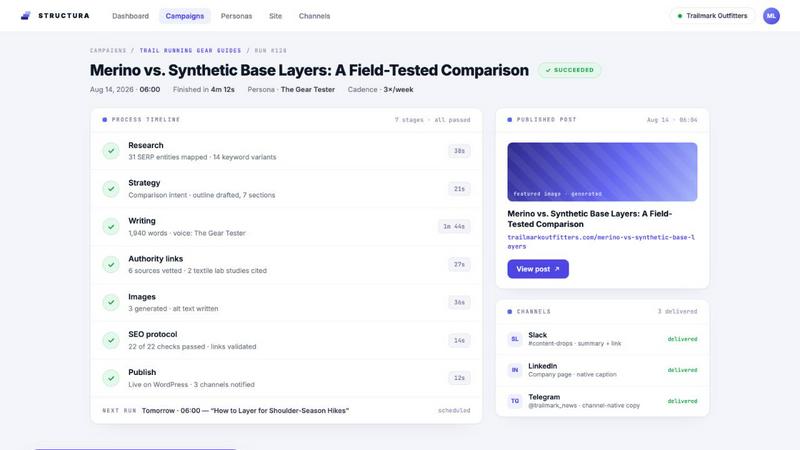
Structura is an autonomous content engine for WordPress and headless sites. It runs the full publishing lifecycle — keyword research, content strategy, writing, authority links, image generation, SEO optimization, and publishing — on a schedule you set, with no per-post intervention.
Output is real Gutenberg blocks, not pasted HTML: posts arrive as individually selectable blocks, clean to edit and theme-agnostic. Every post passes a deterministic 20+ point SEO protocol (title, meta description, keyphrase placement, internal linking, E-E-A-T), compatible with Yoast and Rank Math. For Next.js, Astro, or any custom front end, the same engine delivers through a hosted Content API with full feature parity.
On publish, posts fan out to Slack, Discord, Telegram, or webhooks with channel-specific copy. Connect Google Search Console for per-post performance and a ranked list of what to improve next. Bring your own OpenAI, Gemini, or Claude key, or choose a managed plan. Free plan available.
Explore more in this category:
Similar to Structura

Vonsel
Google Maps scraper with emails, phones and socials, pay as you go. AI finds local business leads and you only pay for the ones that match.

MenuCapture
Upload a photo of your dish, type what you want changed, and get an edited menu photo in about 15 seconds. The dish in the photo stays the same.

MentionReach
Track whether ChatGPT, Gemini and Claude recommend your app or website, at what rank, and who they name instead.

leadmatically
Find More Leads. Grow Your Business

LaunchRanked
Launch once, rank on Google and get cited by AI: free SEO launch pages, directory submissions and AI-written SEO articles.


Substack Explorer
Search Substack newsletters by keyword and see subscriber counts and engagement. Compare the newsletters in your niche and track growth.

Quick Viral Notes
Turn a long-form article into Substack Notes and social posts. Paste the URL and schedule posts from the Chrome extension. By Build to Launch.