

Stylize Image
Easily transform your photos into stunning, stylized images with AI-powered style transfer and quick, user-friendly editing tools.
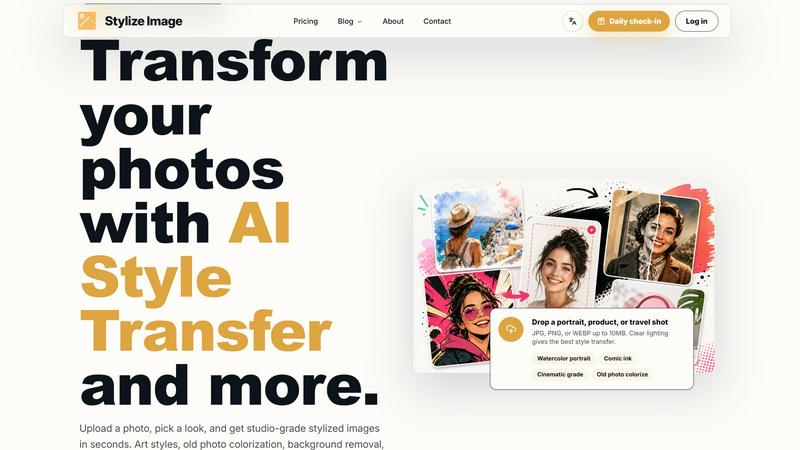
About Stylize Image
Stylize Image is a dynamic online tool designed for creators, marketers, designers, and online sellers who want to enhance their visual content effortlessly. This platform allows users to upload photos and transform them into stunning visuals using a variety of presets or custom prompts. Whether you're looking to create eye-catching social media posts, professional product listings, or captivating blog covers, Stylize Image provides a user-friendly experience that eliminates the need for advanced design skills. With features like background cleanup, old photo colorization, image upscaling, and batch processing, users can streamline their workflow and produce high-quality images quickly. The emphasis on HD exports and a secure, private browser-based workflow ensures that your images are ready for commercial use without watermarks, making it an invaluable asset for anyone looking to elevate their online presence.
Features of Stylize Image
AI Style Transfer
Transform ordinary photos into artist-grade visuals with AI Style Transfer. This feature allows you to apply various artistic styles, such as painting, comic, and watercolor, while maintaining the integrity of the original image's subject, pose, and composition, ensuring that the final output is both creative and representative.
Old Photo Colorization
Breathing life back into black-and-white memories, the Old Photo Colorization feature restores warmth and detail in archival photos. It preserves the authenticity of faces and clothing while adding vibrant colors, making it perfect for heritage projects or family albums.
Batch Consistency
Achieve a cohesive look across multiple images with Batch Consistency. This feature enables users to apply a single style across an entire set of images, ensuring that product catalogs, campaign visuals, or creator shoots maintain a uniform aesthetic, which is crucial for branding.
Style Library
The Style Library offers an extensive collection of over 50 style presets and editing modes. Users can explore various artistic directions, such as editorial, anime, and cinematic, or create custom looks. This versatility allows for personalization while keeping the core attributes of the image intact, resulting in unique and engaging visuals.
Use Cases of Stylize Image
Social Media Enhancement
Stylize Image is ideal for social media managers looking to create engaging profile images and feed visuals. By using trend packs for platforms like TikTok and Instagram, users can ensure their content stands out, driving higher engagement rates and follower growth.
E-commerce Product Listings
Online sellers can utilize Stylize Image to enhance product photos, making them more appealing to potential buyers. By applying consistent styles across product images, sellers can create a professional and attractive storefront that boosts sales and customer trust.
Personal Branding
Professionals seeking to elevate their personal brand can use Stylize Image to create striking avatars and visuals. With the ability to customize styles, they can ensure that their online presence reflects their personality and aligns with their professional image.
Family Archive Revitalization
For families looking to preserve their history, Stylize Image offers tools for colorizing old photographs and enhancing them for modern viewing. This feature allows for the preservation of cherished memories in a visually appealing format, making it easier to share with future generations.
Frequently Asked Questions
What file types can I upload to Stylize Image?
You can upload JPG, PNG, or WEBP files up to 10MB. For the best results, ensure that your images have clear lighting, which aids in effective style transfer.
Do I need any design skills to use Stylize Image?
No prior design skills are necessary. Stylize Image is designed to be user-friendly, allowing anyone to create stunning visuals by simply uploading an image and selecting a desired style.
Can I use my stylized images for commercial purposes?
Yes, as long as you own the rights to the original photo or have permission to use it, you can use the stylized images for commercial purposes. Outputs are clean and watermark-free.
How does batch editing work?
Batch editing allows you to apply the same style across multiple images simultaneously. This feature is perfect for maintaining a consistent look across product catalogs and marketing campaigns, significantly saving time and effort.
Explore more in this category:
Similar to Stylize Image

ImageGPT
ImageGPT is an all-in-one AI creative platform for generating, editing and transforming images and videos using AI.

ErgoAssessment
See your posture the way an ergonomist beside your desk would. Your camera, five body angles, plain fixes. Free, no signup.

Adobe Firefly Background Remover
Strip backgrounds from photos with one click.

ImgEnhancer
Free AI image enhancer that sharpens blurry photos, reduces noise, upscales resolution, and restores clarity online.

AI Album Cover Maker
Create release-ready album covers from a prompt or photo. Generate, refine, and export art for singles, EPs, mixtapes, and playlists.

shardstitch
ShardStitch helps recover and hand off AI coding work, with a visual website editor and SEO Guardrails MCP in development.

RemoveMate
AI background removal and image cleanup tools for product photos, portraits, social posts and everyday creative projects.

Krea 3
Krea 3 is an AI image editor that relights photos, swaps backgrounds and changes one object from a text prompt with GPT Image 2 and Nano Banana Pro.