

SubtitlesFast
Effortlessly create stunning subtitles for your videos in minutes with SubtitlesFast’s all-in-one editing app.
About SubtitlesFast
SubtitlesFast is an innovative web-based application crafted to simplify the subtitle creation process for video content creators across various platforms. Whether you are a vlogger, a marketer, or a social media influencer, this tool empowers you to enhance your videos by automatically generating accurate subtitles in over 50 languages. With a straightforward, user-friendly interface, SubtitlesFast allows you to upload your video, style the subtitles to align with your brand, and publish your content within minutes. This quick turnaround not only boosts viewer engagement but also enhances accessibility for a broader audience, making your content more inclusive. By eliminating the need for complex software installations, SubtitlesFast operates entirely in your web browser, ensuring a hassle-free experience. Its primary value proposition lies in its speed, simplicity, and effectiveness, making it the ideal solution for creators who wish to elevate their content and maximize their reach.
Features of SubtitlesFast
Auto-Transcription
SubtitlesFast offers seamless auto-transcription capabilities, generating subtitles in over 50 languages. This feature ensures that your videos are accessible to a global audience, allowing for greater reach and engagement.
Easy Customization
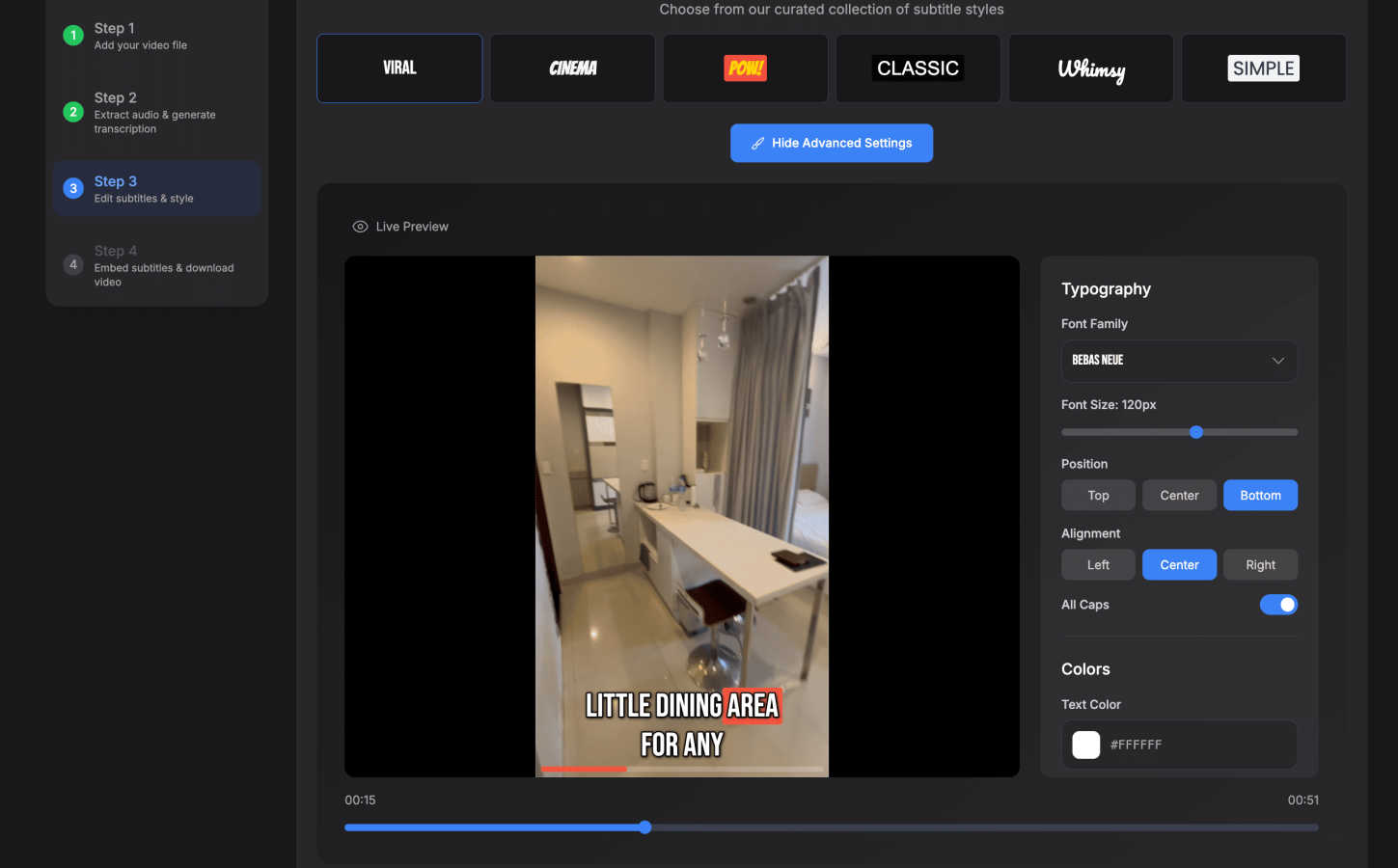
With a simple editing interface, you can easily customize the generated subtitles to match your brand's style. Choose from over 30 animated styles and adjust text settings to create visually appealing subtitles that enhance your video's aesthetic.
One-Click Export
After finalizing your subtitles, SubtitlesFast provides a one-click export option, allowing you to burn the subtitles directly into your video. This feature eliminates the hassle of manual editing and ensures your content is ready for platforms like TikTok, YouTube, and Instagram in no time.
User-Friendly Interface
Designed with creators in mind, SubtitlesFast features an intuitive user interface that requires no learning curve. Even those new to video editing can navigate the platform effortlessly, making it an excellent choice for creators at any skill level.
Use Cases of SubtitlesFast
Daily Vlogs
For daily vloggers, SubtitlesFast streamlines the editing process, allowing you to quickly add subtitles and publish videos without lengthy editing sessions. This efficiency is crucial for maintaining a consistent posting schedule.
Marketing Videos
Marketers can leverage SubtitlesFast to create engaging promotional videos that are accessible to a wider audience. By adding subtitles, they ensure that their messages reach viewers who prefer watching videos without sound.
Social Media Content
Influencers and content creators on platforms like Instagram and TikTok can use SubtitlesFast to enhance their short-form videos. The tool's quick turnaround time allows for rapid content creation, helping them stay relevant in fast-paced social media environments.
Educational Videos
Educators producing online courses or tutorial videos can utilize SubtitlesFast to make their content more accessible. By providing subtitles, they cater to learners who may benefit from reading along while watching instructional material.
Frequently Asked Questions
How does SubtitlesFast generate subtitles?
SubtitlesFast utilizes advanced AI technology to transcribe audio from your videos automatically. This ensures that the subtitles are accurate and generated quickly, saving you time on manual transcription.
Can I customize the subtitles after they are generated?
Yes! SubtitlesFast allows you to customize the appearance of your subtitles, including font style, size, and color. You can choose from over 30 animated styles to enhance your video's visual appeal.
Is there a free trial available to test the service?
Absolutely! SubtitlesFast offers a free trial with no watermarks, allowing you to explore the features and capabilities of the platform before committing to a subscription.
What platforms can I export my videos to?
You can easily export your videos with burned-in subtitles for various platforms, including YouTube, TikTok, and Instagram. This versatility ensures that your content is ready to share on any social media channel you prefer.
Similar to SubtitlesFast


Bulin 47 AI
Turn one portrait into a vertical AI-generated freestyle performance video.

Klype AI
Writes LinkedIn and social posts in your own measured voice and checks every draft for AI tells and invented claims.

VoiceVibe
Talk to your computer: dictate, rewrite, ask about your screen, launch AI agents.

Genjutsu AI Video Editor
Edit existing videos with AI: swap characters, outfits, objects or scenes while using the source clip to guide motion and camera framing.

imgtxtapp.laviolab.com
imgtxtapp.laviolab.com is a Telegram-based image-to-text converter that turns photos, screenshots, scanned documents into editable text

Bulin 47 Video Generator
AI Video Bulin47 lets you put yourself in the viral Bulin47 video trend with AI. Upload your photo, create a personalized Bulin47 video, and share it

Bulin 47 AI Freestyle Video Generator
Upload any photo and get your own Bulin 47 AI Freestyle video