

ToolYard
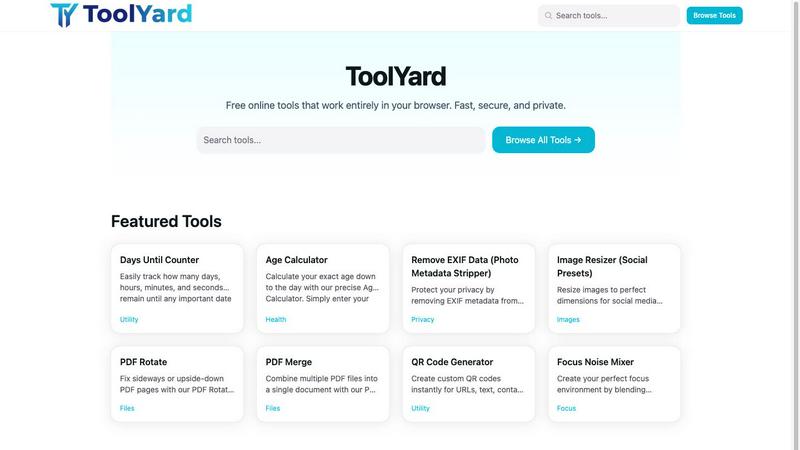
ToolYard offers free, fast, and private browser-based tools for PDFs, images, timers, and more, with no sign-up required.
About ToolYard
ToolYard is an innovative collection of free, browser-based tools designed to simplify everyday tasks for users from all walks of life. Whether you are a student, a professional, or just someone looking to streamline your digital life, ToolYard has something to offer. The platform is built on a philosophy of speed and simplicity, ensuring that every tool runs entirely client-side. This means your files, images, and data remain on your device, ensuring privacy and security. There are no accounts to set up, no hidden fees, and no paywalls—just open the tool and start working. With a diverse toolkit covering productivity, file management, privacy, and creativity, ToolYard is the go-to resource for people who need reliable, efficient solutions without the hassle of traditional software. From merging PDFs to resizing images and generating QR codes, ToolYard is designed to be fast, user-friendly, and effective.
Features of ToolYard
PDF Merge
Combine multiple PDF documents into a single file effortlessly with the PDF Merge tool. This feature is perfect for students and professionals who need to consolidate reports, presentations, or any PDF files quickly. Simply upload your documents, arrange them in the desired order, and click to merge. The entire process is secure, happening entirely in your browser without any uploads to external servers.
PDF Rotate
Fix orientation issues in your PDF files with the PDF Rotate tool. Whether you have scanned documents that are sideways or upside-down, this feature allows you to rotate individual pages or entire documents by 90 or 180 degrees. This quick fix helps maintain the professionalism of your documents, making them easy to read and share.
Image Resizer
Resize images to the perfect dimensions for social media platforms using the Image Resizer tool. Choose from preset sizes optimized for popular platforms like Instagram, Facebook, and YouTube, or enter custom dimensions. This feature ensures your images look their best online, maintaining quality while meeting the specific requirements of each platform.
EXIF Data Remover
Protect your privacy with the EXIF Data Remover, which strips sensitive metadata from your photos before sharing. This feature is crucial for anyone concerned about privacy, as EXIF data can include GPS coordinates, camera settings, and more. Simply upload your images, and the tool will remove all metadata, allowing you to share your photos freely without compromising your personal information.
Use Cases of ToolYard
Planning Events
Use the Days Until Counter to keep track of important upcoming events like birthdays, weddings, or project deadlines. This tool helps you visualize how much time is left, making it easier to plan and prepare.
Social Media Management
Content creators and social media managers can utilize the Image Resizer to ensure all images meet platform specifications. This feature saves time and enhances the visual appeal of posts, leading to better engagement.
Document Organization
The PDF Merge tool is ideal for students and professionals looking to organize various documents into a single, easy-to-navigate file. This can be particularly useful for compiling research papers or project presentations.
Privacy Protection
Photographers and everyday users can benefit from the EXIF Data Remover by ensuring that no sensitive information is shared along with their images. This is essential for maintaining privacy when posting photos online or selling them in marketplaces.
Frequently Asked Questions
Is ToolYard really free to use?
Yes, ToolYard is completely free to use. There are no hidden fees, subscriptions, or accounts required to access any of the tools.
How does ToolYard ensure my data privacy?
ToolYard runs all tools client-side, meaning your files and data never leave your device. This ensures that your information remains private and secure.
Can I use ToolYard on my mobile device?
Yes, ToolYard is designed to work in any modern web browser, making it accessible on both desktop and mobile devices without any installation.
What types of files can I process with ToolYard?
ToolYard supports a variety of file types, including PDF, JPG, PNG, and WebP, allowing you to work with documents and images easily and efficiently.
Explore more in this category:
Similar to ToolYard

xfiles
Free PDF, image and audio tools that process your files locally in your browser. No account or added watermarks.

this+that
An AI agent that reads every email and chat message your team gets, turns requests into tasks, and does what they ask.


TestNeo
TestNeo.ai is an AI-native engineering and release assurance platform that helps teams automate web and API testing using natural language.


RunMyWealth
Smart, private financial calculators for mortgage, FIRE, and debt. 100% free, runs locally in your browser, no signup required.

Nutrition Fact Label
Free FDA-compliant nutrition facts label generator with recipe-to-label nutrition, allergen checks and 152 label formats for 114 countries.
