

TrackMailBox
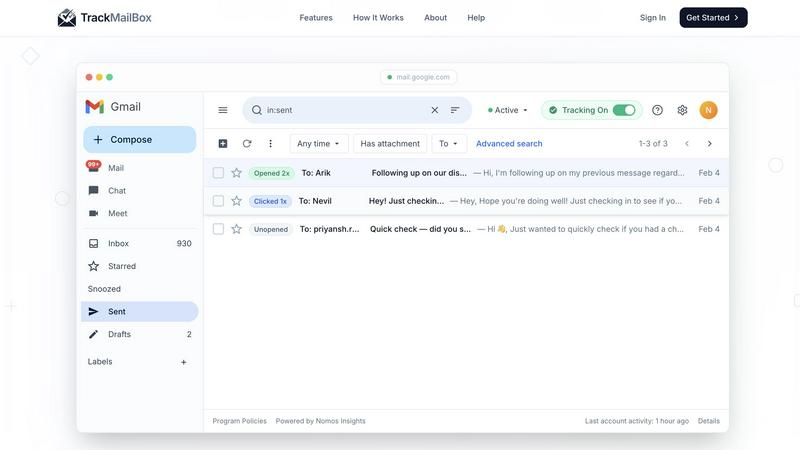
TrackMailBox is a free Chrome extension that provides real-time tracking of email opens and link clicks in Gmail.
About TrackMailBox
TrackMailBox is a free and unlimited email tracking extension designed specifically for Gmail users. It addresses a common question among email senders: "Did they read it?" Unlike Gmail's default settings, which lack built-in read receipts, TrackMailBox provides a seamless solution for those who send important emails like proposals, pitches, or follow-ups. The tool eliminates the frustrations associated with other email tracking solutions that often impose restrictions, include unwanted signatures, or charge monthly fees. With TrackMailBox, you can track an unlimited number of emails without any branding, ensuring that your communications remain professional and clean. This extension is perfect for freelancers, sales teams, recruiters, job seekers, and founders—essentially anyone who relies on email for communication and wants to gain insights into their email engagement.
Features of TrackMailBox
Unlimited Email Tracking
TrackMailBox offers unlimited email tracking, allowing you to monitor as many emails as you want without any costs. There are no hidden fees or premium tiers, making it an ideal solution for those who frequently send important emails.
Real-time Open Notifications
Receive instant notifications the moment your emails are opened. TrackMailBox ensures you know exactly when your recipients engage with your messages, helping you follow up effectively and strategically.
Link Click Tracking
With TrackMailBox, you can track which links in your emails are clicked and how often. This feature provides valuable insights into what content resonates with your recipients and can help you tailor your future communications for better engagement.
Detailed Engagement History
Access a comprehensive engagement history for each email directly within your Gmail interface. You'll see opens, clicks, and timestamps, allowing you to analyze the effectiveness of your email campaigns at a glance.
Use Cases of TrackMailBox
Freelancers Pitching Clients
Freelancers can use TrackMailBox to track their proposals and pitches, ensuring they know when potential clients have read their messages. This insight allows them to time their follow-ups effectively.
Sales Teams Closing Deals
Sales teams can benefit greatly from TrackMailBox by monitoring when leads open their emails and click on links to product demos or sales materials. This real-time data helps them prioritize their outreach efforts.
Recruiters Following Up with Candidates
Recruiters can streamline their communication with candidates by using TrackMailBox to see if their emails, such as interview invites or feedback, have been opened, ensuring a smoother hiring process.
Job Seekers Networking
Job seekers can utilize TrackMailBox to track their networking emails, ensuring they follow up with contacts who have engaged with their outreach. This feature can enhance their chances of securing job opportunities.
Frequently Asked Questions
Is TrackMailBox really free?
Yes! TrackMailBox is completely free and unlimited. You can track as many emails as you want without any cost. There are no credit card requirements, hidden fees, or premium tiers involved.
How do I install TrackMailBox?
Installing TrackMailBox is easy. Simply add the extension from the Chrome Web Store. The installation process takes less than 30 seconds, and you can start tracking right away without any technical setup.
Will my recipients know I'm tracking my emails?
No, your recipients will not be aware that you are tracking your emails. TrackMailBox operates invisibly, meaning no signatures, logos, or labels are added to your outgoing messages.
Can I monitor engagement history for all my emails?
Absolutely! TrackMailBox provides a detailed engagement history for each email you send. You can view opens, clicks, and timestamps directly in your Gmail account, making it easy to analyze your email performance.
Explore more in this category:
Similar to TrackMailBox


ErgoAssessment
See your posture the way an ergonomist beside your desk would. Your camera, five body angles, plain fixes. Free, no signup.

AI Email Filter
AI Email Filter sorts incoming mail into folders using plain-language prompts you write. Works with any IMAP mailbox; bring your own LLM if you want.

BetterKnocks
One powerful software for D2D (Door to door) fields reps to manage their sales and their teams to easily track territories and complete powerhouse CRM


StrictDNS
Block adult content, gambling and more on all your devices, with a friend as your accountability partner who is notified.

Sayble
AI copilot that tells you what to say next on live sales calls, then writes the recap and follow-up.

GetYouTubeTranscript
YouTube transcripts, search and channel data via one API