

VEDAI
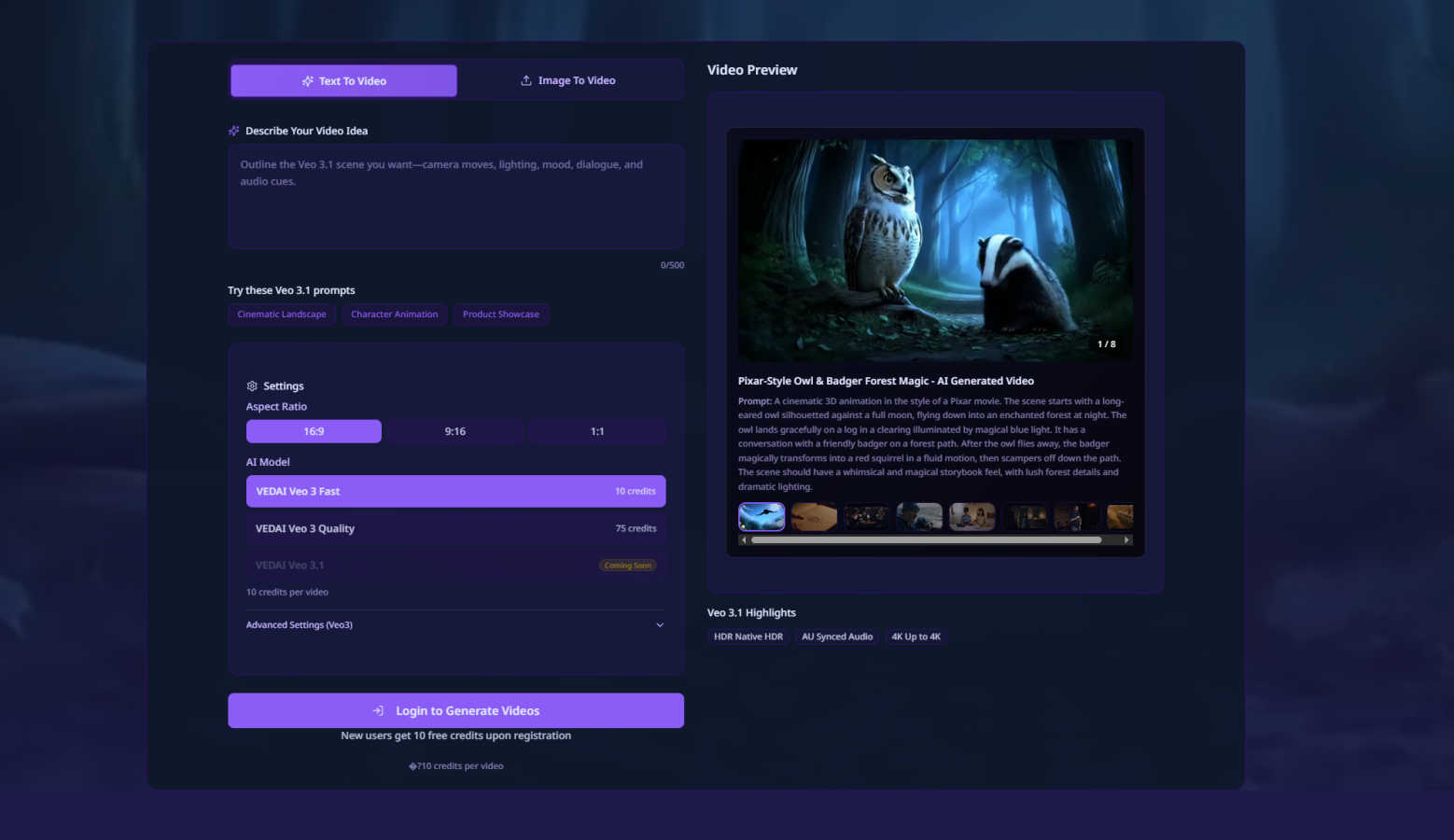
Create stunning AI-generated videos from text or images in just 60 seconds with VEDAI's Veo 3.1 platform.
About VEDAI
VEDAI is an innovative platform that revolutionizes the way we create videos by harnessing the power of AI technology, specifically the advanced Veo 3.1 model developed by Google DeepMind. This tool is designed for a diverse range of users including content creators, marketers, storytellers, and businesses who aspire to produce high-quality, cinematic-grade videos without the challenges associated with traditional video production. VEDAI emphasizes speed and efficiency, allowing users to generate stunning videos in as little as 60 seconds. With a welcoming approach, new users can explore its features through a free trial credit system. VEDAI stands out with its unique capability to keep the Veo 3 model on standby for backup generation, ensuring projects are completed smoothly. Whether you're transforming a text prompt or a single image into a motion video, VEDAI effortlessly translates creative ideas into visual stories, complete with native audio generation for a polished finish. It truly democratizes professional video creation, making it accessible, fast, and enjoyable for everyone.
Features of VEDAI
High-Fidelity Video Generation
VEDAI allows users to create high-fidelity videos quickly, using the advanced Veo 3.1 AI model. This feature ensures that the output is not only fast but also of exceptional quality, comparable to traditional cinematic productions.
Multi-Input Video Creation
With VEDAI, users can start video projects from various input types, such as text prompts, single images, or even two defined images to specify the start and end frames. This flexibility accommodates different creative processes and preferences.
Native Audio Generation
The platform includes a built-in native audio generation feature, which enhances the overall video experience. Users can expect seamless audio integration that complements the visuals, making it easier to create a cohesive storytelling environment.
Backup Generation Mode
To prevent project delays, VEDAI features a backup generation mode powered by the Veo 3 model. If there are issues with the primary generation, users can rely on this backup option to ensure their videos are completed without interruption.
Use Cases of VEDAI
Marketing Campaigns
Businesses can use VEDAI to create engaging promotional videos for their products or services. By quickly generating high-quality content, they can keep their marketing efforts fresh and dynamic, appealing to their target audience effectively.
Social Media Content Creation
Content creators and influencers can leverage VEDAI to produce eye-catching videos for social media platforms. The ability to generate videos rapidly allows them to maintain a consistent posting schedule and engage their followers with new content regularly.
Educational Video Production
Educators can utilize VEDAI to create informative and engaging videos for their students. Whether it's for online courses or classroom presentations, the platform makes it easy to produce professional-quality educational content.
Storytelling and Animation
Writers and filmmakers can bring their narratives to life using VEDAI. The platform's capabilities for generating videos from text prompts or images enable creative storytelling through animated visuals, making it suitable for both personal projects and professional productions.
Frequently Asked Questions
How long does it take to create a video with VEDAI?
Creating a video with VEDAI takes as little as 60 seconds, thanks to its advanced AI technology which streamlines the video production process.
Can I use my own images for video creation?
Yes, VEDAI allows users to upload images to generate videos. You can start with a single image or specify two images to define the start and end points of your video.
Is there a free trial available for new users?
Absolutely! New users are welcomed with free trial credits, enabling them to explore VEDAI's features and capabilities without any initial investment.
What types of audio can I use in my videos?
VEDAI includes native audio generation, which means it can create audio tracks specifically designed to fit your video content, ensuring a polished and professional output.
Explore more in this category:
Similar to VEDAI


Dame Hombro
Make a personalized Dame Hombro freestyle video from one person or pet photo.

Popstar AI
Popstar AI is an AI video generator that puts you in Drake's POPSTAR music video from one photo, with the original song and no watermark.

Bulin 47 AI Videos
One photo in, a 15-second Bulin 47 street freestyle video with sound out: original dembow beat, lip-synced Spanish verse, crowd.

Leadeon
AI growth tool for X and LinkedIn: write posts in your voice, schedule at your best times, find leads on X and see what works.


Bulin 47 AI
Turn one photo into the viral 19-second Bulin 47 freestyle, with original sound and a watermark-free vertical MP4.

Artcraft AI
AI image and video studio in your browser: generate and edit images, turn photos into videos, edit clips by sentence.