

veloceidm.com
VELOCE AI is a smart Windows download manager that speeds up your downloads with AI, a built-in browser, and a lifetime license for just five dollars.
About veloceidm.com
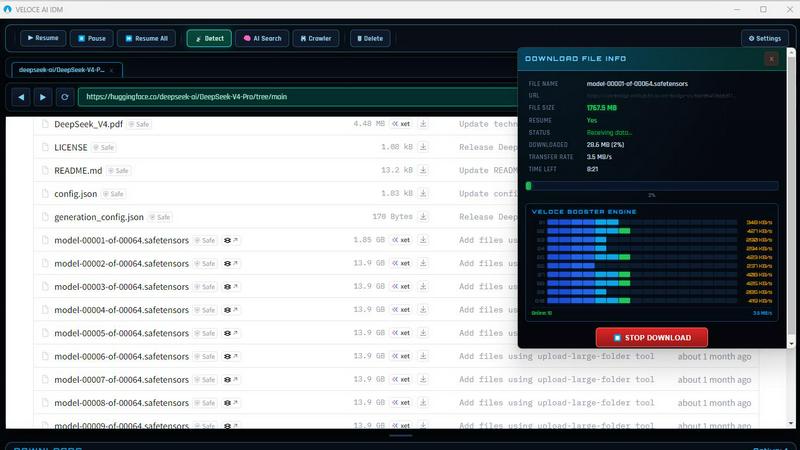
VELOCE AI is a next-generation Windows download manager built to replace outdated tools like Internet Download Manager (IDM). Developed on the Electron framework with an integrated Chromium browser, VELOCE AI represents a significant leap forward in download technology, using artificial intelligence to intelligently manage and accelerate your downloads. Unlike traditional download managers that have barely changed in 25 years, VELOCE AI adapts to your internet connection in real time, delivering faster speeds, fewer failures, and zero setup. The application is designed for anyone who regularly downloads files from the web, from casual users grabbing media content to power users seeking developer binaries, legacy archives, or public data repositories. Its core value proposition is simplicity and affordability: a one-time lifetime payment of just $5 includes all future updates, with no subscriptions, no ads, and no hidden fees. VELOCE AI works with all major media formats and content types, supports up to 32 simultaneous connections for maximum throughput, and includes a built-in browser so you can browse, find files, and download everything within a single application. The modern dark-themed user interface is clean and intuitive, making powerful download management accessible to everyone.
Features of veloceidm.com
AI-Accelerated Download Engine
VELOCE AI automatically optimizes every download for maximum speed by learning your network patterns and adapting in real time. The AI engine analyzes your connection stability, bandwidth availability, and server responsiveness to dynamically adjust download parameters. This means no manual tuning is required, no complicated settings to configure, and no guesswork about what might work best. The system continuously monitors performance and makes micro-adjustments throughout each download session, ensuring you always get the fastest possible transfer speeds regardless of network conditions.
Built-in Chromium Browser
The integrated Chromium browser allows you to browse the web, find downloadable content, and initiate downloads all within a single application. This eliminates the need for browser extensions, switching between windows, or copying and pasting URLs. As you navigate websites, VELOCE AI automatically detects downloadable media and files, presenting them for one-click capture. This seamless integration streamlines the entire workflow from discovery to completion, saving time and reducing friction compared to traditional download managers that require manual link entry.
Multi-Connection Engine with 32 Threads
VELOCE AI splits files into smaller segments and downloads them simultaneously using up to 32 parallel connections. This multi-threading approach dramatically accelerates download speeds by leveraging your full bandwidth capacity. The engine intelligently manages chunk assembly, reassembling the file segments in the correct order as they arrive. This technology is particularly effective for large files, high-definition videos, software installers, and archive packages, where traditional single-thread downloads would take significantly longer to complete.
AI File Finder
VELOCE AI includes a powerful AI File Finder that scans public web archives, repositories, and indexed web sources to locate files that normal search engines often miss. This feature excels at discovering legacy archives, developer binaries, public data repositories, and other niche content buried deep within the internet. Instead of spending hours manually searching through search results, the AI File Finder automates the discovery process, presenting you with direct download links for files that match your criteria. This is an invaluable tool for researchers, developers, and anyone seeking hard-to-find digital content.
Use Cases of veloceidm.com
Downloading Large Media Files for Offline Viewing
Content creators, video editors, and media enthusiasts often need to download large video files, audio tracks, or high-resolution images for offline work. VELOCE AI excels in this scenario by splitting these large files into segments and downloading them simultaneously across up to 32 connections. The AI acceleration ensures maximum throughput even on congested networks, while the built-in Media Manager organizes downloaded content automatically. This means you can download a 4K video in minutes instead of hours, without worrying about connection drops or corrupted files.
Discovering and Retrieving Legacy Software and Archives
Developers, IT professionals, and historians frequently need to locate older software versions, archived datasets, or public domain content that has been removed from mainstream search results. The AI File Finder feature scans public archives and repositories to locate these buried files, saving hours of manual searching. For example, a developer needing a specific older version of a library for compatibility testing can use VELOCE AI to find and download it quickly, while a researcher can access public data repositories that standard search engines overlook.
Streamlining Workflows for Digital Content Creators
YouTubers, podcasters, and social media managers often need to download reference materials, stock footage, or audio samples from various websites. With VELOCE AI's built-in Chromium browser, they can browse source websites, automatically detect downloadable media, and initiate downloads with a single click. This eliminates the repetitive process of copying URLs, switching between applications, and managing multiple download windows. The result is a smoother, faster workflow that lets creators focus on content production rather than file management.
Batch Downloading for Software and System Administrators
System administrators and IT managers frequently need to download multiple software installers, patches, updates, or configuration files across different sources. VELOCE AI handles batch downloads efficiently with its multi-connection engine, allowing multiple files to download simultaneously without manual intervention. The AI acceleration optimizes each download based on the source server's capabilities, reducing total download time. Additionally, the one-click content discovery feature helps administrators quickly identify and capture all downloadable resources on a software vendor's page, ensuring nothing is missed.
Frequently Asked Questions
What makes VELOCE AI different from traditional download managers like IDM?
VELOCE AI is built on modern technology (Electron with Chromium) and uses artificial intelligence to adapt to your network in real time, whereas traditional managers like IDM use static configurations that require manual tuning. VELOCE AI also includes a built-in browser, AI File Finder for discovering hidden content, and a one-time lifetime price of just $5 with no subscriptions or ads. In contrast, IDM costs $25 for a license and lacks AI-powered features.
Is VELOCE AI safe to download and use?
Yes, VELOCE AI has been scanned by over 65 security vendors on VirusTotal with zero detections, confirming it is clean and safe software. The application is regularly updated to maintain security and compatibility with Windows 10 and 11. You can also try it risk-free with a 3-day free trial that requires no credit card, allowing you to verify its safety and performance before purchasing.
How does the AI File Finder work?
The AI File Finder scans public web archives, repositories, and indexed web sources to locate files that standard search engines often miss. You simply enter your search criteria, and the AI searches through vast digital archives to find legacy documents, developer binaries, public datasets, and other niche content. The results are presented as direct download links, saving you the effort of manually searching through countless web pages.
Does VELOCE AI support all file types and formats?
Yes, VELOCE AI is designed to work with all major media formats and content types, including video files (MP4, AVI, MKV), audio files (MP3, WAV, FLAC), documents, software installers, archives (ZIP, RAR, 7z), and more. The built-in Media Manager helps organize downloaded content for easy local playback and access. The multi-connection engine handles any file type equally well, optimizing speed regardless of format.
Pricing of veloceidm.com
VELOCE AI offers a single, straightforward pricing plan: a one-time payment of $5 for a lifetime license. This includes all future updates, AI-powered download acceleration, the built-in Chromium browser, media downloads and organization, support for up to 32 parallel connections, and full compatibility with Windows 10 and 11. There are no subscriptions, no hidden fees, and no advertisements. For new users, there is a free 3-day trial available with no credit card required, allowing you to test all features before making a purchase. This pricing model stands in stark contrast to competitors like IDM ($25 per license), Ninja ($19), and even free tools like FDM that bombard users with ads.
Explore more in this category:
Similar to veloceidm.com


Hotel Lobby AI
Hotel Lobby AI turns two portraits into a duet video in an orange recording booth with motion, lip-sync, and audio.

Tiny Desk AI Video Maker
Turn three photos into a vertical Tiny Desk-style concert video with original sound.

ZombieTrend AI
ZombieTrend AI turns two photos into a cinematic zombie love story video with sound, no watermark, and a free preview.

Uniclip
Clip pages, take full-page screenshots and batch-capture list data to Notion, Feishu, Obsidian, Markdown, CSV or JSON.

GenX
All-in-one AI workspace to generate images, videos, and audio with multiple leading AI models.

TroveKey
Search tabs, Chrome bookmarks and history, run browser commands, and save webpages and social posts locally—no account.

PLRental
AI-powered platform for car, motorcycle, and ATV rental agencies: scan IDs, generate contracts, and manage fleet and finances.