

TimaLens
Turn prompts, scripts, documents and recordings into whiteboard explainer videos with synchronized drawings, narration and scene-level editing.
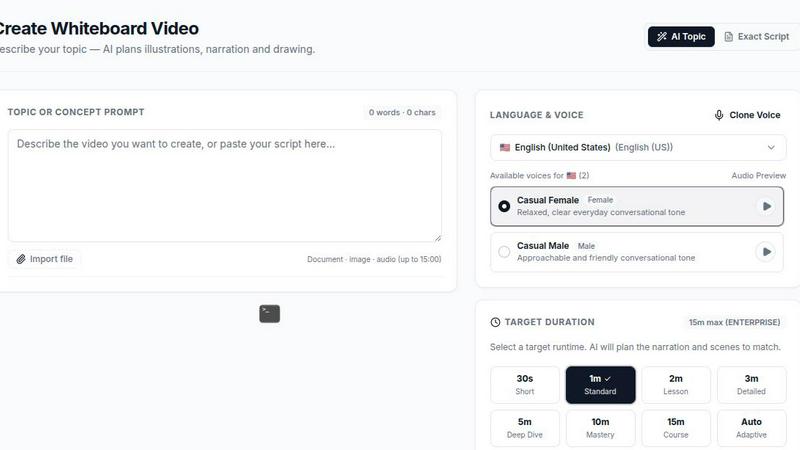
About TimaLens
TimaLens creates narrated whiteboard videos from teaching or training material. Inputs include a topic, script, PDF, slides, Word document, audio recording, YouTube link or web page. The service plans ideas into scenes, draws as narration explains them, and lets users change an individual scene without redoing the whole video. Finished videos can be downloaded as MP4 files or shared by private link.
The workflow is aimed at teachers, trainers and explainer creators who need structured visual explanations. It supports narration in more than 70 languages and regional variants. The site also draws a clear boundary around its use: it is not designed for cinematic or photorealistic clips, talking avatars, music videos or frame-by-frame professional animation control. Those constraints matter when choosing a tool for a specific visual style.
Features of TimaLens
- Create videos from prompts, scripts, documents, audio and links
- Synchronized drawings and narration organized into scenes
- Edit an individual scene without recreating the full video
- Download MP4 files or share a private link
Use Cases of TimaLens
- Convert a textbook chapter or lesson notes into a visual lesson
- Turn a lecture, podcast or voice memo into an explainer
- Create onboarding or training videos from documents
- Explain product steps using screenshots and narration
Frequently Asked Questions
Can I use my own recording as narration?
Yes. Upload audio to keep it as narration while TimaLens plans drawings around the spoken content. The site also describes recording in a browser and voice cloning, with voice cloning starting on the Creator plan.
Can I edit a video after it is generated?
Yes. The described workflow lets you change one scene without redoing the entire video.
Is it intended for cinematic video?
No. The site says it is not designed for short cinematic or photorealistic clips, talking avatars, music videos or frame-by-frame animation control.
Explore more in this category:
Similar to TimaLens

No Scrubs AI
Turn one to three portraits into a 23-second white-studio dance video with sound, in 480p or 720p.

StudyRPG
Turn any PDF, EPUB or Word file into a study game: AI writes the questions, you play them as tower defense, a story, an RPG, duels or flashcards.


MAGI-2
MAGI-2 video generation on Magi2Gen creates up to 30 seconds of 1080p video with native sound from a prompt, with optional image references.


LongevLab
Track biological age, scan lab reports and choose which health data to use in AI Chat and Deep Research on iPhone or Android.

N33 AI
Chat with multiple AI models, search the web, and work with images and PDFs in one interface, with free access and paid Pro.

7 Deadly Sins Test
7 Deadly Sins Test is a browser quiz that scores seven behavioral traits and displays them in an instant radar chart for self-reflection.