

WebScore
WebScore audits any website for performance, SEO, accessibility, security, and conversions, giving you clear fixes to improve traffic and rankings.
About WebScore
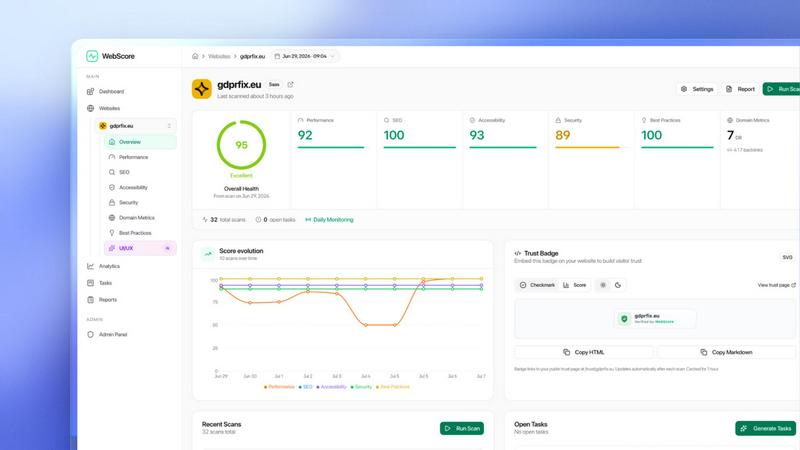
WebScore is an all-in-one website audit platform designed to give you a complete picture of your site's health in about 60 seconds. It scans any website across seven critical dimensions: Performance and Core Web Vitals (measured on Google's own PageSpeed Insights infrastructure so the numbers match what Google sees), technical and on-page SEO with Google Search Console insights, Accessibility (WCAG), Security (SSL, headers, SPF/DKIM/DMARC), Best Practices, Domain Metrics (Domain Rating, backlinks, referring domains), and an AI-powered Conversion Audit. Instead of just giving you a score and leaving you guessing, WebScore provides a step-by-step fix for every issue it finds. It is built for website owners, developers, marketers, and anyone who wants to understand what is quietly costing them traffic, conversions, and rankings. A standout new capability is that WebScore is also an MCP server, meaning you can plug it directly into AI coding tools like Claude Desktop, Claude Code, Cursor, Codex, or Grok. From there, your AI assistant can run full audits, read every issue with how-to-fix guidance, pull Search Console performance data and valuable backlinks, and manage monitoring, all from the chat. This makes WebScore a powerful tool for both hands-on analysis and AI-driven workflow automation.
Features of WebScore
Comprehensive Seven-Dimension Scan
WebScore does not just check one thing. A single scan covers Performance and Core Web Vitals, technical and on-page SEO with Search Console insights, Accessibility against WCAG standards, Security including SSL, headers, and email authentication, Best Practices, Domain Metrics like Domain Rating and backlinks, and an AI Conversion Audit. This gives you a complete health report for your site in about one minute.
Step-by-Step Actionable Fixes
Every issue WebScore finds comes with a specific, actionable fix. You do not get a red number and a vague suggestion. Instead, you get clear guidance like "add labels to 3 form inputs so screen readers can announce them" or the exact file-level change to improve performance. This turns a diagnostic report into a direct action plan.
AI-Powered Conversion Audit
This is a separate, AI-driven scan that goes beyond technical scores. WebScore uses Claude to review actual desktop and mobile screenshots of your pages. It then returns prioritized CRO (Conversion Rate Optimization) fixes, flagging weak CTAs, unclear value propositions, and missing trust signals. It tells you why visitors might not convert and what to change.
MCP Server Integration
WebScore acts as an MCP server, allowing you to connect it to AI coding tools like Claude, Codex, Cursor, and Grok. From within your AI chat, you can run full audits, pull domain metrics, check SSL and email security, list your websites, and turn monitoring on or off. Sites scanned through your AI are automatically added to your dashboard, and the system reads stored results for instant lookups.
Use Cases of WebScore
Diagnosing Organic Traffic Drops
If your website traffic has been declining, WebScore can quickly pinpoint the cause. By scanning your site, you might discover that Core Web Vitals have degraded, a critical SEO tag is missing, or your security headers are misconfigured. With the step-by-step fixes, you can address the root issues and work to recover your rankings and traffic.
Optimizing a Website for a Product Launch
Before launching a new product or service, you want your website to be in peak condition. Use WebScore to run a comprehensive audit. Ensure your landing pages load fast, are accessible to all users, have strong SEO foundations, and are secure. The AI Conversion Audit can also review your sales page to ensure your CTAs and value proposition are clear and effective.
Automating Audits with AI Coding Tools
For developers and technical marketers who use AI assistants, WebScore's MCP server is a game changer. You can ask your AI tool in Claude or Cursor to "audit our staging site and list all accessibility issues with fixes." The AI will connect to WebScore, run the scan, and return the results directly in the chat. This integrates website auditing into your existing development workflow.
Competitive Website Analysis
WebScore's public leaderboard ranks websites across Performance, SEO, Accessibility, and Security. You can scan your own site to see your score and rank, and then compare it against competitors. This reveals specific areas where your site is stronger or weaker. You can then use the detailed fixes to close the gap on your competitors.
Frequently Asked Questions
How long does a WebScore scan take?
A standard scan of your website takes about 60 seconds. The platform checks all seven dimensions simultaneously, so you get a complete report in roughly one minute. Re-scans are just as fast, allowing you to track the impact of your fixes.
Does WebScore use Google's data for performance?
Yes. For Performance and Core Web Vitals, WebScore measures your site on Google's own PageSpeed Insights infrastructure. This means the performance numbers you see in your report are the same numbers that Google uses for its search ranking algorithm, giving you accurate and relevant data.
How does the AI Conversion Audit work?
The AI Conversion Audit is a separate scan you can run on any page. WebScore takes actual screenshots of your page on both desktop and mobile. An AI model, powered by Claude, then reviews these screenshots like a human CRO expert would. It identifies weak CTAs, unclear value propositions, missing trust signals, and other conversion barriers, providing a prioritized list of fixes.
What is the MCP server and how do I set it up?
The MCP server allows you to connect WebScore to AI coding tools such as Claude, Codex, Cursor, and Grok. You configure it by adding a small JSON block to your MCP client settings, including the WebScore API URL and your personal API key. Once set up, your AI assistant can run audits, retrieve issues, and manage monitoring directly from the chat interface.
Pricing of WebScore
WebScore offers a flexible pricing model. You can scan your website for free to get started. After your free scan, each additional report costs $3. For users who want unlimited access, WebScore offers a lifetime plan for a one-time payment of $29.99. This lifetime perk also includes the ability to use the MCP server with tools like Claude Desktop, Claude Code, and Cursor. No credit card is required to start with the free scan.
Explore more in this category:
Similar to WebScore

Promptifi
Reviewed AI prompts and workflows for B2B sales, from account research to renewal. Run them in ChatGPT, Claude, Gemini or Copilot. 100 free.


OpenDaemon
Free Windows AI agent app: describe an app in plain words and it plans and builds it phase by phase with your coding app.


Easemic
Free open-source Android comic & manga cloud reader streaming encrypted libraries from S3, WebDAV & OPDS.

Rhinobird
AI video ads, UGC-style videos, and product visuals for cross-border sellers and e-commerce brands.

Maeve Social
Plan, approve and publish social content with an AI assistant, analytics, and API, CLI and MCP access for agents.